

Visitor Identity and Matching
How Ours Privacy recognizes a returning visitor and connects one person's activity across devices, browsers, and sessions into a single identity, scoped to your account.
Ours Privacy recognizes when someone returns to your site so their interactions connect into a single, consistent identity instead of looking like a brand new person each visit. Identity is always scoped to your own account: Ours never links a visitor across unrelated companies, and the strongest signals are the identifiers you choose to provide.
The payoff shows up wherever a journey spans more than one visit or one device. Someone researches on a phone, comes back on a laptop, and converts a week later. Counted as three visitors, that reads as three shallow sessions and a conversion out of nowhere. Counted as one person, it reads as one journey your marketing actually earned.
This page is the overview of identity resolution in Ours Privacy: how a visitor is recognized, how you re-identify a known person, how unified user profiles are built across a person's sessions, and where the results show up in reporting and destinations.
Looking for cross-device attribution, identity stitching, or an identity graph? They're all names for what this page describes. Ours Privacy resolves identity inside your own account rather than against a shared cross-company graph, which is what keeps it usable in HIPAA-regulated workflows. Start with cross-device attribution and cross-session identity below.
Cross-device attribution and cross-session identity
Identity resolution gets sold as one magic capability. It isn't, and separating cross-device attribution from cross-session recognition tells you which lever to pull.
Cross-session is the same browser coming back. A durable first-party cookie solves it, and a custom domain is what makes that cookie durable.
Cross-device is one person on a phone and a laptop, with no shared cookie by definition. Only an identifier you send solves it. When you pass an external_id (or an email) on both devices, those visitors resolve to the same person and merge into one profile. That merge is the device stitching other tools describe: it's what makes a phone-to-laptop journey read as one person instead of two visitors. Without an identifier, two devices stay two visitors, and no amount of cookie tuning changes that.
That's the whole mechanism, and it's worth being blunt about the split:
| You want | What actually does it |
|---|---|
| The same browser recognized weeks later | Server-set first-party cookie via a custom domain |
| One person's phone and laptop connected | An external_id or email sent on both |
| A person recognized when the cookie is gone | Identity Recovery, same device only |
| A journey continued across domains you own | ours_visitor_id passed in the URL |
The rest of this page covers each of these in order.
How a visitor is recognized: the identity resolution layers
Identity resolution here is not one signal but four, each catching what the one before it missed, applied in a fixed order:
| Layer | Signal | Catches |
|---|---|---|
| 1. First-party visitor cookie | A cookie on the domain serving the SDK | The same browser returning, for as long as the cookie lives |
| 2. Identifiers you provide | external_id, email | The same person on any device or browser, once they identify themselves |
| 3. Identity Recovery | Short-lived request and device signals | The same device when no cookie can be read |
| 4. Explicit ID passing | ours_visitor_id in a URL | The same person moving between separate domains you own |
Every visitor is given a visitor ID, stored in a cookie (with local storage as a backup) in their browser. On a return visit that ID is read back, so their sessions connect to the same identity. Building on that base:
- Identifiers you provide. When you send an
external_idoremail, Ours ties the visitor to a known person and can merge their activity across devices. These are the most reliable signals because you control them, and on server-side sources, where there's no cookie, they are how a visitor is identified at all. Because both fields resolve to the same visitor, pass anexternal_idwhenever you have one and letemailcover the window before an account exists. A phone number, member ID, patient ID, or CRM ID all work; pass whichever one is stable for you as theexternal_id. - Identity Recovery. When a visitor can't be recognized from their cookie, for example moving between an in-app browser and their default browser, the opt-in Identity Recovery backstop can reconnect them. It runs only after the cookie and any provided identifiers have failed, and it matches the same device rather than across devices. Connecting one person's separate devices is layer 2's job.
A new ID is created only when none of these recognize the visitor.
Configure Identity Recovery
On a Web SDK source, turn on Identity Recovery and set the match window plus the maximum number of visitors who can share an IP address. Keep Exclude Request Context off for sources where you want Identity Recovery available.
First-party and third-party cookies
Where the visitor cookie lives determines how durable it is, and that depends on whether you use a custom domain.
- With a custom domain (recommended): the SDK is served from your own subdomain, so the cookie is first-party to your site. First-party cookies are not subject to the tracking-prevention rules that browsers apply to third parties, so a returning visitor stays recognized for a long time. The cookie is also set server-side, in an HTTP response header, which means it isn't capped by Safari's ITP seven-day limit on cookies written by JavaScript.
- Without a custom domain: the SDK is served from a shared Ours Privacy host, so the cookie is third-party relative to your site. Modern browsers (Safari's ITP, and others) actively limit third-party cookies, so identity is less durable and a returning visitor is more likely to look new.
The cookie is shared automatically across the subdomains of whichever domain serves it (for example www. and app. of the same site). For this reason, setting up a custom domain is the single most effective step for reliable visitor recognition, and it's one CNAME record. Without it, identity depends on a cookie the browser is actively trying to expire.
Re-identifying a known visitor
When you know who someone is, typically once they log in, pass their external_id or email so Ours can attach the session to that person.
HTTP API
Include external_id or email in your requests to the HTTP API.
Sources
Include external_id or email in your webhook payloads.
When these identifiers are present, Ours uses them to look up and match the visitor within your account.
Maintaining identity across your own domains
Cookies are not shared between separate domains. If you operate more than one domain and want a visitor's identity to carry across them, you pass the visitor ID explicitly. Nothing is shared between domains unless you choose to pass it.
Use the ours_visitor_id query parameter:
// Example URL with visitor ID
https://example.com?ours_visitor_id=${ours.getVisitorId()}
You can carry the session along with it using ours_session_id, so the journey reads as one continuous session rather than two:
// Example URL with both visitor ID and session ID
https://example.com?ours_visitor_id=${ours.getVisitorId()}&ours_session_id=${ours.getSessionId()}
When ours_session_id is present in the URL, the SDK uses it as the current session instead of starting a new one. This is useful for:
- Navigation between domains or subdomains you own
- Linking a visitor's journey across your own properties
- Keeping analytics and destinations on one continuous session across domains
Unified user profiles
When visitors share the same external_id, Ours merges their records into a single User profile. This connects a known person's activity across the devices and sessions where they've identified themselves, giving you one view of that person within your account.
How profiles are built
- Detection: when an event is processed, Ours checks whether the visitor has an
external_id. - Lookup: if present, Ours finds every visitor in the account with the same
external_id. - Merge: records are sorted by
last_seen_at(newest first) and their properties combined. - Profile: a single user is produced with the most up-to-date information across those sessions.
Merging strategy
- Newest data wins. Properties from the most recent session take precedence.
- Nothing is lost. Properties from every session are preserved; newer values override older ones.
- Time spanning.
first_seen_atkeeps the earliest timestamp;last_seen_atkeeps the latest. - Deterministic. The merge is consistent and repeatable.
Example
A person interacts with your site on two devices:
Device A (mobile):
external_id: "user123"email: "user@example.com"first_name: "John"last_seen_at: "2024-01-15T10:00:00Z"
Device B (desktop):
external_id: "user123"email: "user@example.com"last_name: "Doe"city: "San Francisco"last_seen_at: "2024-01-16T14:30:00Z"
Resulting profile:
external_id: "user123"email: "user@example.com"first_name: "John"last_name: "Doe"city: "San Francisco"first_seen_at: "2024-01-15T10:00:00Z"last_seen_at: "2024-01-16T14:30:00Z"
Accessing user data
During destination dispatch, you can reference user properties with the user.* prefix:
user.emailuser.first_nameuser.cityuser.external_id
This unified data is available alongside visitor and event data when you map fields to a destination. This is the part that's easy to overlook and hard to retrofit: identity that only exists inside a reporting UI does not improve your ad platform match rates, while identity that flows into every destination mapping does.
Where identity shows up
Identity resolution is infrastructure. These are the places you see the return on it:
- Conversion Attribution splits credit across a person's touchpoints using six attribution models. Every touchpoint identity resolution recovered is a touchpoint that can earn credit; every one it misses is credit silently handed to the last click.
- Conversion Journey Summary and Journey Explorer show the resulting journeys, including how long they took and how many touchpoints they had. Both numbers are only correct if the journey was connected in the first place.
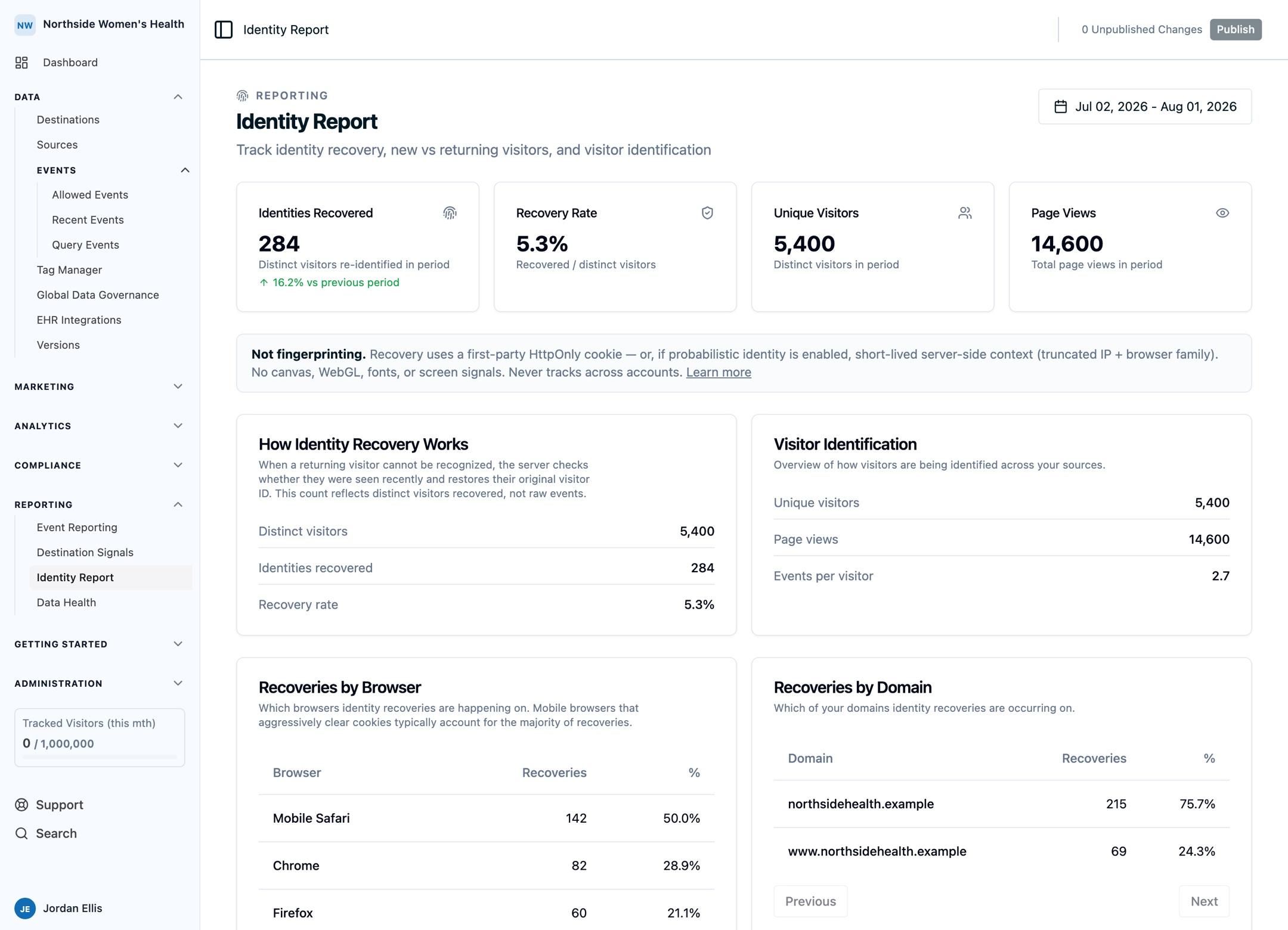
- The Identity Report shows how many visitors Identity Recovery reconnected, the recovery rate against all unique visitors, and the trend over time.
- Destinations receive the merged
user.properties, which is what lifts match rates at ad platforms and CRMs. - View-through conversions depend on it entirely, since an impression and a conversion days later are almost never in the same session.
Providing your own visitor ID
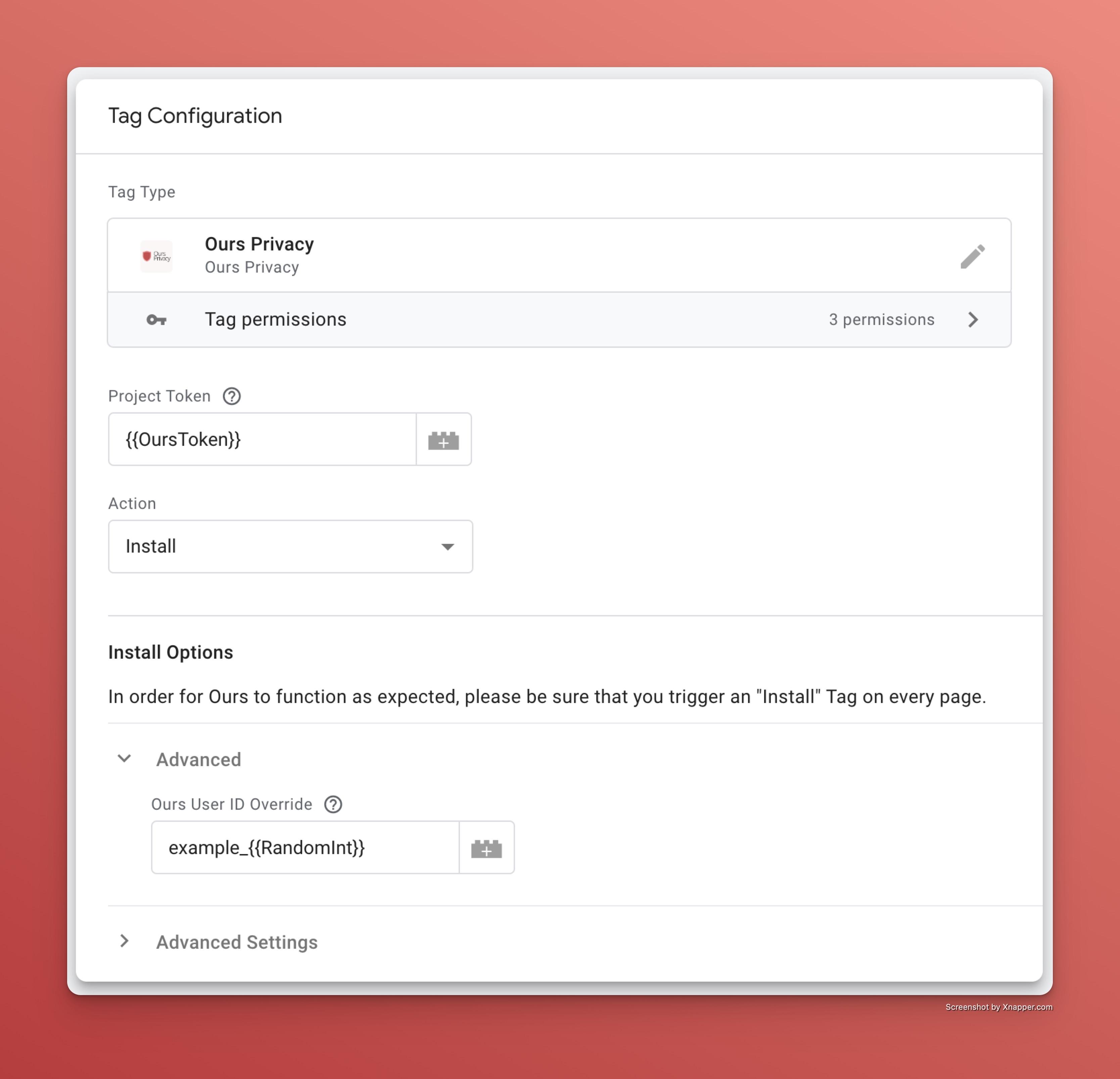
If you already run your own visitor identification system, you can supply the ID when initializing the SDK:
ours('init', '<ours web api key>', {
  user_id: '<your custom visitor id>',
});
You can also set a custom visitor ID through the Tag Manager interface.
Note: When supplying your own IDs, make sure your system generates a stable, unique ID for each person and persists it across their visits.
Excluding request context
Exclude Request Context is a per-source privacy control. When enabled, Ours does not use request metadata such as the visitor's IP address for identity matching. Because Identity Recovery relies on those signals, turning this on also disables Identity Recovery for that source. Use it when you want matching to depend only on cookies and the identifiers you provide.
Scope: your account only
Taken together, the layers above resolve many devices and sessions to one person. The difference between this and a shared industry graph is where the resolution happens, and that difference is a design decision rather than a missing feature.
- Identity is scoped to your account. Ours never links a visitor across unrelated accounts, so your visitors are not enriched with, or contributed to, a cross-company graph.
- The most reliable identifiers (
external_id,email) are ones you choose to send. - Identity carries across separate domains only when you pass the visitor ID yourself.
- You can exclude request context from matching on a per-source basis.
- Signals used for probabilistic matching are short-lived and are not retained in a form that identifies an individual.
For healthcare and other regulated advertisers, this scoping is what makes person-level measurement usable at all. Resolving identity against a shared graph typically involves moving identifiers between companies, which is the exact thing a HIPAA-regulated workflow cannot do.
Best practices
- Use a custom domain. First-party cookies are the single biggest improvement to reliable visitor recognition.
- Send
external_idearly. Set it as soon as you know who someone is to unify their profile across devices. - Include
emailduring early interactions to improve match accuracy before an account exists. - Pass
ours_visitor_idwhen crossing your own domains where cookies aren't shared. - Use
user.*properties in destination mappings to send unified, cross-device data downstream.
Next Steps
- Conversion Attribution: how these connected touchpoints earn credit across six attribution models.
- Custom Domains: serve the SDK first-party so returning visitors stay recognized.
- Identity Recovery: the opt-in backstop for visitors a cookie can't recognize.
How is this guide?