

Mobile App Attribution
Track a mobile app with Ours Privacy: stitch app activity to a person's web history, report on app conversions, and decide whether you need a mobile measurement partner.
Your app sends events through one of three mobile SDKs, or straight from your backend over the Ingest API. Those events land on the same person profile as that person's website and server activity, so you report on app and web behavior together, and route app conversions to the same destinations as your web conversions.
Ours Privacy identifies people by email and by the IDs you already hold. It reads no IDFA, no Google advertising ID, and no app set ID, so your app needs no AppTrackingTransparency prompt to use the SDK. Visitor identity and matching is the companion to this page.
If your app is where people you already acquired book, buy, and manage their accounts, Ours Privacy measures it and you need no second vendor. If you buy app installs as an acquisition channel, you want a mobile measurement partner alongside Ours Privacy, and the two run together.
What you can measure
| Scenario | Supported |
|---|---|
| Someone who already has your app taps a tracked link | Yes. Their app activity joins their existing profile, with campaign context from the link. |
| Someone installs your app, then signs up or logs in | Yes. Email or external ID rejoins them to their browser history and its campaign context. |
| Someone installs after a link you send by email or SMS | Yes. That link carries the identity into the app. |
| Reporting which ad drove a tap through to the App Store or Play Store | Yes. No engineering beyond a tracked link. |
| Tying app activity back to the ad that drove a fresh install | Yes, from signup or login onward. The install event itself stays unattributed. |
Each row works once the person is identifiable. Attribution starts at that moment, and for an app that requires an account, signup is usually it.
How to wire up web-to-app identity
Two of the five steps are yours to build, and one of those ships with an app release.
1. Capture campaign context on the web. The Web SDK reads UTM parameters and ad-platform click IDs from your landing page URL and stores them on the visitor. Nothing to configure.
2. Put the visitor ID on the outbound link. This is your code. Use a redirect source for the tap that sends someone to the app store, so the tap lands as an event. On a redirect domain that shares your first-party cookie, the redirect already resolves the visitor. Across domains, read the visitor ID and append it:
const url = `https://links.example.com/redirect/abc123?event=Store+Tap&ours_user_id=${ours.getVisitorId()}`;Note: A
/redirect/link readsours_user_id. The mobile SDKs readours_visitor_id. The Web SDK reads either. Put both on every link and any hop finds the ID.
A redirect link covers the web hop, a tap that lands on your site or in an app store. For the hop that opens the app, point people at your own Universal Link or App Link, on a domain you control, with ours_visitor_id on it:
const appUrl = `https://links.yourdomain.com/open?ours_visitor_id=${ours.getVisitorId()}`;3. Hand the opening URL to the SDK. This is also your code. The SDKs hook nothing in the operating system, so your app forwards the URL it was opened with. Each SDK page has the wiring for its platform: iOS, Android, React Native.
4. The SDK stitches. When the link carries ours_visitor_id, the SDK sets the visitor ID, and every event after that lands on the profile holding the person's web history and campaign context.
5. Verify. Open the link on a device with the app installed, then check the Recent Events Dashboard. The app event should land on the same visitor as the browser session that produced the link.
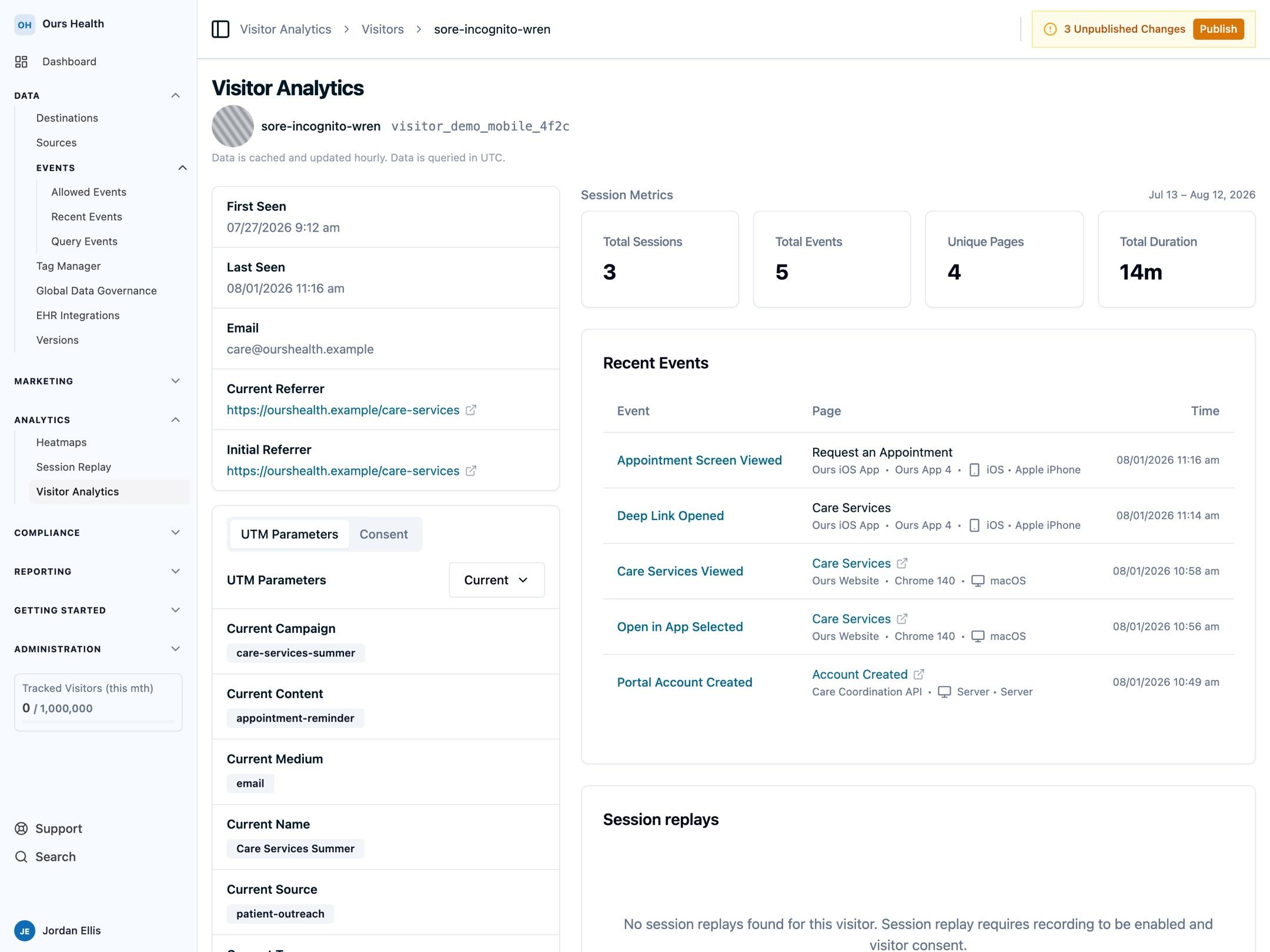
Backend app events work the same way over the Ingest API, with or without an SDK in the app. Send app-specific fields like app_version, bundle_id, and screen_name as event properties; they are not typed ingest fields, and they are dropped if you send them as default properties.
Do you need a mobile measurement partner?
Partners specialize in the paid-install market. Ours Privacy does not do two of the jobs that live there:
- Paid-install economics. Cost per install and return on ad spend, drawn from ad-network spend, plus arbitration when two networks claim the same install and fraud screening for installs a network claims but did not cause.
- Deeper ad-network integration. Apple's aggregated iOS reporting for people who decline app tracking, and deferred deep linking that drops a brand new user onto a specific screen.
If your growth budget buys app installs, you want a partner for those two. Otherwise Ours Privacy covers it, and you can add a partner later without redoing your setup.
Where the line falls
The App Store returns no install URL to a newly installed app. Apple's AdServices framework returns an attribution token on first launch, but it resolves Apple Search Ads campaigns only. Google Play returns a referrer string through the Play Install Referrer API. Our SDKs call neither one, so a partner is what closes that loop for you automatically, by matching an install to a recent ad click.
Identify the person instead. Four moments do it:
- Signup or login. The person authenticates with an email or an ID you already know, and their app activity joins their existing profile.
- A link you send after install. An onboarding email or SMS opens the app and carries the identity.
- Any later tracked link into the installed app.
- Identity recovery. A first app open with no link and no login gets matched to a recent browser visit from the same network. Enable it on both your web source and your app source: the web source records the browser visit, the app source looks it up. Default settings skip the match when more than three visitors share a network address, so it works on a home network and rarely in a hospital or an office.
From that moment on you can trace every in-app event to the campaign that first brought the person in. The install event stays unattributed. That matters for install reporting. It does not affect reporting on appointments or purchases.
Each of those four needs a browser visit to join back to, since the visit is where campaign context gets recorded. A campaign that sends people from an ad straight to the app store never touches your site. On Android you can close that gap yourself: read the Play Install Referrer on first launch and pass its utm_source, utm_medium, and utm_campaign values to the SDK as default properties, and first-touch and last-touch attribution work from the first event. On iOS, store-direct install campaigns want a measurement partner.
What a partner gives you, and what Ours Privacy gives you
| Capability | Ours Privacy | A mobile measurement partner |
|---|---|---|
| Mobile SDKs for iOS, Android, and React Native | Yes | Yes |
| In-app event tracking | Yes | Yes |
| Conversions to ad platforms | Yes, matched on the identifiers you send | Yes, including app-install postbacks |
| Attribution reporting in product, with charts and tables | Yes | Yes |
| Deep links handled inside the app | Reads inbound links | Reads, generates, and hosts them |
| Web and app activity on one person profile | Yes, one profile across site, app, and backend | Varies by vendor |
| Consent management, tag management, session replay | Yes | No |
| Routing to non-advertising destinations | Yes, your warehouse and 100+ destinations | Raw-data export, usually a paid add-on |
| Consent-gated dispatch and a signed BAA | Yes | Varies by vendor |
| Requires no IDFA and no ATT prompt | Yes | Deterministic view-through and ad-network cost joins need them |
| Install attribution | No, attribution starts at signup or login | Yes |
| Deferred deep linking | No | Yes |
| SKAdNetwork and AdAttributionKit postbacks | No | Yes |
| Install fraud screening | No | Yes |
| Ad-network cost, cost per install, and ROAS | No | Yes |
A partner measures the install. Ours Privacy measures what the person does across your site, your app, and your backend.
Branch, AppsFlyer, and Adjust are the common partners in this category. Ours Privacy has a built integration with one of them: the Branch source ingests Branch's app events with no field mapping to configure. Install, Reinstall, Open, Purchase, Add to Cart, Complete Registration, and your own custom events arrive carrying campaign, channel, ad set, creative, platform, operating system, device model, revenue, currency, transaction ID, and the mobile advertising identifiers Branch collected. Identity binds through the developer identity you set for the logged-in user in Branch's SDK, which arrives as that person's external_id. Events from another partner can go to the Ingest API or a webhook source.
When a partner already fires postbacks to a destination, adding a second path from Ours Privacy to that same destination inflates that platform's reported numbers. Pick one system of record per destination.
How attribution reports behave on app events
First-touch and last-touch UTM attribution work on app and server events, with no cookie and no browser session. Campaign context lives on the visitor, so an in-app conversion reads back to the first and last campaign that touched that person.
Multi-touch attribution needs web page views. Conversion Attribution and its six models split credit across sessions, and a session is built from web page views recorded by the Web SDK. A visitor with app events only has no sessions to split credit across, so they do not appear in that report.
Contact your account representative to turn on Conversion Attribution for your organization.
For app-heavy accounts, use Event Attribution Insights and UTM Performance Comparison for in-app conversions, and treat multi-touch as a web-journey tool.
What the SDKs give you
Three SDKs cover mobile: iOS (Swift), Android, and React Native. Each page lists its own current platform requirements.
All three carry the same core surface: event tracking, identify, flush, reset, default properties, opt in and opt out, deep-link attribution, and setting the visitor ID. The React Native SDK is pure JavaScript with no native modules, so it installs in Expo Go without a config plugin, and it also covers Expo and react-native-web.
Identifiers. On iOS the SDK collects no IDFA, so an AppTrackingTransparency prompt is not required. On Android it requires only the INTERNET permission and does not request the advertising ID permission (AD_ID). Two optional permissions on the Android SDK page cover network-state and Bluetooth-state awareness; neither is an advertising identifier. Ours Privacy collects no IDFA, Google advertising ID, IDFV, or app set ID anywhere. Those identifiers reach your account only when a partner sends them, or when you attach them yourself as event properties.
What Identity Recovery uses. If you enable it, matching runs on a truncated and hashed network address plus browser family, operating system family, and coarse location. No advertising identifier is involved. It stays off until you turn it on, per source, and Identity recovery documents every setting.
Campaign parsing. When a link opens your app, the SDKs parse its query string and attach campaign context to the events that follow: the standard UTM parameters plus more than two dozen ad-platform click IDs, including gclid, gbraid, wbraid, fbclid, msclkid, ttclid, rdt_cid, li_fat_id, sccid, and epik.
Persistence. On Android, parsed campaign parameters survive a full app restart. On iOS and React Native they last for the run of the app, and only the visitor ID persists across a restart. Attribution holds in all three cases, because the join happens on the visitor ID.
Where the boundaries are
Ours Privacy does a version of most partner jobs, measured on the person instead of the install:
| Instead of | Ours Privacy gives you |
|---|---|
| Install attribution | Attribution on the person. From signup or login onward, you can trace their in-app activity to the campaign that brought them in, and an Install event your partner computed can be ingested alongside it. |
| Deferred deep linking | Deep links into an installed app. Your Universal Link or App Link opens the app, and the SDK reads the campaign parameters and visitor ID off it. |
| Deep link generation and hosting | Link parsing on whatever URL your app opens with, so you keep your own link domain and association files. |
| A cross-app device graph | Identity recovery, which matches an app open to a recent browser visit from the same network, scoped to your account and using no advertising identifier. A first app open can find the person's browser profile with no deep link and no login. |
| An app session model | Screen views as ordinary events, tracked, reported, and routed like every other event you send. |
| Meta app events, GA4 app streams, and app-specific channels at TikTok, Snapchat, Reddit, and Pinterest | The same destination path your web conversions take, matched on an email, an external ID, or a click ID. A handful of destinations, including Amazon DSP, also accept a mobile advertising identifier you supply. |
| A Flutter SDK | The Ingest API, which any Flutter app can post to. |
| Native phone call tracking | Call-tracking sources. CallRail, CallTrackingMetrics, and WhatConverts send call events into the same profile, and CallRail's cookie capture stitches call conversions back to Google and Meta Ads. |
Next Steps
- iOS SDK, Android SDK, React Native SDK: install the SDK for your app and wire up deep-link handling.
- Visitor identity and matching: how app, web, and server events resolve to one person.
- Ingest API: send app events from your backend.
- Attribution overview: which attribution view answers which question.
Email support@oursprivacy.com for a read on what your mobile setup will measure.
How is this guide?