

Global Data Governance
Configure centralized consent rules that stop selected destinations from receiving events when consent conditions match.
Use Global Data Governance to centrally stop selected destinations from receiving events when a rule matches. Each category combines decision logic with the destinations it applies to, so you do not need to repeat the same consent rule in every destination.
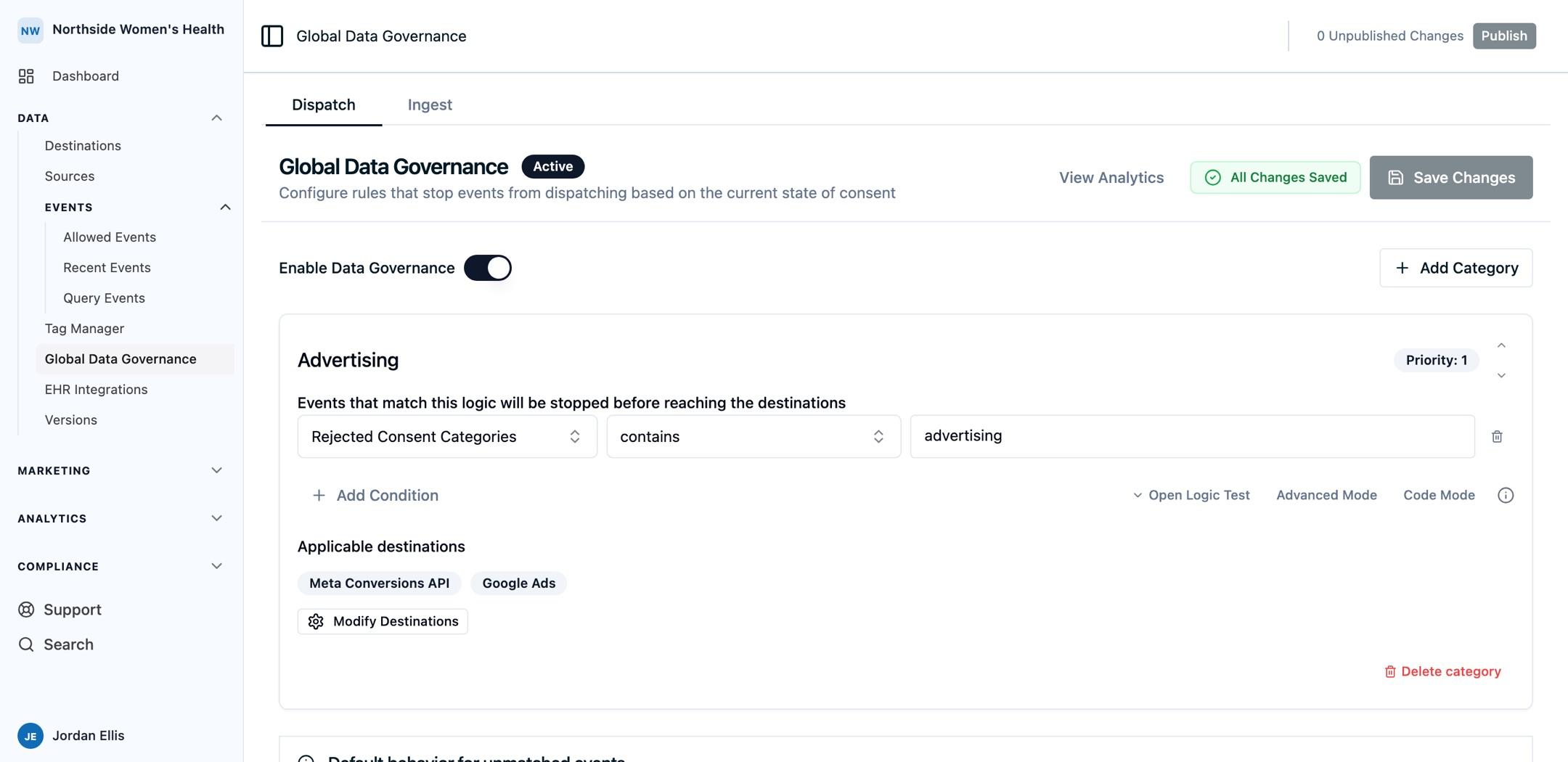
Overview
Global Data Governance lets you:
- Create consent categories with the logic that should stop dispatch.
- Assign one or more destinations to each category.
- Evaluate categories in priority order.
- Keep unaffected destinations dispatching normally.
Configure Rules
- Open Global Data Governance from the dashboard.
- Turn on Enable Data Governance.
- Select Add Category, then give the category a clear name such as Advertising or Analytics.
- Configure the logic that should stop dispatch. The condition must evaluate to true when the event should not reach the selected destinations.
- Select the destinations that the category controls, then save your changes.
- Publish the pending version before the updated rules apply to new events.
For example, the rule shown above stops events from reaching Meta Conversions API and Google Ads when Rejected Consent Categories contains advertising.
How Rules Apply
Global Data Governance runs after the allow list and before destination mapping.
- Ours Privacy evaluates each category that applies to the destination being dispatched.
- When a category's logic matches, dispatch stops for that category's selected destinations.
- Events that do not match a category continue to the destinations they are otherwise allowed to reach.
Rule Priority
Categories are evaluated in priority order. When more than one category matches the same destination, the first matching category applies. Use the up and down controls beside a category to set that order.
Keep categories focused on one purpose. For example, use separate Advertising and Analytics categories when those destination groups should respond to different consent choices.
Consent Inputs
When you use Ours Privacy Cookie Consent, the consent state is available for rules. Other consent tools can provide the relevant consent state with the visitor or event data you send to Ours Privacy.
Before publishing, test events with accepted and rejected consent choices and review the affected destinations in View Analytics.
Next Steps
- Data Sharing Report: review the governance rules and destination configurations across your account.
- Cookie Consent Auditing and Reporting: export subject-level consent evidence for individual visitors.
How is this guide?