

Deduplication
How Ours Privacy prevents duplicate events at ingestion, avoids double-counted conversions at ad platforms, and what to expect from double-firing during a parallel-run migration.
Deduplication shows up in three different places in Ours Privacy, and they solve three different problems: preventing the same event from being stored twice, preventing a destination from counting the same conversion twice, and avoiding double-counting when you run Ours Privacy alongside an existing analytics setup during a migration.
Not sure which section is yours? If your ad platform's own numbers don't match what you expected, start with avoiding double-counted conversions at ad platforms. If you're running Ours Privacy alongside an existing analytics setup during a migration, go to avoiding double counting during a parallel run. If you're combining a client-side event with a server-side confirmation for the same conversion, see event deduplication at ingestion.
Event deduplication at ingestion
Ours Privacy deduplicates incoming events using the combination of visitor_id and distinct_id. When two events arrive with the same pairing, only the first is stored; later ones are ignored so a retried or double-sent event never creates a second record.
This is a best-effort safeguard against retries and double-sends, not a guarantee against every form of duplication. If your own site or app fires the same tracking call twice with different distinct_id values (for example, once from the Web SDK and once from a duplicate GTM tag), those arrive as two distinct events because nothing ties them together as duplicates.
See Understanding Events for the full mechanics, including how race conditions between near-simultaneous events are resolved.
Combining a client-side event with a server-side confirmation
A common pattern is tracking a conversion from the Web SDK when a customer completes checkout, then sending a server-side confirmation for the same conversion once payment actually clears. To have Ours Privacy treat these as one event rather than two:
- Match the visitor. Pass the visitor's
userId(the value fromours.getVisitorId()in the browser) on the server-side call, so the server event attaches to the same visitor as the client-side one. See Visitor Identity and Matching for how visitor matching works. - Match the
distinctId. Set the same deterministic value, such as an order ID or your payment provider's transaction ID, asdistinctIdon both the clienttrackcall and the server-side/trackcall. Reusing the samedistinctIdon both calls is how you tell Ours Privacy these represent one conversion, not two.
If either value differs between the two calls, both events are stored and dispatched independently, since nothing else ties them together as duplicates.
Avoiding double-counted conversions at ad platforms
A separate concern is conversions being counted twice by an ad platform, which typically happens when the same conversion reaches a platform through two paths, for example its client-side pixel and Ours Privacy's server-side dispatch. Ad platforms solve this with a dedup key: send the same key on both paths and the platform counts the conversion once.
Ours Privacy sets that key automatically wherever a destination supports it, using the event's stable identifier so the pixel-side and server-side hits agree:
- Meta (Facebook) Conversions API uses the event's identifier as
event_id, matching Meta's deduplication requirements for events sent via both the Pixel and CAPI. - Pinterest Conversions API uses the same identifier as its
event_id. - Google Ads uses it as a unique event identifier alongside the click identifiers (
gclid,gbraid,wbraid) already captured on the visitor. The Unique Event ID mapping field can hash or change the case of that identifier before it is sent, if the raw value should not reach Google. - AppLovin sets a
dedupe_idon every event so a conversion dispatched through both the AppLovin Pixel and server-to-server is only counted once. - Admitad and other affiliate destinations key off your own order or transaction ID, so retrying the same order is safe and never double-counts.
You don't need to configure this: as long as a destination's client-side pixel and the Ours Privacy server-side dispatch are tracking the same underlying event, the dedup key lines up automatically. Check the destination's own page under Destinations for platform-specific notes.
Avoiding double counting during a parallel run
When you run Ours Privacy alongside an existing analytics or tag setup, typically while validating a migration, the same real-world conversion is being tracked by two systems at once. Double counting only becomes a problem once both systems are actively sending that conversion to the same downstream destination (the same Meta pixel, the same GA4 property, and so on).
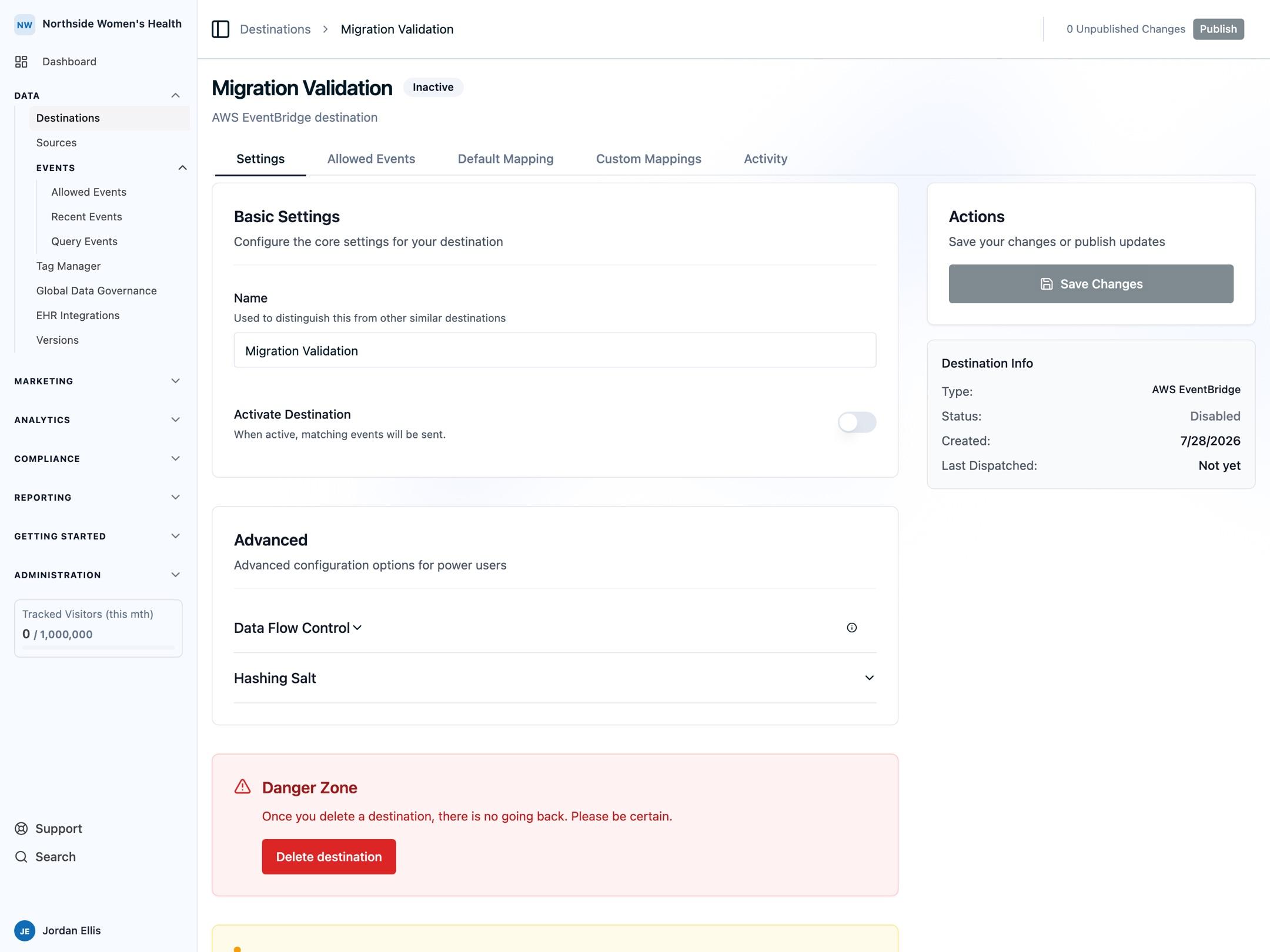
Work through this per destination, not all at once:
- While validating, leave each new Ours Privacy destination turned off. On the destination's Settings tab, the Activate Destination toggle controls this; while it's off, matching events are still captured and visible in Recent Events, but nothing is sent to the third-party platform. This lets you compare Ours Privacy's event counts against your existing setup with no risk of duplicate conversions reaching the destination.
- For each destination you're ready to cut over, disable the equivalent tag in your old setup first, then turn on Activate Destination for that destination in Ours Privacy. Cut over one destination at a time rather than flipping every toggle at once, so a mismatch is easy to trace back to a single change.
- If a tag lives outside your tag manager, for example hardcoded in a template rather than managed through GTM, disabling it needs a code change and deploy, not just a tag manager publish. Confirm with your engineering team which of your existing tags are and aren't tag-manager-managed before you start cutting over.
- Watch for duplicate tags on the same trigger on your own site, for example a page view tag firing from two different tag managers on the same page load. This inflates volume independently of anything above and isn't specific to Ours Privacy.
Next Steps
- Understanding Events: the full event lifecycle, including ingestion-level idempotency.
- Destination Overview: how events reach each destination, and where to find platform-specific dedup notes.
- Test Mode: validate your setup without dispatching to live destinations.
If you're seeing duplicate or double-counted events that don't match the behavior above, reach out to support@oursprivacy.com.
How is this guide?