

Standard Healthcare Events
The canonical healthcare event and property schema in Ours Privacy: a vertical-agnostic contract for patient acquisition, booking, attendance, calls, and revenue, so your funnels, conversions, and attribution work without custom setup.
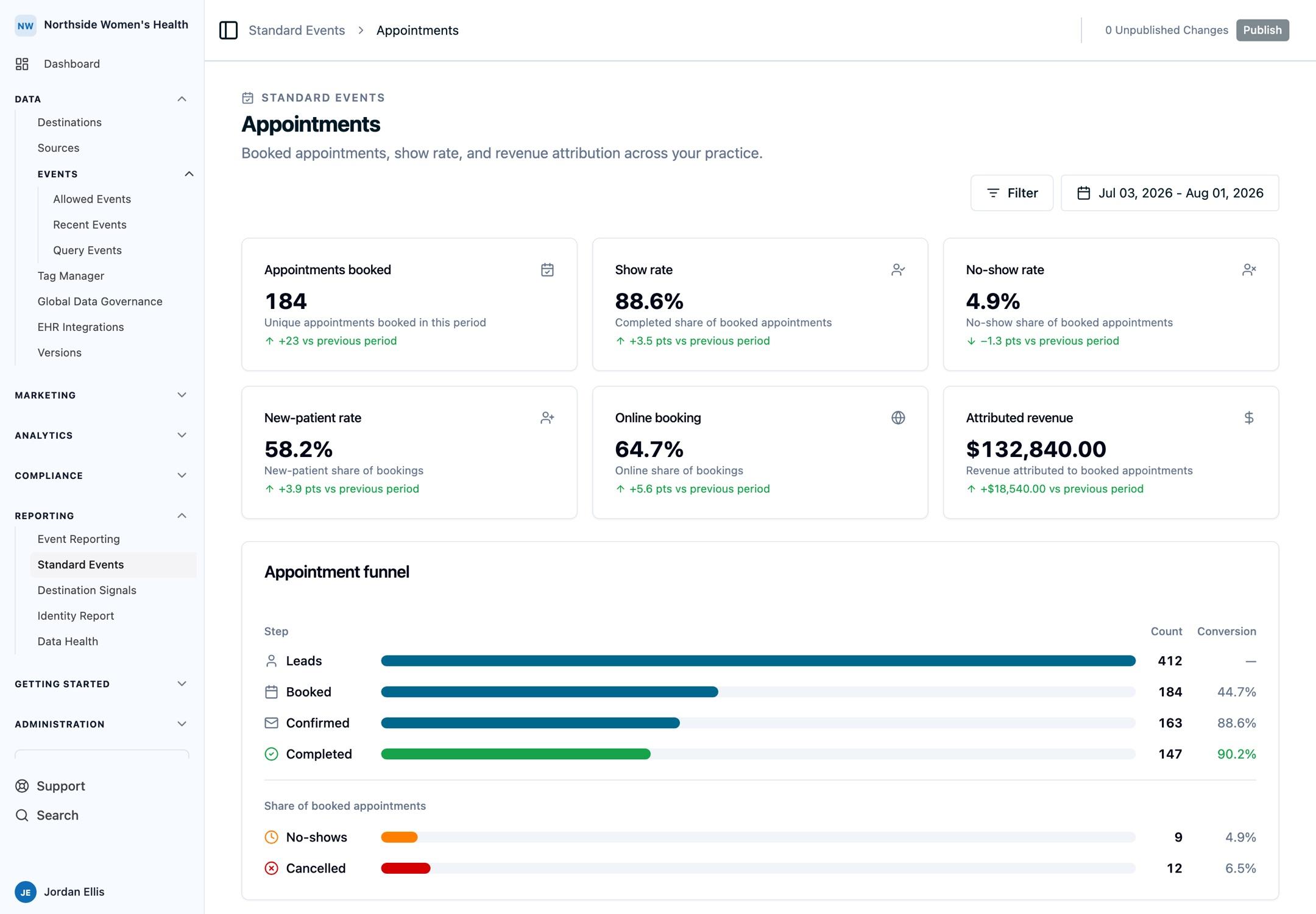
Track these events in Ours Privacy and you get one clean, semantic naming convention for the whole patient journey: a new inquiry, a booked appointment, whether the patient showed, the calls in between, and the revenue that follows. We recommend adopting them as your standard event names so every source, team, and destination refers to the same things the same way.
The names are what make reporting work without setup. Attribution and Web Analytics already recognize this schema, so funnels, conversion rates, revenue, and multi-touch attribution compute the moment the events arrive. Use your own naming instead and each report has to be mapped by hand; send appointment_booked and revenue_recognized and the patient-acquisition reports run against them directly.
Already tracking custom events? You can keep your existing event names and use the event renaming feature to normalize them to the standard names before they reach a destination or report. Adopting the schema is recommended, not required.
How to send these events
You send standard events the same way you send any event to Ours Privacy. Pick the path that matches who is doing the work:
- No code: build a tag in the Tag Manager to fire these events from your site.
- Website code: call the Web SDK with
ours('track', 'appointment_booked', { ... }). - Backend, EHR, or PMS: post events from your server with the Server-to-Server API, connect your EHR directly over FHIR or HL7, or connect another supported source. See Choose an EHR or PMS Connection Path.
Before an event reaches a destination, add its name to that destination's event allow list. Use test mode to confirm events arrive correctly before sending real data.
Events
The journey runs through four stages: acquisition, booking, attendance, and revenue. Track the events that apply to you. Event names are lowercase snake_case, read object first (for example appointment_booked).
Every property is optional (events are never rejected for a missing one), but the grade shows how much the standard reports lean on it. Highly recommended links the patient journey or makes the event meaningful; Recommended powers the standard dashboards; Optional enables deeper breakdowns by site or provider.
You never add attribution or identity properties yourself. Ours Privacy captures the full attribution block (UTMs, gclid, fbclid, and more; see Understanding Events) on every event, and patient identity (name, email, phone, date of birth) travels as visitor properties so it stays consistent across the journey. From a server, EHR, or PMS, identify the patient with those same visitor properties and send the time the action occurred, so back-dated records land on the right day. See the Server-to-Server API.
lead_captured
A new inquiry: a phone call, web form, or online booking request. A "Schedule" button click or the start of a booking flow counts here as intent, not as a booked appointment, so your booked count stays clean.
| Property | Recommendation | Notes |
|---|---|---|
service_line | Recommended | Your service categories (e.g. hygiene, implants, ortho). Lowercase, stable values |
is_new_patient | Recommended | true / false |
booking_channel | Recommended | online / phone / walk_in |
provider_id | Optional | Provider requested |
location_id | Optional | Omit for single-location and digital-health orgs |
appointment_id | Optional | Link to the appointment if one is created |
call_tracked
An inbound call logged with its outcome and source. A tracked call is also a lead. When you have call detail, send call_tracked and don't also fire lead_captured for the same call, or it counts twice.
| Property | Recommendation | Notes |
|---|---|---|
call_outcome | Highly recommended | booked / not_booked / missed / voicemail |
call_duration_s | Recommended | Call length in seconds |
is_new_patient | Recommended | true / false |
service_line | Recommended | Your service categories |
staff_id | Recommended | Who handled the call |
booking_channel | Optional | Usually phone |
appointment_id | Optional | Set if the call booked an appointment |
new_patient_created
A first-time patient record is created. This is the standalone version of the is_new_patient flag. Pick one as your new-patient signal so the same patient is not counted twice.
| Property | Recommendation | Notes |
|---|---|---|
service_line | Recommended | Your service categories |
provider_id | Optional | Assigned provider |
location_id | Optional | Omit for single-location and digital-health orgs |
appointment_booked
An appointment is confirmed on the schedule.
| Property | Recommendation | Notes |
|---|---|---|
appointment_id | Highly recommended | New ID for the appointment; reuse it through completion and revenue. Unique across your locations |
service_line | Recommended | Your service categories |
is_new_patient | Recommended | true / false |
booking_channel | Recommended | online / phone / walk_in |
provider_id | Recommended | Provider booked |
location_id | Optional | Omit for single-location and digital-health orgs |
appointment_confirmed
The patient confirms an upcoming appointment. An optional funnel step between booked and completed.
| Property | Recommendation | Notes |
|---|---|---|
appointment_id | Highly recommended | Same ID as the booking |
provider_id | Optional | Provider booked |
location_id | Optional | Omit for single-location and digital-health orgs |
appointment_rescheduled
A booked appointment moves to a new time or provider. Send this with the original appointment_id rather than cancelling and rebooking, so the journey stays linked.
| Property | Recommendation | Notes |
|---|---|---|
appointment_id | Highly recommended | Reuse the original booking's ID |
provider_id | Recommended | New provider, if changed |
service_line | Optional | Your service categories |
location_id | Optional | Omit for single-location and digital-health orgs |
appointment_completed
The patient attended (showed). For telehealth, send this when an online intake or video visit is finished.
| Property | Recommendation | Notes |
|---|---|---|
appointment_id | Highly recommended | Same ID as the booking |
service_line | Recommended | Your service categories |
provider_id | Recommended | Provider seen |
is_new_patient | Recommended | true / false |
location_id | Optional | Omit for single-location and digital-health orgs |
appointment_no_show
A booked appointment was missed. This is the event behind no-show tracking and show-rate reporting.
| Property | Recommendation | Notes |
|---|---|---|
appointment_id | Highly recommended | Same ID as the booking |
service_line | Recommended | Your service categories |
provider_id | Recommended | Provider booked |
location_id | Optional | Omit for single-location and digital-health orgs |
appointment_cancelled
A booked appointment was cancelled and not replaced. If it was moved instead, send appointment_rescheduled.
| Property | Recommendation | Notes |
|---|---|---|
appointment_id | Highly recommended | Same ID as the booking |
service_line | Recommended | Your service categories |
provider_id | Recommended | Provider booked |
location_id | Optional | Omit for single-location and digital-health orgs |
purchase
A payment captured at checkout or point of sale. This is the GA4-aligned conversion ad platforms optimize on; if you only send one revenue event, send this. When forwarding to GA4 or Google Ads, keep the name purchase and rename lead_captured to GA4's generate_lead with event renaming.
| Property | Recommendation | Notes |
|---|---|---|
value | Highly recommended | Amount in dollars (major units, not cents) |
currency | Highly recommended | ISO 4217 code, e.g. USD |
appointment_id | Recommended | Link to the appointment |
service_line | Recommended | Your service categories |
is_new_patient | Optional | true / false |
provider_id | Optional | Provider seen |
location_id | Optional | Omit for single-location and digital-health orgs |
revenue_recognized
Revenue attributed to a patient or appointment in your PMS or ledger. It often lands later and in pieces (insurance, balance payments). To keep repeated sends of the same transaction from double-counting, set a stable $distinct_id on the event.
| Property | Recommendation | Notes |
|---|---|---|
value | Highly recommended | Amount in dollars (major units, not cents) |
currency | Highly recommended | ISO 4217 code, e.g. USD |
revenue_type | Recommended | first_visit / first_year / ltv |
appointment_id | Recommended | Link to the appointment |
service_line | Recommended | Your service categories |
provider_id | Optional | Provider seen |
is_new_patient | Optional | true / false |
location_id | Optional | Omit for single-location and digital-health orgs |
Examples
A new patient books online after arriving from a Google Ads campaign:
ours('track', 'appointment_booked', {
  appointment_id: 'appt_8f21',
  service_line: 'ortho',
  is_new_patient: true,
  booking_channel: 'online',
  provider_id: 'dr_chen',
  location_id: 'austin_north',
});
An inbound call that did not convert:
ours('track', 'call_tracked', {
  call_outcome: 'not_booked',
  call_duration_s: 142,
  service_line: 'cosmetic',
  is_new_patient: true,
  staff_id: 'front_desk_02',
});
Revenue captured at checkout:
ours('track', 'purchase', {
  value: 2400,
  currency: 'USD',
  appointment_id: 'appt_8f21',
  service_line: 'implants',
});
A telehealth intake completion, with no physical location:
ours('track', 'appointment_completed', {
  appointment_id: 'visit_5523',
  service_line: 'primary_care',
  is_new_patient: false,
});
Fits your practice setup
The schema works as-is for the most common setups:
- Multi-location groups (dental and medical groups, hospital systems): set
location_idandprovider_idon every event to break reporting down by site and provider. - Single-location practices: omit
location_id. Everything else works the same. - Digital health and telehealth: omit
location_idand track visits or intakes through theappointment_*events. Sendappointment_completedwhen an online intake or video visit is finished.
This schema is built for HIPAA-regulated workflows. Keep protected health information out of event names, and send patient identity as visitor properties so it is handled through identity matching rather than embedded in event data.
Next Steps
- Understanding Events: how events, properties, and the dispatch flow work
- Visitor Properties: where patient identity belongs
- Allow Listing Events: add these event names to a destination's allow list
- Sources Overview: connect a website, server, or EHR/PMS source
- EHR and PMS Integrations: connect lower-funnel outcomes to the patient journey
How is this guide?