

Identity Recovery
Identity Recovery is an opt-in backstop that reconnects returning visitors when first-party cookies can't be read, such as across embedded and default browsers on the same device.
Identity Recovery is a backstop, not your primary identification. Most returning visitors are recognized by their custom domain first-party cookie, which persists for as long as the cookie lives and has no lookback window. Identity Recovery is a separate, opt-in feature for the cases that cookie can't cover.
That gap shows up when there's no first-party cookie to read: a visitor moves between an embedded browser (Instagram, TikTok) and their default browser, or uses multiple browsers on the same phone. Without recovery those look like separate visitors. With it enabled, Ours Privacy checks whether a similar visitor was seen within a recent match window and, if there's a clear match, restores their original visitor ID. If not, a new ID is assigned as usual, and a $identity_recovered event is emitted whenever a session is reconnected so it's auditable in your event stream.
The match window governs only this backstop matching. It does not limit how long a cookie-recognized visitor stays recognized.
Identity Recovery is available on all plans and is disabled by default.
Enabling Identity Recovery
Identity Recovery is opt-in per source. Open your source settings and toggle Identity Recovery on. That's it. The defaults work well for most sites.
Once enabled, you can optionally adjust the match window and network threshold described below.
Configuration Options
| Setting | Description | Default |
|---|---|---|
| Enabled | Turn Identity Recovery on or off for this source. | Off |
| Match window (minutes) | How far back recovery looks for a match when there's no first-party cookie. Shorter windows are more precise; longer windows catch visitors who were away longer. Range: 1 to 1,440 (24 hours). | 60 |
| Max visitors per IP | If more than this many visitors share the same network address, matching is skipped to avoid guessing wrong. Useful on shared or corporate networks. Range: 1 to 25. | 3 |
How Matching Works
When a returning visitor can't be recognized, Ours Privacy looks at recent activity from similar visitors. If there's a clear match, the original visitor ID is restored. If the situation is ambiguous, matching is skipped and a new ID is assigned instead.
This works across source types. A visitor browsing your site generates web SDK events, and when they later submit a form that triggers a webhook or an API call, Identity Recovery can link those events back to the same visitor.
Identity Recovery only runs after the first-party cookie and deterministic methods (login identity, external IDs, email) have all failed to identify the visitor. It never overrides an identity those methods already established.
Shared networks like hospital lobbies and corporate offices have many people behind the same IP. When the system detects too many distinct visitors on the same network, it skips matching entirely rather than guess wrong. VPN users whose IP changes every session also get a clean new ID. These are the right outcomes.
Measuring Impact
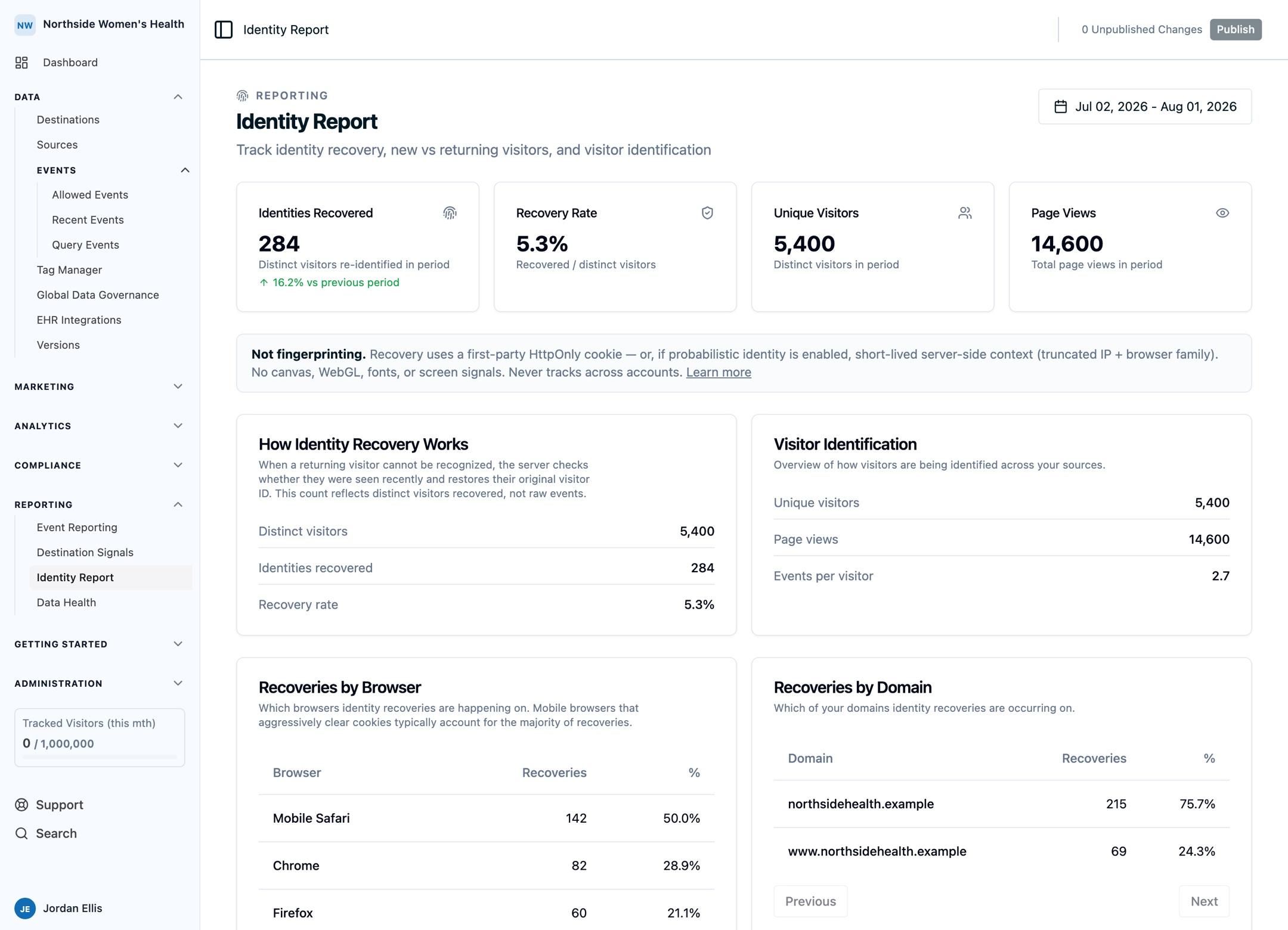
When Identity Recovery reconnects a visitor, it powers the Identity Report dashboard, where you can see:
- Recovery count: how many visitors were reconnected in a given period
- Recovery rate: the percentage of visitors recovered out of all unique visitors
- Trend over time: whether recovery is increasing or decreasing period-over-period
Use the Identity Report to understand how interrupted sessions affect your data and whether adjusting your match window or network threshold would help.
Privacy
- Signals used for matching are short-lived and are never stored in a way that can identify an individual.
- Recovery is scoped to your account. There is no cross-account linking.
- Matching works across sources within the same account. A visitor seen on a web source can be recovered when they later trigger events through a webhook or API source.
- If Exclude Request Context is enabled on a source, Identity Recovery is automatically disabled for that source.
When It Works Best
- Visitors return on the same device and network within the match window
- Your audience browses on mobile, where identity gaps are most common
- Visitors move between embedded browsers (Instagram, TikTok, Facebook) and their default browser (Safari, Chrome) on the same device
- You use a web source with a custom domain for first-party tracking, and Identity Recovery catches the edge cases
It won't recover visitors who return from a different device, switch networks, or come back after the match window has expired (visitors who still have their first-party cookie are recognized regardless of the window).
Best Practices
- Start with defaults. A 60-minute window and a max of 3 visitors per network is a conservative starting point.
- Check the Identity Report. Monitor your recovery rate over time and adjust settings if needed.
- Pair with deterministic identity. Calling
identifywhen a visitor logs in is always the most reliable approach. Identity Recovery complements it for anonymous sessions.
Next Steps
- Visitor Identity and Matching: where Identity Recovery sits among the four identity layers, and how they feed attribution reporting.
- Custom Domains: set up the server-side, first-party cookies that recognize most returning visitors with no lookback window.
- Conversion Attribution: how recovered touchpoints earn credit across the six attribution models.
How is this guide?