

Overview
Ours Privacy Experimentation provides HIPAA-compliant A/B testing, redirect experiments, and personalization built into your CDP. No separate tool, no separate BAA.
Ours Privacy Experimentation is HIPAA-compliant A/B testing and personalization built into your CDP. Run content experiments, redirect tests, and always-on personalization using the same visitor identity, event pipeline, and analytics you already have.
No separate tool. No separate BAA.
New: Manage experiments through Claude, ChatGPT, and other AI assistants. See Manage Experiments with AI.
Want answers without leaving the dashboard? Ask the built-in AI Assistant how an experiment is set up or which variant is leading.
Why Teams Choose Ours Privacy Experimentation
- Drive experiments from your AI assistant. Create, edit, start, stop, and read live results from Claude, ChatGPT, or any MCP-compatible client, no dashboard required. See Manage Experiments with AI.
- HIPAA-compliant by default. The platform is already HIPAA-compliant, so your experiments are too. No separate BAA or compliance add-on required.
- CDP-native targeting. Target on URL, query parameters, visitor context, and event-derived accumulated visitor properties. No integration required.
- No-flicker delivery path. Render with the server-side assignment API, or use the synchronous redirect installation path when a pre-paint experience matters.
- Consent-gated. Only consenting visitors participate. Integrated with the Ours Privacy CMP at the pipeline level, not a client-side check that can fail silently.
- First-party experiment data. Impressions and your existing conversion events flow into the same analytics pipeline you already use. No separate reporting silo.
- Session replay and heatmaps per variant. See exactly why a variant won by drilling into replays and click maps for each variant.
- Code-driven rendering when you need it. If your app owns the UI in React, Vue, or Next.js, use Headless Experiments and Headless Personalization to render variant-specific UI in your own code instead of relying on DOM mutations.
Experiment Types
Experiments come in four flavors. Pick by where the rendering happens:
| Type | What It Does |
|---|---|
| Headless Experiments | Your application code reads the assignment from the SDK and renders the variant itself. Best for React, Vue, Next.js, and other framework-controlled UIs. |
| Server-Side Experiments | Your backend calls the assignment endpoint and renders the variant before the page reaches the browser. Best for SSR, edge functions, and non-browser clients. Browser and server converge on the same variant for the same visitor. |
| Content Experiments | The runtime modifies text, styles, images, or visibility on the same URL via DOM modifications. Best for static pages where the runtime can safely mutate the HTML. |
| Redirect Experiments | The browser redirects variant visitors to a completely different URL before the page renders. Best when you've built two distinct pages. |
Personalization comes in two flavors:
| Type | What It Does |
|---|---|
| Headless Personalization | Programmatic access to visitor signals (geo, UTM, device, and visitor status) via window.ours_experiments.getVisitorContext(). |
| Content Personalization | Always-on rules that show targeted content to qualifying visitors, with no test and no winner. |
All three experiment types support A/B/n with as many treatment variants as you need.
Key Features
- Manage Experiments with AI: Run the full experiment lifecycle through Claude, ChatGPT, or other AI assistants over MCP
- Installation: Load experimentation through the recommended Web SDK or Tag Manager path, or use a manual fallback when needed
- Headless Experiments: Read assignments from the SDK and render variants in your own application code
- Server-Side Experimentation: Call the assignment endpoint from your backend (SSR, edge functions, or non-browser clients) and render the assigned variant before the page reaches the browser
- Content Experiments: Modify DOM elements per variant: text, styles, images, visibility, custom CSS/JS
- Redirect Experiments: Send variant visitors to a different URL before the page renders
- Headless Personalization: Access visitor signals from your own JavaScript for code-driven personalization and analytics enrichment
- Content Personalization: Always-on content rules that target visitor context and behavior-derived properties
- Goals & Conversion Tracking: Measure experiments against the events you already send your CDP, set a primary metric, and send new goal events
- JavaScript SDK: Full reference for
window.ours_experiments: assignments, events, and forced variants - Experiment Settings: Targeting, traffic allocation, visitor status, and consent
How It Works
- Create an experiment in the Ours Privacy dashboard, via the REST API, or by asking your AI assistant
- Define variants: ask AI to create DOM modifications, define DOM modifications or redirects with the API, or read assignments in your own application code
- Set targeting: URL patterns, query parameters, visitor context, accumulated personalization properties, or any combination
- Start the experiment: the experiment script loads,
window.ours_experiments.init({ visitorId })runs, and targeting is evaluated on each page load - Measure results: pick a goal event you already send your CDP; the report updates with the measures for your chosen analysis method
- Declare a winner: stop the experiment and optionally roll out the winning variant
Architecture
The experiment runtime loads as a lightweight JavaScript file from your custom domain. On each page load it:
- Reads the visitor's existing variant assignment from a server-set cookie
- If no assignment exists, deterministically hashes the visitor ID to a variant
- Applies DOM modifications or redirects before the page fully renders, or exposes the assignment to your own code through
window.ours_experiments - Tracks an
$experiment_impressionevent via the CDP SDK (deduplicated per session) - Exposes
window.ours_experiments, including explicitinit(...), for access from your own JavaScript code
Getting Started
- Install experimentation: If your site already runs the Ours Web SDK, you just add the experimentation token to your existing init call.
- Create an experiment in the Ours Privacy dashboard, API, or MCP client
- Define variants: Ask AI or use the API to set up DOM modifications or redirect URLs
- Start the experiment: Traffic allocation begins immediately
- Track your goal event: Use your normal CDP event tracking, for example
ours('track', 'signup_completed'). See Goals & Conversion Tracking for how experiments measure results.
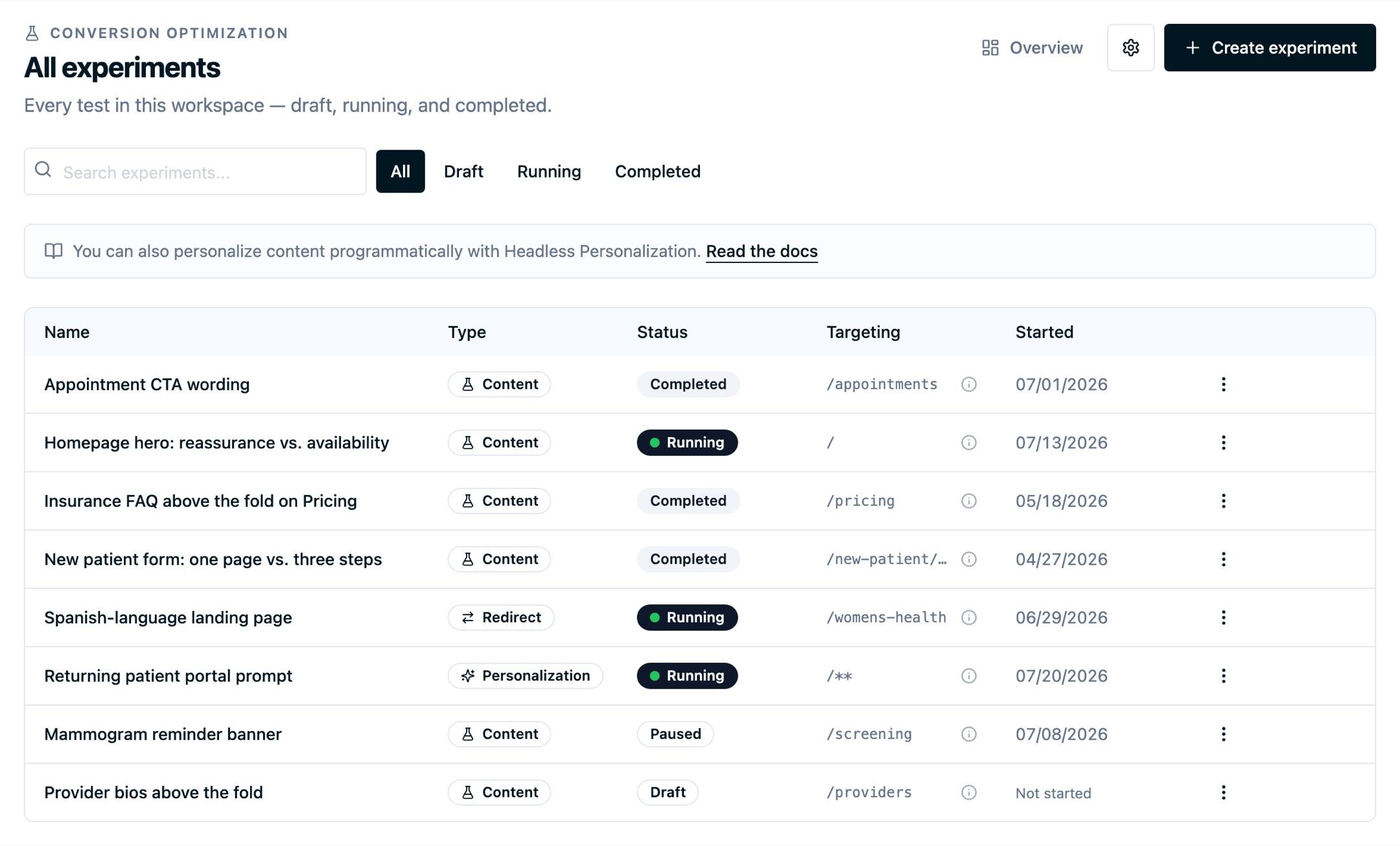
Once you have a few running, the experiments list is where you watch them: type, status, the pages each one targets, and when it started.
Need Help?
Reach out to support@oursprivacy.com if you have questions about setting up experiments or interpreting results.
How is this guide?