

Experiment Settings
Configure each experiment's targeting (URL pattern, query parameters, visitor status), traffic allocation, and consent behavior. All targeting rules are evaluated client-side before variant assignment.
Each experiment carries a small set of settings that control who enters it and how traffic is allocated. All of these are configured in the dashboard when you create or edit an experiment.
This page covers:
- Name and description: how to rename an experiment after it exists
- Targeting: URL patterns, query parameters, visitor status
- Traffic allocation: what percentage of eligible visitors enter
- Consent: how the runtime respects visitor consent
Name and Description
The name is how an experiment is identified in the dashboard, and the description is where you record what you are testing and what you expect to happen.
Both can be changed at any time from the experiment's detail page. Select Rename next to the experiment title, edit either field, then select Save. Press Enter to save or Escape to discard.
Renaming is safe on a live experiment:
- Results are preserved. Impressions, conversions, and the results timeline all survive a rename. There is no need to delete and recreate an experiment to change its name.
- The experiment key does not change. A key is assigned when the experiment is created and is not affected by later renames, so SDK and server-side code that reads by key keeps working. See Headless Experiments for how keys are used.
- The change is recorded. Editing a running experiment appends a note to its change log so the results timeline stays interpretable.
Completed experiments cannot be renamed. Their results are final, so the Rename control is not shown.
Targeting
Targeting rules decide which visitors are eligible for an experiment. Only visitors who pass all rules are assigned a variant. Everyone else sees the original page, unmodified. All rules are evaluated client-side by the experiment runtime before any variant is applied.
URL Patterns
URL patterns control which pages the experiment runs on. Visitors on matching pages are eligible; visitors on other pages are not.
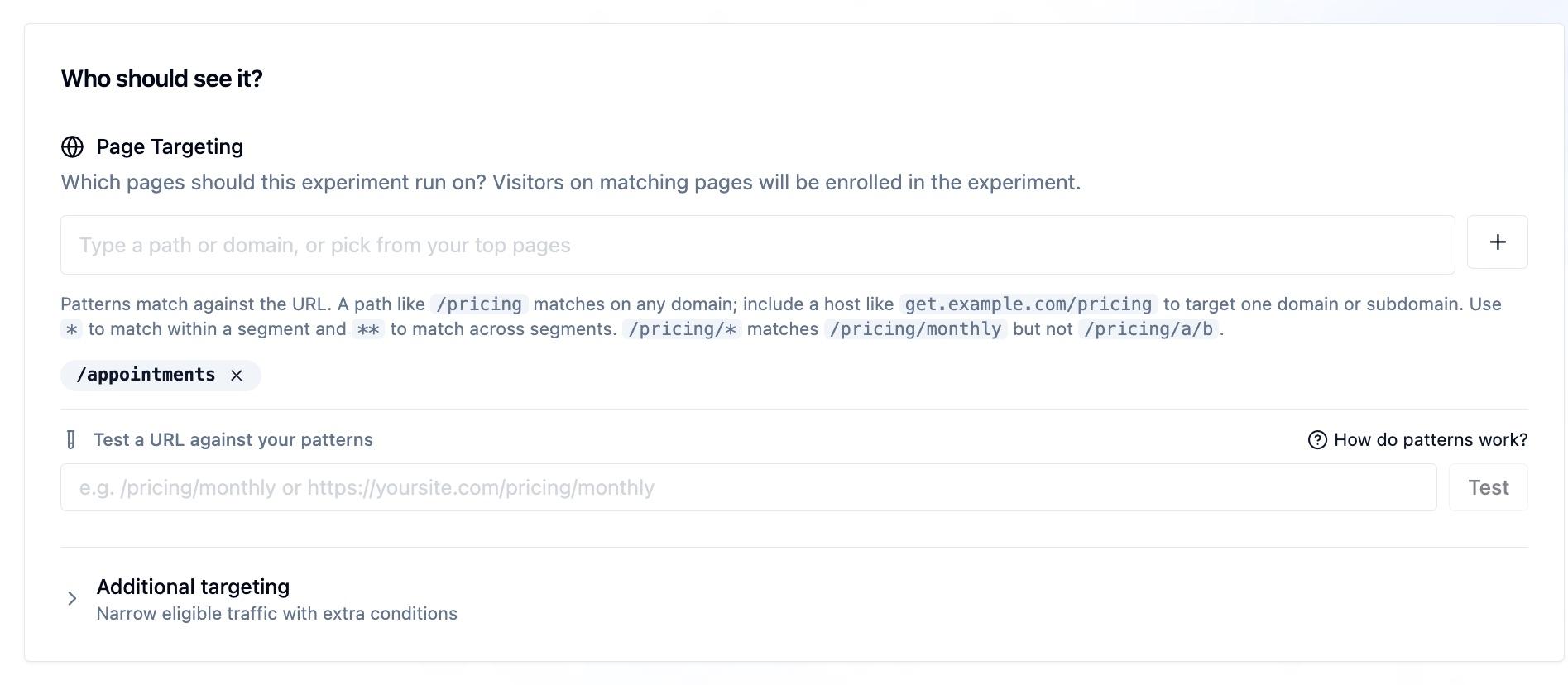
Each pattern is either a path (matched on any domain) or a host-qualified pattern (matched against the full URL so a single domain or subdomain can be targeted). Use * to match within a single segment and ** to match across segments.
| Pattern | Matches | Does Not Match |
|---|---|---|
/pricing | /pricing on any domain | /pricing/enterprise |
/pricing/* | /pricing/monthly, /pricing/annual | /pricing/a/b |
/blog/** | /blog/post, /blog/2024/recap | /docs/blog |
get.example.com/pricing | get.example.com/pricing | www.example.com/pricing |
example.com/** | Any path on example.com | other.com/any |
If no URL pattern is set, the experiment will not run on any page.
Query Parameters
Narrow an experiment to visitors whose URL contains specific query string values. This is useful for targeting paid traffic by UTM parameter, affiliate codes, or any key-value pair in the URL.
Each condition specifies a key, an operator, and (for most operators) a value. All conditions use AND logic, every condition must match for the visitor to be eligible.
| Operator | Meaning | Example |
|---|---|---|
equals | Key exists and value matches (case-insensitive) | utm_source equals meta |
contains | Key exists and value includes the substring | utm_campaign contains spring |
exists | Key is present, regardless of value | gclid exists |
not_equals | Key is missing, or value does not match | utm_source not_equals internal |
not_exists | Key is not present in the URL | debug not_exists |
Matching is case-insensitive for all value comparisons.
Example
To target visitors arriving from a Meta ad campaign:
utm_sourceequalsmetautm_mediumequalscpc
A visitor landing on ?utm_source=meta&utm_medium=cpc enters the experiment. A visitor with only ?utm_source=meta does not (both conditions must match).
Visitor Status
Target experiments based on whether the visitor has been to your site before.
| Option | Who It Targets |
|---|---|
| All visitors | Everyone (default) |
| First-time visitors only | Visitors who have never loaded a page with the experiment snippet on this domain |
| Returning visitors only | Visitors who have loaded at least one previous page with the snippet |
Visitor status is determined when window.ours_experiments.init({ visitorId }) runs. The runtime stores the last initialized visitor ID in its experiment cookie metadata. If the same visitor ID returns, they are considered returning. If the runtime has not seen that visitor ID before, they are considered first-time.
If a visitor clears their experiment cookies, they will be treated as first-time again.
How Targeting Rules Combine
All targeting rules are evaluated in order. A visitor must pass every rule to be eligible:
- URL pattern: is the visitor on a matching page?
- Query parameters: does the URL contain the required key-value pairs?
- Visitor status: is the visitor new or returning, as required?
- Traffic allocation: is the visitor within the allocation percentage (see below)?
If any rule rejects the visitor, the experiment is skipped entirely for that pageview.
Traffic Allocation
Traffic allocation controls what percentage of eligible visitors enter the experiment. Visitors who are eligible (they pass all targeting rules) but fall outside the allocation percentage see the original page and are not tracked as experiment participants.
Set this to 100 to include all eligible visitors. Lower it if you want to limit exposure while you validate results.
Consent
When experimentation is loaded through the Ours Web SDK or Tag Manager, experiments respect the same consent settings as the rest of the Ours Privacy platform: impressions flow through the CDP, which applies your consent rules before anything is forwarded to a destination. You do not need to add consent checks to individual experiments.
The synchronous script install (used for redirect experiments) is different by design: it records the variant assignment directly so the redirect can fire before the page renders, which means the impression does not pass through the CDP's consent layer. This is safe because impressions are internal to your experiment results and are never forwarded to destinations. If you need experiment impressions themselves to honor CDP consent gating, load experimentation through the Web SDK or Tag Manager instead. See Installation.
Next Steps
- Content Experiments: Modify elements on the same page
- Redirect Experiments: Send visitors to a different URL
- Headless Experiments: Render variants in your application code
- JavaScript SDK: Access assignments from your own code
How is this guide?