

Manage Experiments with AI
Use the Ours Privacy MCP server to create, edit, start, stop, and analyze A/B tests through natural-language prompts in Claude, ChatGPT, and other AI assistants.
Use this page to run the full experiment lifecycle (create, edit, start, stop, and read results) through an AI assistant like Claude or ChatGPT, without touching the dashboard.
It pairs the MCP Server with the same REST-backed experimentation engine documented elsewhere in this section. It is the preferred authoring path for always-on personalization.
Open Experiments in appBefore You Start
- Connect your AI tool to the Ours Privacy MCP server. See MCP Server (platform).
- Make sure the API key you used has permission to read and write experiments.
- Install the experiment runtime on your site if you haven't already. See Installation.
Create an Experiment
Ask your assistant in plain language. Example prompt:
"Create a draft content experiment named Pricing CTA v2 targeting
/pricing. Add two variants: control (no change) and treatment (button text: Try it free)."
Behind the scenes the assistant calls create_experiment, then create_experiment_variant for each variant. The new experiment appears in Experiments in your dashboard as a draft.
A primary metric event and at least two variants are required before an A/B or multivariate experiment can start, so include the goal event in your prompt, for example, "...with primary metric signup_completed."
Create Personalization
Ask for the behavior signal first when the target depends on an event:
"When a visitor views
/pricing, storevisited_pricing: true. Then create an always-on personalization named Pricing follow-up for visitors withvisited_pricing, replace.hero h1with Ready to compare plans?, and publish it."
The assistant creates a personalization property rule, creates an experiment with type: "personalization", adds a DOM-modification treatment, then starts it. Personalization has an auto-created control row but needs no primary metric; every visitor matching the targeting gets the treatment.
Property rules begin accumulating from the next matching event and are available on the visitor's next full page load. They are the runtime path for event-derived behavior; do not describe a saved Audience Builder segment as a direct experiment target.
Edit an Experiment
Once a draft exists, you can edit it the same way:
"Update the Pricing CTA v2 experiment to target visitors with UTM source
The assistant updates targeting and allocation through update_experiment_settings and update_experiment.
Start an Experiment
When you're ready to ship:
"Start the Pricing CTA v2 experiment."
The assistant calls start_experiment, which atomically publishes the experiment and makes it live. Assignment begins immediately; impressions and your existing conversion events flow into the same analytics pipeline you already use.
Read Live Results
Ask for the current numbers anytime:
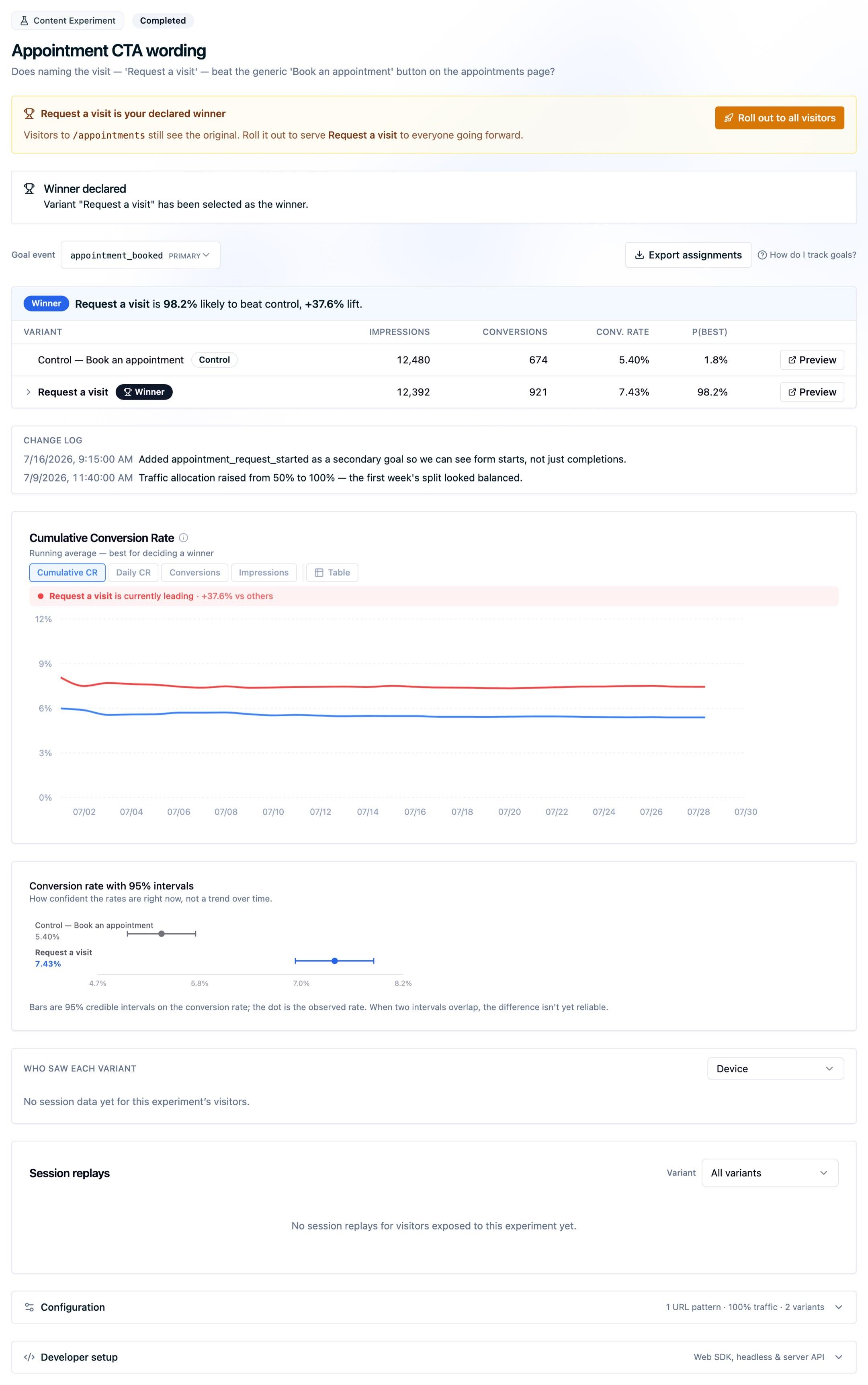
"How is Pricing CTA v2 performing? Which variant is winning?"
The assistant calls get_experiment_results and summarizes the Bayesian probability-to-be-best for each variant. For trends over time, ask for "results over the last 14 days", which hits get_experiment_results_time_series.
Stop an Experiment
When you've seen enough:
"Stop Pricing CTA v2 and lock in the treatment."
The assistant calls stop_experiment. To apply the winning variant permanently, use the rollout option in the stop dialog or see Declaring a Winner.
Available Tools
The MCP server exposes tools for:
- Experiments: list, get, create, update, start, pause, resume, stop, delete, results, results time series, session replays
- Experiment Variants: list, get, create, update, delete
- Experiment Settings: list, get, create, update, delete
- Personalization Properties: list, get, create, update, delete
- Versions: list, get, update, publish (new draft), rollback (re-publish existing), snapshot, diff
For the full list, prompt your assistant for "what tools are available from oursprivacy?"
Next Steps
- Headless Experiments: render variant UI in your own application code
- Content Experiments: modify DOM elements per variant
- Experiment Settings: targeting, allocation, and consent rules
Need Help?
Reach out to support@oursprivacy.com if you have questions about running experiments through AI.
How is this guide?