

Declaring a Winner & Rolling Out
After an experiment ends, declare which variant won and optionally roll it out to 100% of visitors. Declaring a winner and rolling it out are separate, reversible steps.
When you stop an experiment, you decide what happens next. You can declare a winner to record which variant won, and you can roll a variant out so every visitor sees it going forward. These are two separate choices: declaring a winner is for your records and changes nothing for visitors; rolling out is what actually serves the variant to everyone. Both are reversible.
Just want to end the test? Stop it without declaring a winner or rolling out: every visitor returns to the original experience and your results stay frozen for review.
Declaring a Winner vs. Rolling Out
It helps to keep the two ideas separate:
- Declaring a winner records which variant won, for your reporting and history. On its own it does not change what visitors see: everyone still gets the original experience after the test ends.
- Rolling out serves a variant to 100% of targeted traffic going forward. A winning redirect becomes an ongoing redirect; a winning content change becomes the new default. This is an explicit, opt-in decision.
You can do either, both, or neither. Declaring a winner without rolling out is common when you plan to ship the change yourself in code. Rolling out gives you the change immediately with no code.
Declare a Winner
You declare a winner when you stop the experiment: choose the winning variant in the stop dialog. This is optional; leave it unset to simply end the test.
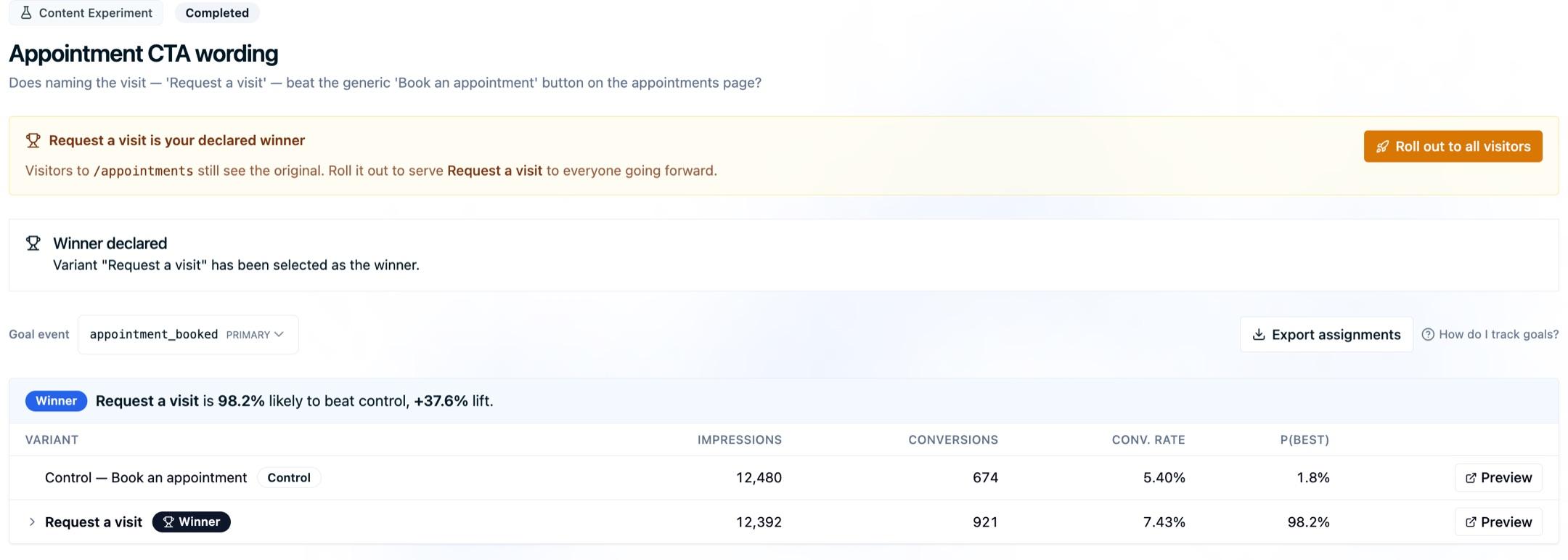
Declaring a winner never changes what visitors experience and never alters your collected results. It's a label on the finished experiment.
Roll Out to All Visitors
Rolling out serves the chosen variant to every visitor on the experiment's targeted pages, with no traffic split. Start a rollout either from the stop dialog (check Also roll this variant out to all visitors now) or later from the completed experiment page, which offers a one-click Roll out to all visitors whenever a non-control winner has been declared.
Once a rollout is live, the experiment page shows a live banner confirming exactly what visitors now experience, with a Preview so you can see it yourself and, for redirects, a link to open the destination. Allow about 3–15 minutes for a new rollout to take effect everywhere.
A rolled-out experiment keeps all its variants available for preview, but it no longer records impressions or conversions: the test is over, so its results stay frozen.
Note: You can't roll out the control variant, which is just the original experience. To return everyone to the original, stop the rollout instead.
Stop a Rollout
Rolling out is reversible. From the completed experiment page, choose Stop rollout and every visitor reverts to the original experience. Stopping a rollout leaves your declared winner intact: it only changes what's being served, not your record of which variant won.
Redirect Experiments: Consider a 301
Rolling out a winning redirect keeps sending visitors to the new page with no code required, which is ideal for confirming the result and keeping things moving. For a permanent redirect, a 301 redirect at your server or CDN is the more robust long-term home: it's faster, survives independently of the experiment, and is clearer to search engines. Roll out here when you want it live now; move it to a 301 when you're ready to make it permanent.
Your Results Stay Frozen
Stopping an experiment freezes its results. Declaring a winner, rolling out, and stopping a rollout are all decisions about what happens next: none of them change the conversion data the experiment already collected. You can always come back to review how the variants performed.
For a fixed-horizon Frequentist experiment, stopping before the planned cohort has matured produces an inconclusive result. See Experiment Methodology for the decision rules.
Next Steps
- Goals & Conversion Tracking: How experiments measure results and pick a winner
- Experiment Methodology: Understand each method's official evidence state
- Redirect Experiments: Set up a split-URL redirect test
- Experiment Settings: Targeting, traffic allocation, and visitor status
- Content Experiments: Run a DOM-modification A/B test
How is this guide?