

Data Sharing Report
A read-only dashboard of what data you forward to each destination and how your consent rules govern it.
The Data Sharing Report is a read-only dashboard that answers two questions for compliance teams, legal reviewers, and administrators: what data are you sending out to each destination, and how is consent governing it? It's the outbound counterpart to Web Scanners: not what loads on your site, but what you forward downstream.
Open Data Sharing Report in appWhat it shows
The dashboard summarizes your current configuration as a set of widgets:
- Summary: how many destinations receive data, how many fields you share, how many destinations consent can halt, and how many rules key off visitor consent.
- How shared data is protected: a breakdown of every shared field by treatment: sent raw, reduced, hashed, or redacted. Fields that are mapped but nulled are counted apart, since they transmit no value.
- Consent coverage: how many destinations have their dispatch governed by a visitor-consent rule, versus those that don't.
- Most-shared fields: the fields forwarded to the most destinations, ranked by reach, with raw (unprotected) sharing flagged.
- Global Data Governance Rules: the active Global Data Governance categories and the destinations each one affects.
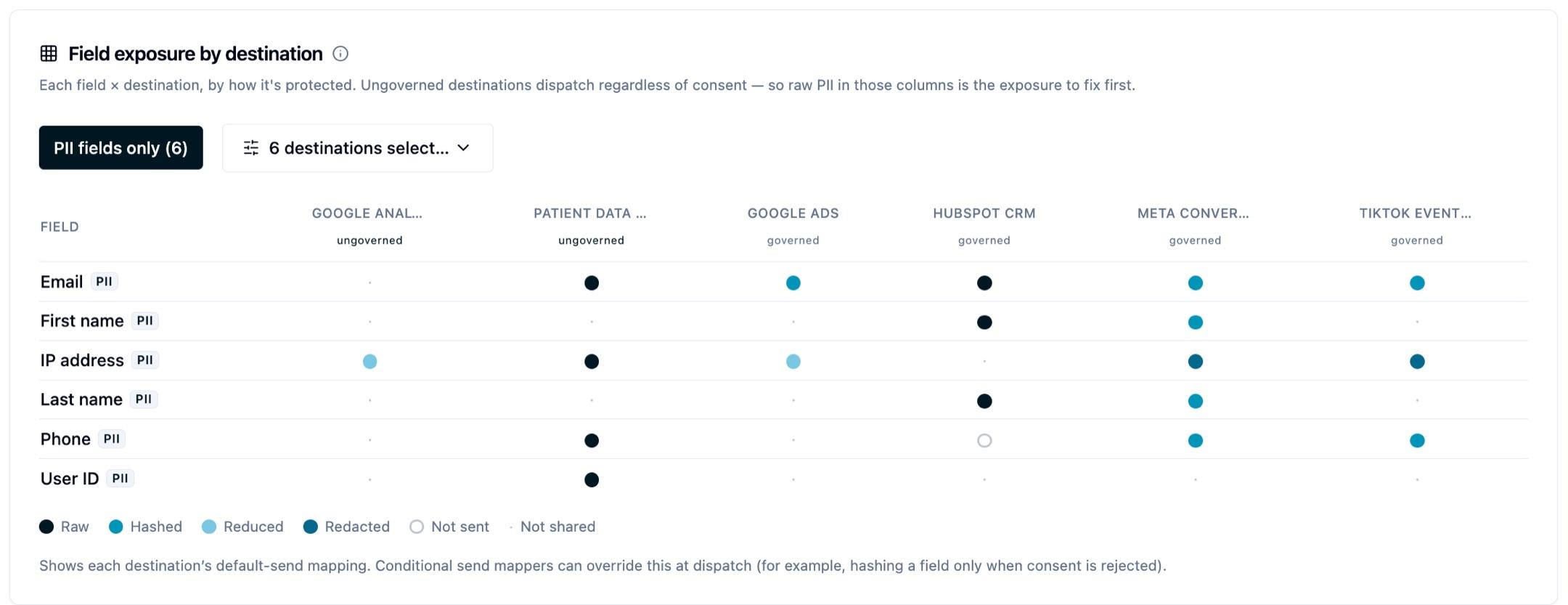
- Field exposure by destination: a matrix of shared fields against destinations. Each cell shows how that field is protected (raw, reduced, hashed, or redacted) when sent to that destination. You can filter by destination or limit it to PII fields.
- Regional consent defaults: what visitors in each region default to before they interact with your banner, by consent category, and where an ungoverned destination would send data regardless of that default.
- Destinations: a table with one row per destination showing fields shared, how protected they are, custom rules, and whether consent governs it. Select a row to expand the full stop, send, and default mapping detail.
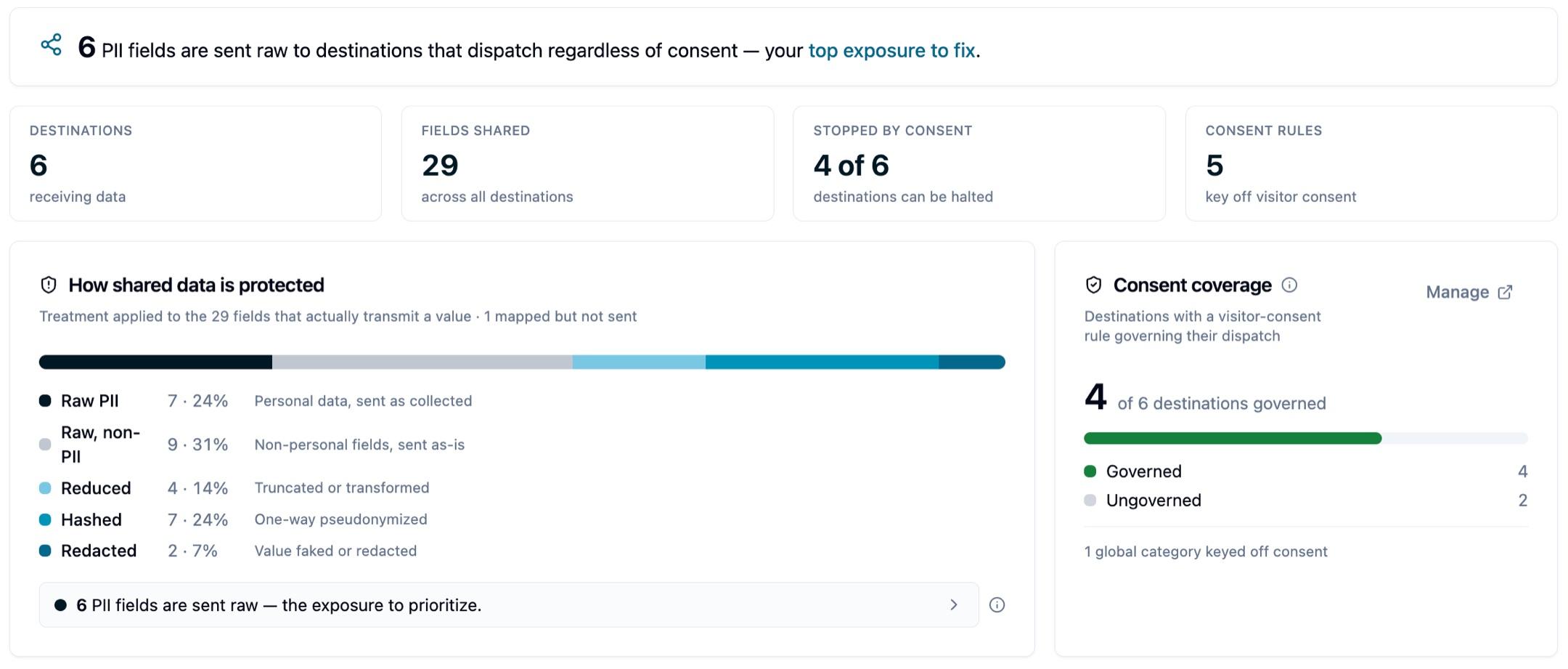
Note: A destination counts as consent-governed only when a stop rule or a targeting global category keys off the visitor's consent, a rule that can actually halt dispatch. A consent-keyed send rule changes the payload (for example, nulling a field) but still dispatches, so it does not count as governing.
Note: The protection breakdown and field-by-field exposure reflect each destination's default send mapping, the baseline applied when no conditional mapper matches. Conditional send mappers can layer changes on top at dispatch time (for example, hashing a field only when consent is rejected), so a field's actual treatment for a given event may differ from the default shown here.
Exporting the report
Select Download PDF for a formatted, read-only version of what's on screen — the one to attach to a review request.
Select Download Excel for the workbook. It includes an overview sheet of all destinations with their rule counts, a sheet for the global governance rules, and one sheet per destination with its full rule and mapping detail.
Common uses
- Preparing documentation for internal or external compliance reviews.
- Confirming what data leaves Ours Privacy for each destination, and how it's protected first.
- Reviewing which destinations consent rules actually govern.
- Keeping a point-in-time record of your data-sharing configuration.
Next steps
- Global Data Governance: configure the centralized consent rules shown here.
- Data Access and Privacy: how data is hashed and redacted per destination.
- Web Scanners: the inbound view of what loads in a visitor's browser.
Questions about your configuration? Reach out to support@oursprivacy.com.
How is this guide?