

Progress Over Time
See how your third-party footprint, high-risk trackers, and consent coverage have changed across scans, as a shareable progress report card.
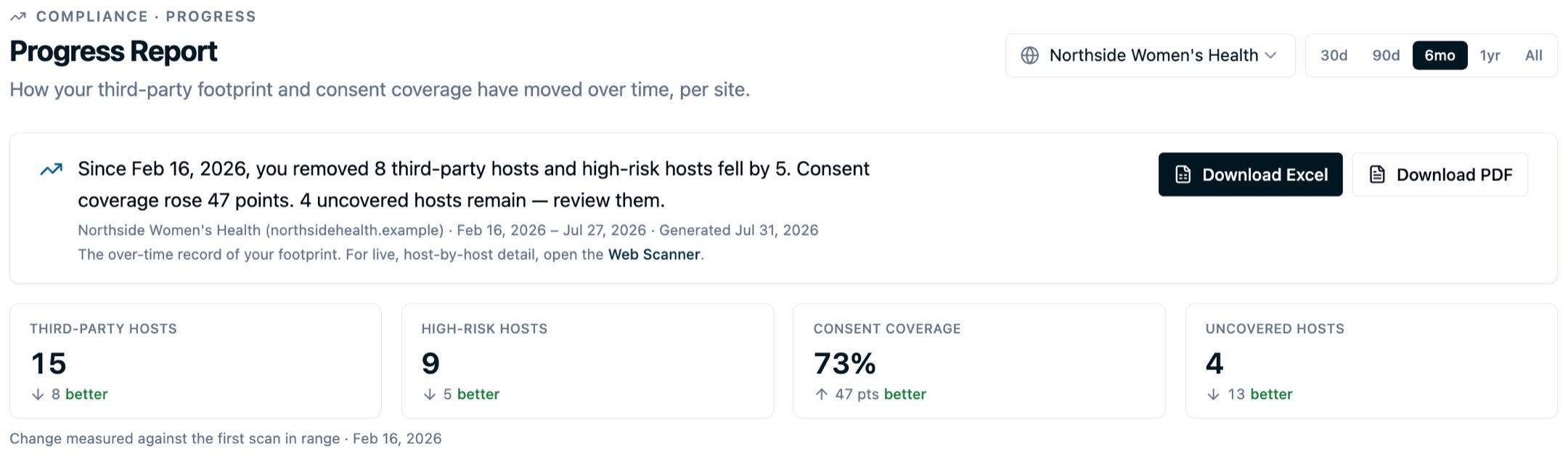
Compliance → Progress Report turns your scan history into a before-and-after story: how many third-party hosts you've removed, how your high-risk hosts have shrunk, and how your consent coverage has climbed over time. It's the report card you can screenshot for a board deck, hand to an auditor, or use to show the work is paying off.
It's the over-time companion to the Web Scanner: the Web Scanner shows what's loading on your site right now, host by host; the Progress Report shows how that footprint has changed. Anywhere you need the exact hosts behind a number, View hosts takes you back to the Web Scanner.
Open Progress Report in appPick which site to report on with the selector in the header (if you run more than one web scanner), and choose the date range: 30 days, 90 days, 6 months, 1 year, or all history.
What it shows
The report card reads left to right, oldest scan to newest:
- Headline deltas: third-party hosts, high-risk hosts, consent coverage, and uncovered hosts, each shown as the change across the selected date range (from the oldest scan in the window to the latest). An arrow shows which way the number moved; a better or worse label says whether that move was healthy. Fewer hosts and higher coverage are better.
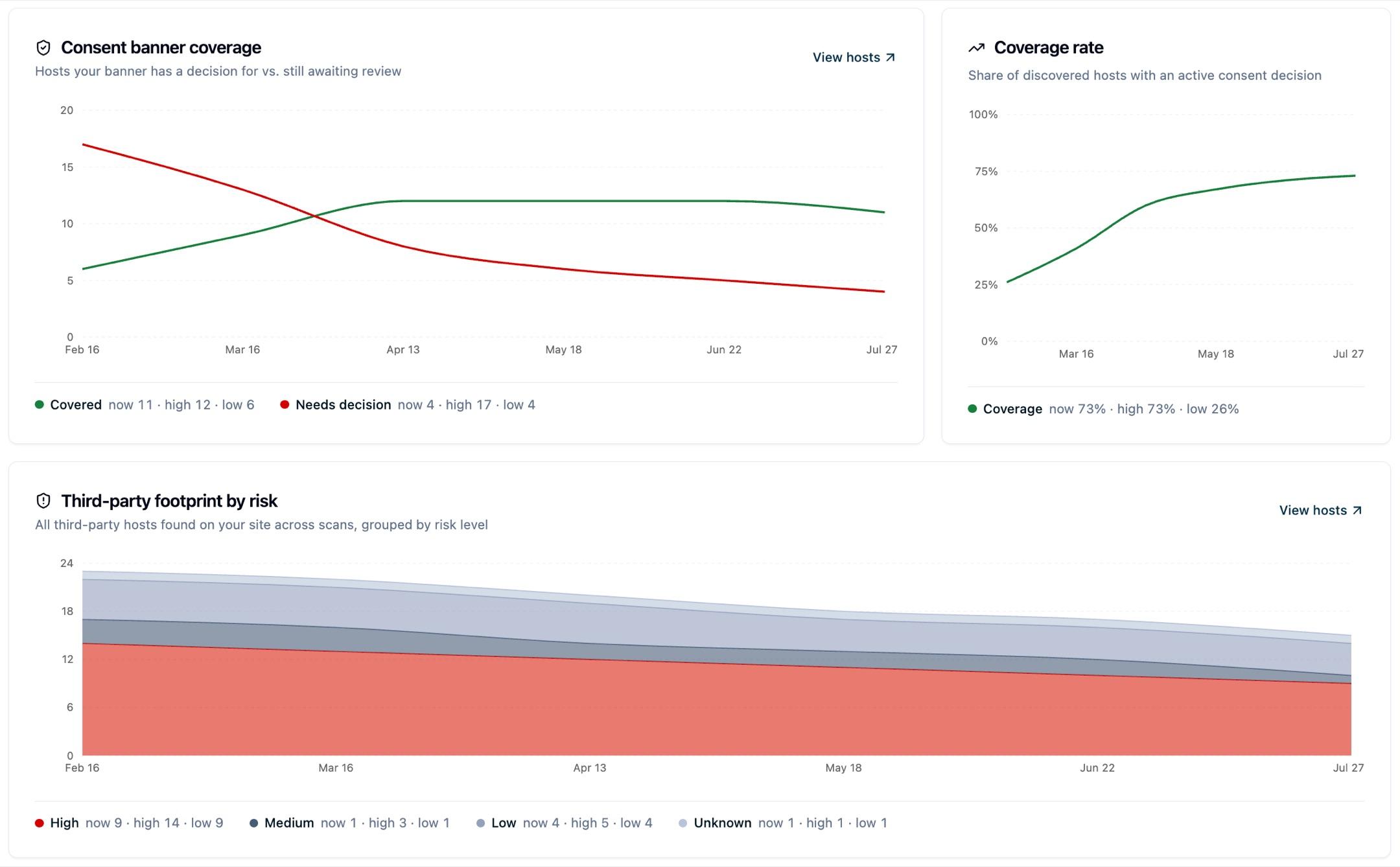
- Consent coverage over time: the share of detected hosts your consent banner or suppression rules already cover, per scan. This is the most robust metric to watch.
- Hosts by risk over time: high, medium, low, and unknown hosts stacked so you can see the risky ones shrink.
- Covered vs. needs-decision: the two lines diverging as you bring more of your footprint under control.
- Categorized vendors over time: how many vendors you've categorized in your consent banner, by the date each configuration was published.
Under every chart, a legend names each line and lists its current value along with the window's high and low, so you can read the peaks and troughs without hovering. View hosts on the host charts opens the Web Scanner, where you can see the exact hosts behind any number. To read the raw series, open Scan-by-scan data at the bottom for a table with every metric per scan, newest first.
Using it as a privacy score or benchmark
If you're looking for a privacy score, privacy rating, or a before-and-after benchmark to show internally, this is the page that provides it. The Progress Report is the scorecard.
It does not reduce your site to a single composite number. It reports the four measures that a reviewer can actually act on, each as a before-and-after change across the window you pick:
- Consent coverage %: the share of detected hosts your consent configuration governs. This is the closest thing to a headline score, and the most robust one to quote, because it stays meaningful even when crawl scope changes.
- High-risk hosts: the count you want going down.
- Third-party hosts: the overall size of your footprint.
- Uncovered hosts: what still needs a decision.
To build a before-and-after comparison:
- Set the date range to a window that starts before the changes you made, then read the headline deltas. Each one shows the move from the oldest scan in the window to the latest, with a better or worse label.
- Use Download Excel for the shareable version. The Summary sheet is the one-page scorecard: the four headline metrics with their change since the first scan in range, plus a one-line verdict.
- Quote coverage % as your primary number and high-risk hosts as your secondary one. Together they say your footprint is more governed and less risky, which is the claim an auditor or executive is looking for.
Note: Coverage % and risk counts are measurements of what the scanner observed, not a certification. They are evidence that your posture improved, not a compliance guarantee.
How to read a trend
Prefer coverage %, not raw counts. The number of hosts a scan finds moves with how many pages the crawl reaches. A wider crawl can surface more hosts without anything getting worse, so a jump in raw host count is not always a regression. Each point on a trend notes how many pages that scan reached, and consent coverage % stays meaningful even as crawl scope changes.
The two clocks are different. The scanner charts move on your scan schedule: what's actually loading in the browser. The categorized-vendors chart moves on your publish history: how your consent banner is configured. They tell related but distinct stories: one is what your site does, the other is how your banner is set up. We keep them on separate charts on purpose.
Hosts, not vendors. The Progress page counts distinct hosts (like alb.reddit.com), because consent coverage is decided per host. The Resources tab groups those hosts into vendors (for example, several Reddit hosts roll up to one "Reddit" vendor), so its counts are smaller. Both are correct: they answer different questions.
Exporting the report
There are two exports, for two different audiences. Download PDF produces a formatted, read-only report card — the one to attach to an email or drop into a board deck as-is. Download Excel produces the evidence workbook you hand to an auditor who wants to pivot the numbers themselves.
The workbook has three sheets:
- Summary: the site, the coverage window, the generated date, the one-line verdict, and the four headline metrics with their change since the first scan in range. This is the page a skimmer reads.
- Scan history: one row per scan with every metric (hosts, risk breakdown, covered/uncovered, coverage %, cookies, local storage), so the full trend is auditable in a spreadsheet.
- Consent banner history: categorized vendors by publish date, kept on its own sheet because it moves on your banner's publish clock, not your scan schedule.
The Scan history sheet has one dated row per scan, so a specific change can always be traced back to a specific date. It's built for audit evidence, spreadsheets, and pivots.
Next steps
- Web Scanners overview: what the scanner detects and how coverage works.
- Data Sharing Report: the outbound counterpart to your inbound footprint.
Questions about interpreting a trend or exporting for an audit? Reach out to support@oursprivacy.com.
How is this guide?