

Audit Log
Review who accessed protected data, changed configuration, or signed in across your organization, and request a full export of your audit trail.
The Audit Log gives you a self-serve, read-only window into your organization's activity for periodic compliance review: who touched what, when, and whether it was allowed. It's designed for the recurring access reviews that frameworks like HIPAA and SOC 2 expect.
Open Audit Log in appWhat you'll see
Activity is grouped into three categories, shown together on one timeline:
- Data Access: each time protected data was read or searched, including the outcome (success, failure, or denied).
- Configuration: changes to your sources, destinations, accounts, and other settings.
- Authentication: sign-ins, sign-ups, and organization membership changes.
Each entry shows the time, category, actor, action, affected resource, outcome, and originating IP address where available. Expand a row for the few extra details, such as whether an action was taken on behalf of someone else.
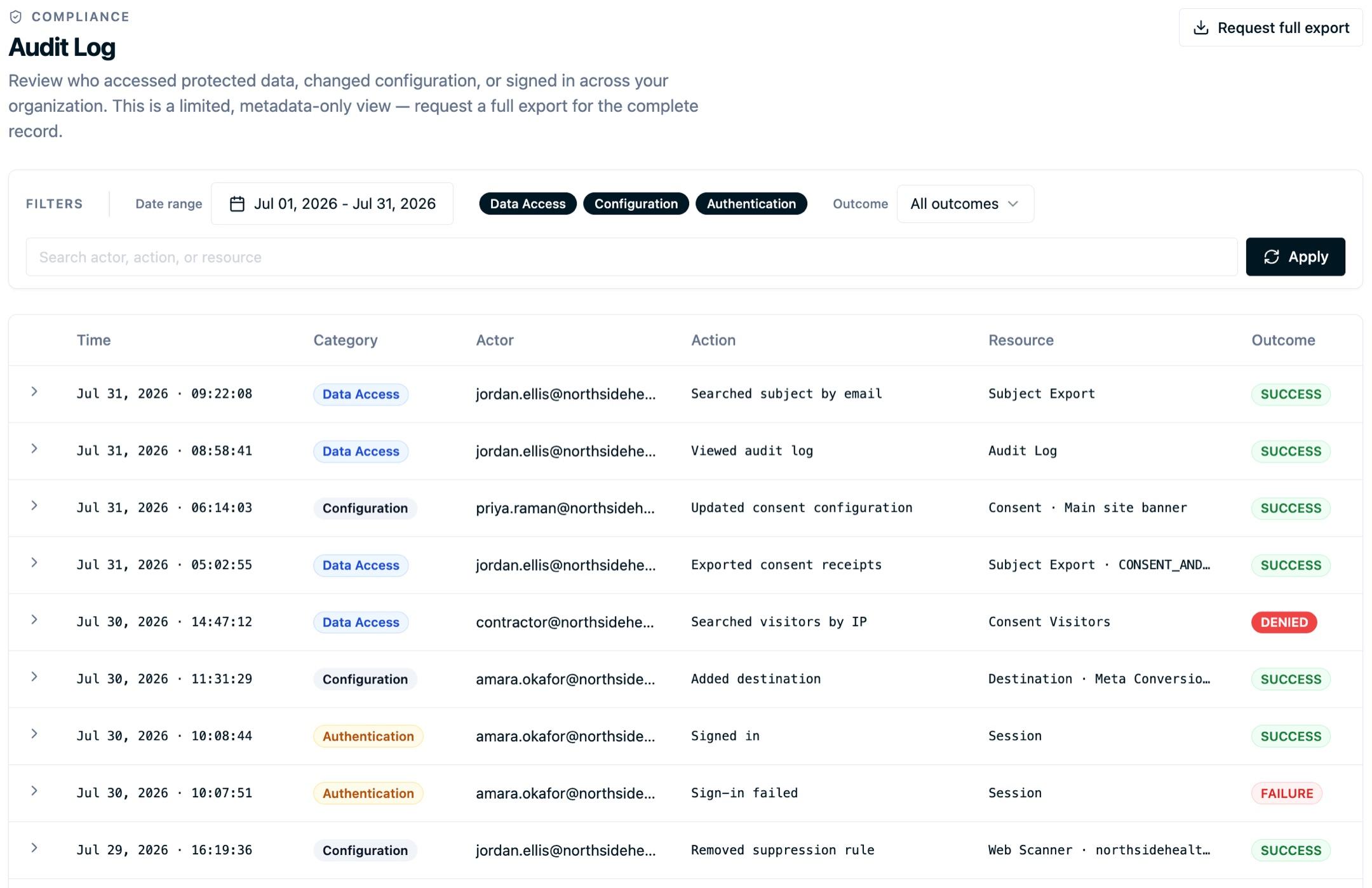
This is a limited, metadata-only view that never shows the underlying data payloads themselves. For the complete record, request a full export (below).
Perform a platform action
Configuration Changed
A user signs in, accesses protected data, or changes configuration.
Review policies and permissionsFiltering and searching
- Date range: review any window up to 90 days at a time.
- Categories: toggle Data Access, Configuration, and Authentication on or off.
- Outcome: narrow Data Access to successes, failures, or denied attempts.
- Search: free-text match across actor, action, and resource.
Reviewing the audit log is itself an auditable action: opening this page is recorded in your Data Access trail. That's expected and by design.
Requesting a full export
The in-app view is intentionally a limited slice. When you need the complete audit trail, including the full before/after details the limited view omits, use Request full export. Pick your date range, add any context for our team, and submit. You'll get the full export file by email, typically within a few business days.
Audit records are retained for compliance and are excluded from account deletion, so historical exports remain available.
If your security team wants this activity monitored continuously rather than reviewed periodically, the same trail can be streamed into a SIEM such as Splunk or Microsoft Sentinel. See SIEM Audit Log Streaming.
Next steps
- SIEM Audit Log Streaming: stream this trail into Splunk, Microsoft Sentinel, or another SIEM.
- Subject Export: assemble a reviewer-ready record for a single individual.
- Data Sharing Report: see, in aggregate, what data you share with each destination.
Questions about your audit trail? Reach out to support@oursprivacy.com.
How is this guide?