

Consent Analytics
Track how your consent banner performs across your site: opt-in and opt-out rates, dismissals, trends over time, and the pages and hosts driving them.
Consent Analytics answers one question: how is your consent banner actually performing across your site? It tracks how many visitors see the banner, how many opt in, opt out, or dismiss it, how those rates move over time, and which pages and hosts drive them.
Open Consent Analytics in appOverview
The Overview tab is a single-screen snapshot of consent activity for the selected period.
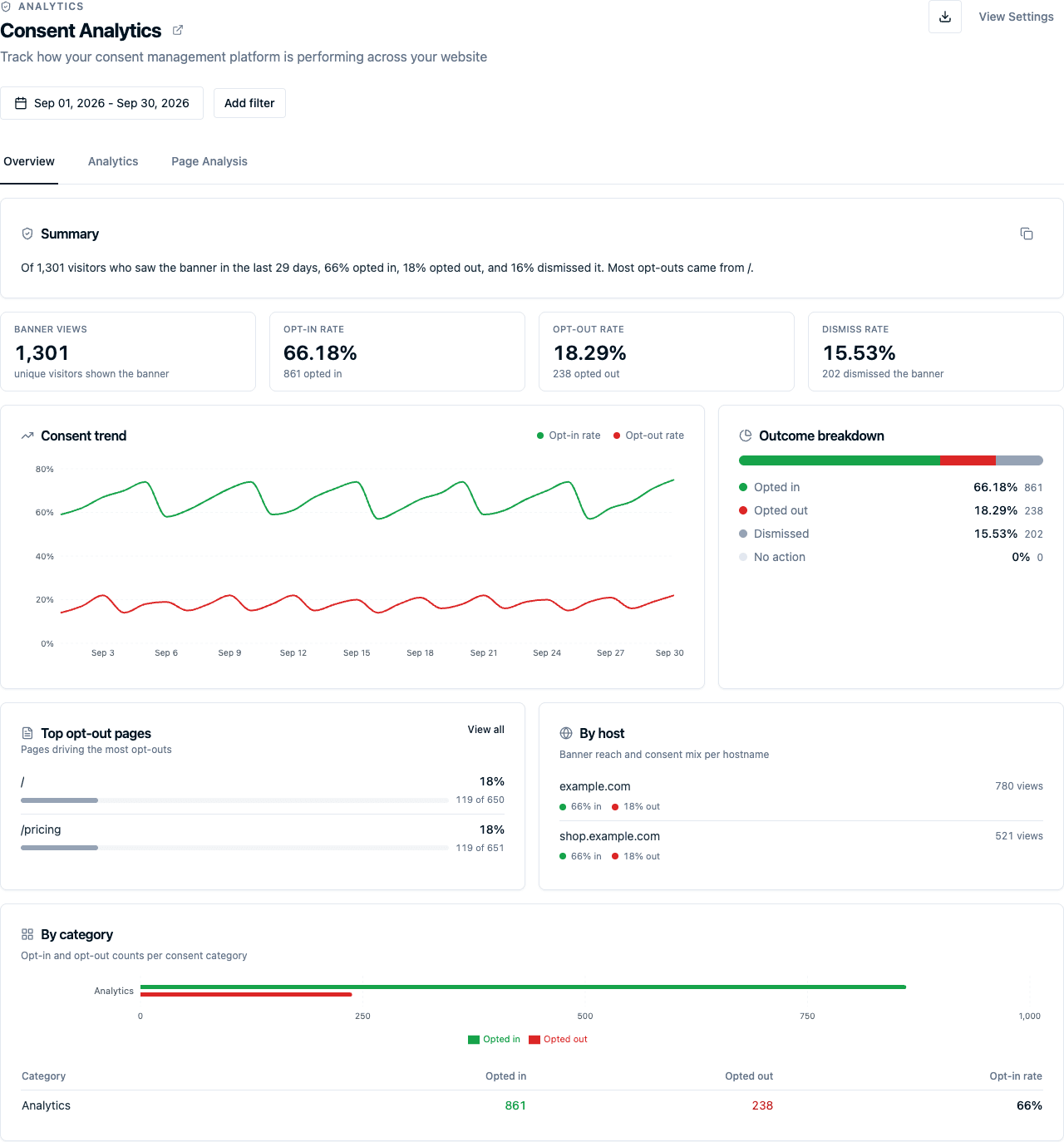
- Summary: a one-sentence readout of the period: how many visitors saw the banner, the share who opted in and out, and where most opt-outs came from.
- Headline rates: banner views, opt-in rate, opt-out rate, and dismiss rate, each with the underlying count.
- Consent trend: opt-in rate against opt-out rate over the date range.
- Outcome breakdown: how banner views decompose into opted in, opted out, dismissed, and no action.
- Top opt-out pages: the pages driving the most opt-outs, ranked by rate.
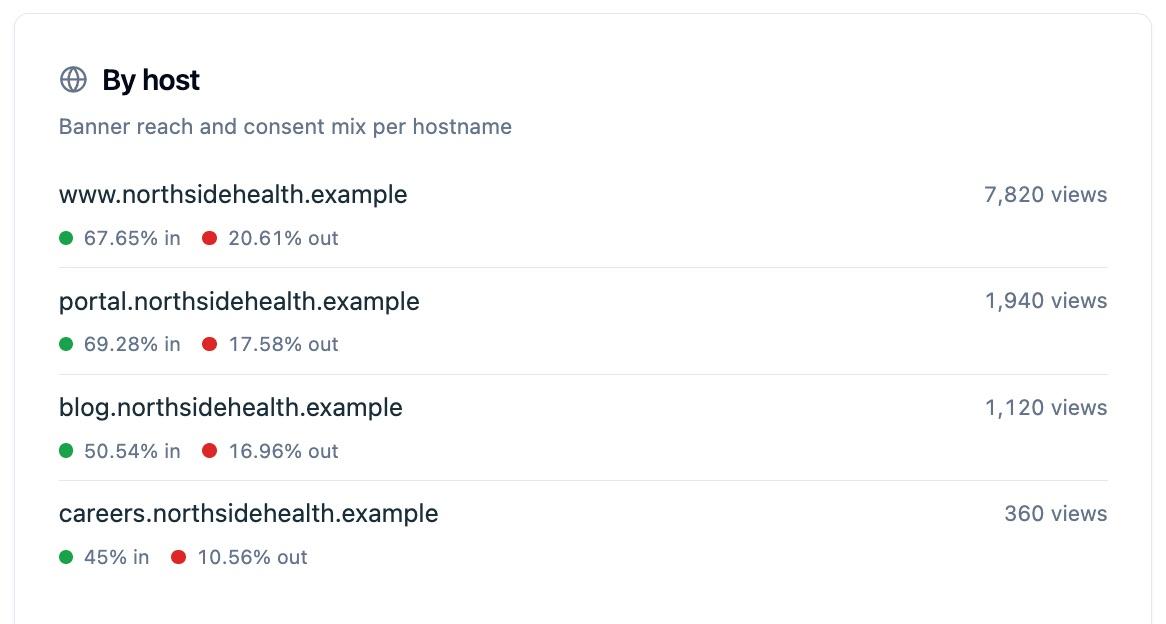
- By host: banner reach and the opt-in / opt-out mix for each hostname, so you can compare subdomains.
- By category: opt-in and opt-out counts for each optional consent category.
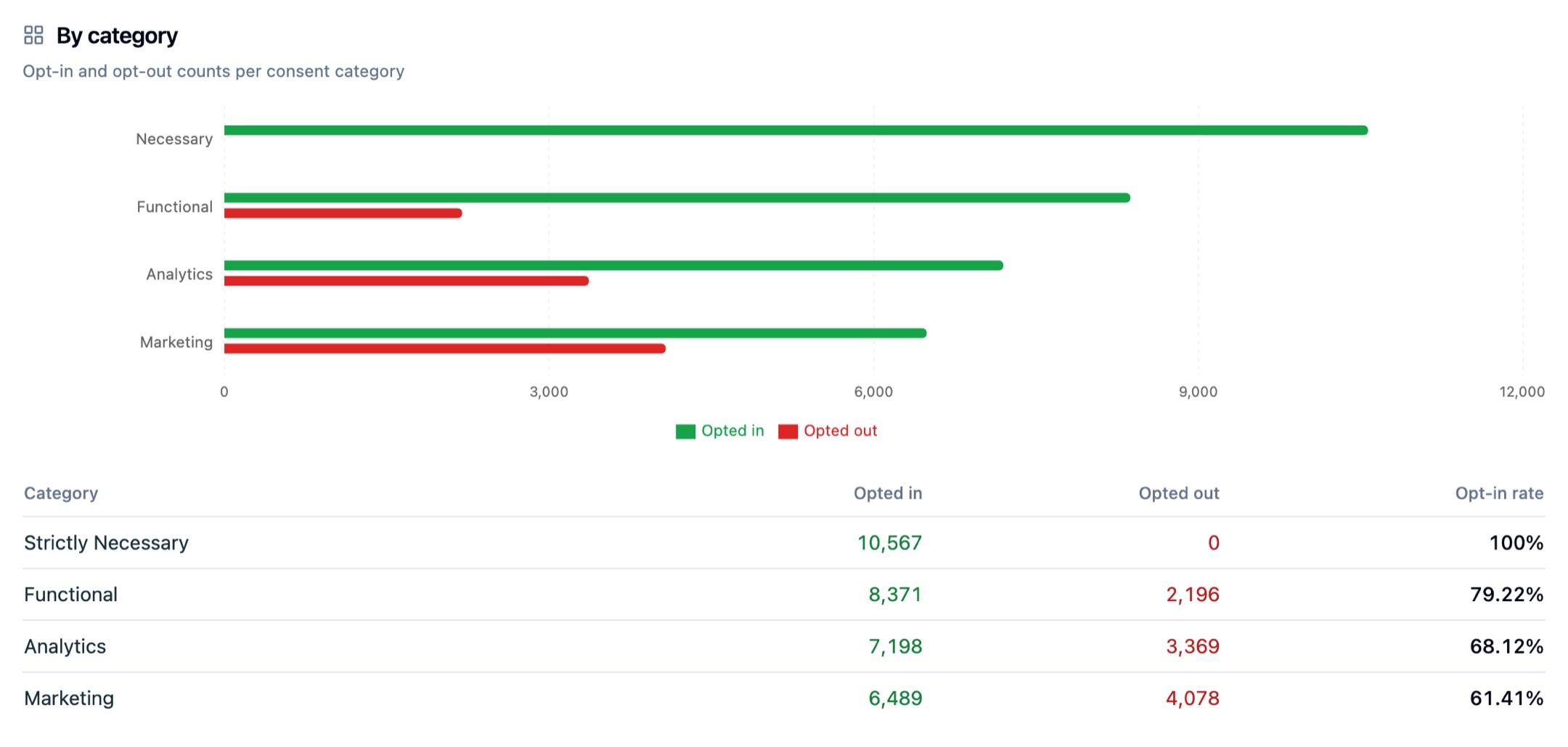
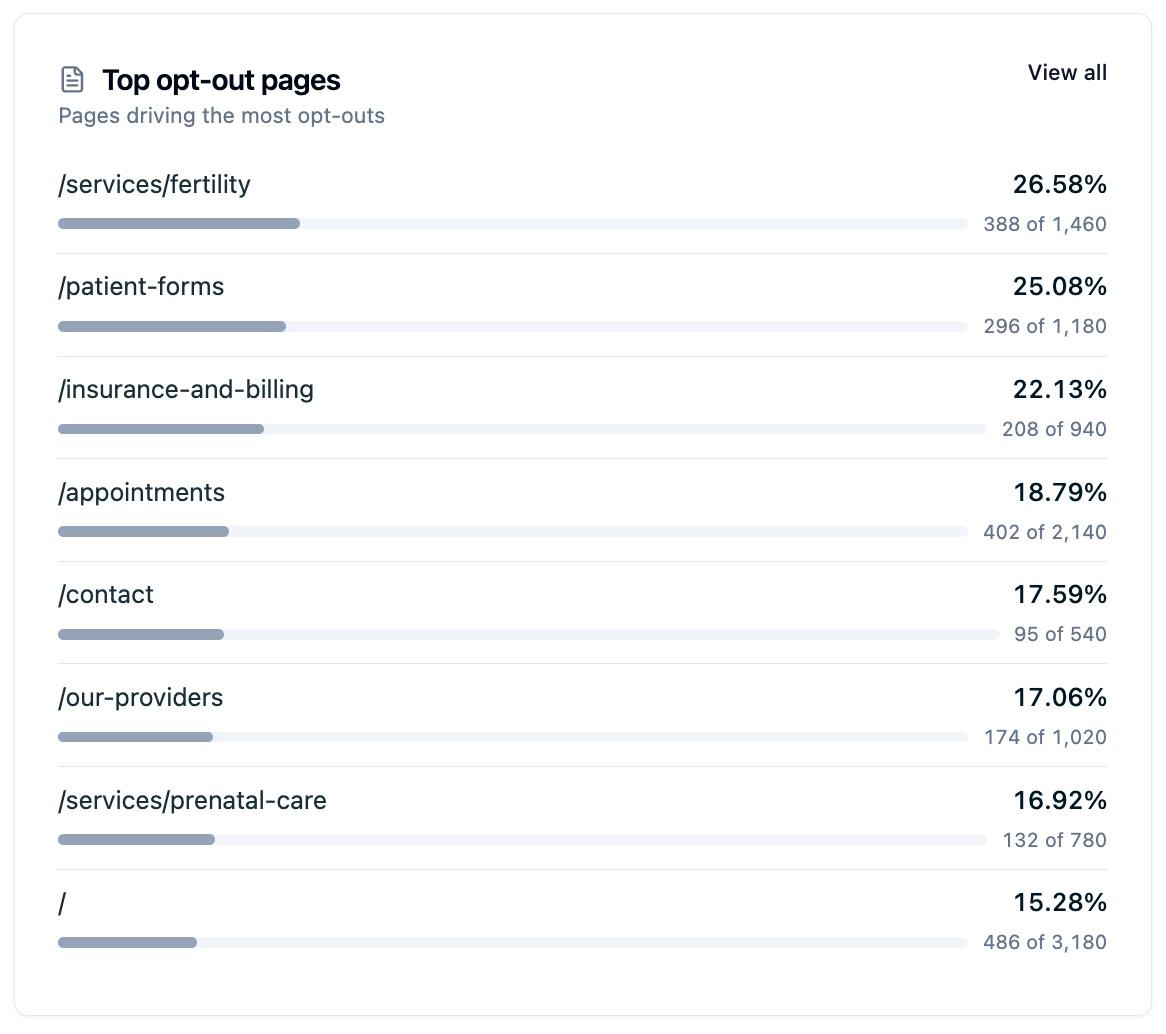
Banner views, opt-ins, and opt-outs count unique visitors. Dismissals count recorded dismissal events, including close-icon actions and configured auto-dismissals, so the dismiss rate shows those events as a share of banner views.
How outcomes are counted
Consent Analytics separates the following outcomes:
- Opted in: a visitor uses the accept-all action, labeled Accept all by default, in the banner or preferences modal.
- Opted out: a visitor uses the accept-necessary action, labeled Accept necessary by default, in the banner or preferences modal.
- Dismissed: a visitor closes the banner with the close icon, or the banner automatically closes when your rule is configured to dismiss it after a set time. This does not change consent choices and prevents that consent version from being shown automatically again.
- No action: a derived remainder after opted-in, opted-out, and dismissed outcomes are subtracted from banner views. It is not a separately recorded event and can be zero when recorded outcomes exceed banner views.
Custom category selections saved in the preferences modal appear in By category, but do not count toward the headline opt-in or opt-out rates. They can therefore remain in No action in the outcome breakdown.
The report does not infer consent from continued browsing. The consent behavior that applies after a dismissal or no action depends on your configured rule and category defaults.
Analytics
The Analytics tab plots banner impressions, opt-ins, opt-outs, and dismissals over time, grouped hourly, daily, weekly, or monthly. Switch between a chart and a table, use Add filter to narrow by page or other properties, and turn on Compare to previous period for hourly or daily trends to see the prior window alongside the current one. Use the page-header Export control to download the current filtered report as CSV data or a PDF report.
Page Analysis
The Page Analysis tab breaks performance down page by page, so you can see which URLs generate the most opt-outs and dismissals. Each row shows impressions, opt-outs, and dismissals, with links to drill into the visitors or the per-page analytics.
Filters
All three tabs share the same filter builder, and your selections carry across them. The date range defaults to the last 30 days.
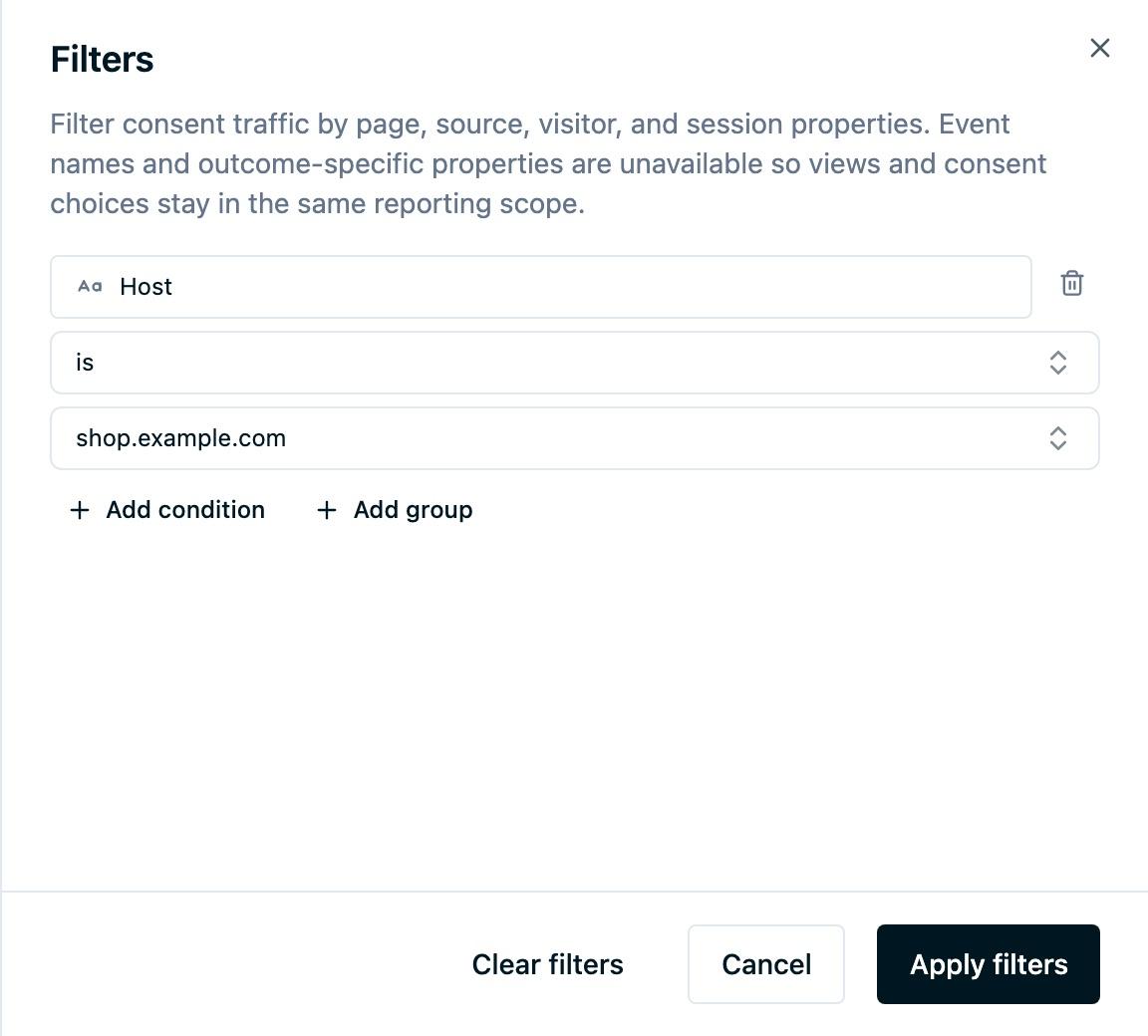
- Select Add filter to open the filter sidebar.
- Choose a property, such as Host, Pathname, Source name, Country, Region, City, or a session property.
- Choose an operator and select or type a value. Suggestions use recent activity from the last 30 days; you can type values that are not listed.
- Combine conditions with AND or OR, then select Apply filters.
For a page on one domain, combine Host and Pathname. A pathname condition alone matches that path across domains. Region and City conditions can match locations outside the United States.
Select Edit filters to change your conditions or Clear filters to remove them. The same conditions apply to the dashboard's breakdowns, visitor drilldowns, and report exports. The visitor action selector remains available alongside the shared filters.
Common uses
- Spotting pages or hosts where opt-out and dismiss rates run high.
- Tracking how a banner change moves opt-in rate over time.
- Comparing consent behavior across regions or subdomains.
- Sharing a point-in-time read of banner performance with marketing or compliance.
Next steps
- Web Scanners: see what loads in a visitor's browser and what your banner covers.
- Data Sharing Report: see what data you forward to each destination and how consent governs it.
- Subject Export: export consent evidence and activity for a single subject.
Questions about interpreting your numbers? Reach out to support@oursprivacy.com.
How is this guide?