

Auditing and Reporting
Learn how to generate auditor-grade receipts and export compliance-ready consent evidence from Ours Privacy CMP.
Ours Privacy CMP includes auditor-grade receipts so your team can produce clear evidence for audits, legal reviews, and internal compliance checks.
What You Can Show
With consent reporting, you can document:
- Who made a consent choice
- When it happened
- What they chose
- Where it happened (site/page and location context)
- Which consent policy context applied at that time
Why This Matters
Audits and legal reviews usually require more than a dashboard screenshot. They require evidence that is:
- clear and understandable to non-technical reviewers
- tied to real visitor decisions
- exportable for compliance workflows
- traceable to the policy active at the time of consent
Auditor-Grade Receipts
Ours Privacy CMP gives you auditor-grade receipts that combine consent actions with policy context so you can confidently answer questions like:
- "Did this person provide consent?"
- "What exactly did they consent to?"
- "Which policy was in effect when they made that choice?"
Consent Audit Export (Subject Lookup)
Use Compliance → Subject Export to review privacy-safe aggregate lookup evidence before you export compliance data. See Subject Export for the full walkthrough.
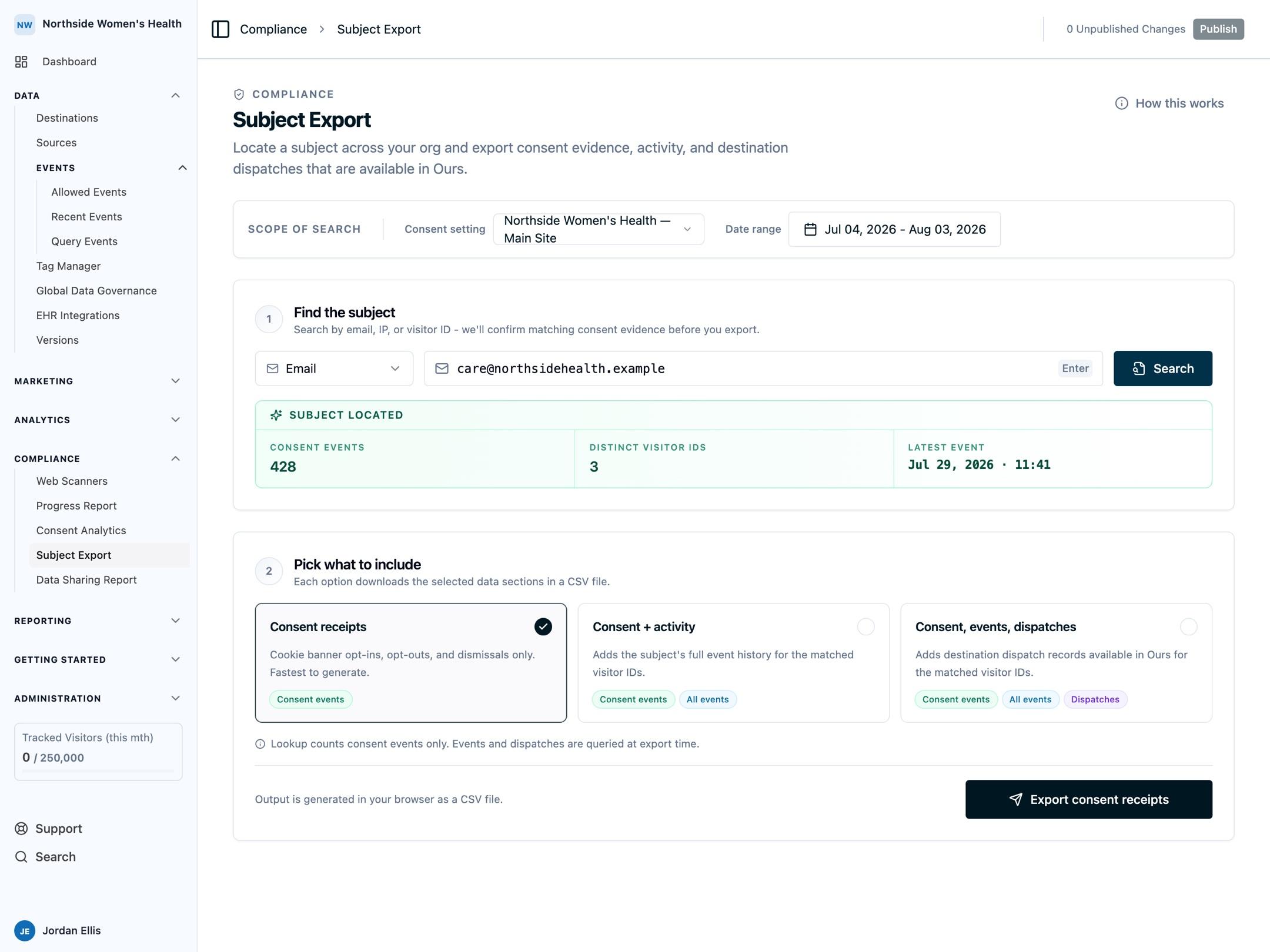
- Open Compliance → Subject Export.
- Under Scope of search, pick the consent setting and a date range.
- Under Find the subject, choose one identifier type and enter the value:
- IP address
- Visitor ID
- Run Search to confirm whether evidence exists.
- Under Pick what to include, choose how much history to export:
- Consent receipts: cookie banner opt-ins, opt-outs, and dismissals only
- Consent + activity: adds the subject's full event history for the matched visitor IDs
- Consent, events, dispatches: also adds destination dispatch records
- Run the export to download CSV evidence.
The lookup returns a found/not-found status plus matched event and visitor counts so compliance teams can confirm scope before export.
CSV Evidence Fields
The audit CSV includes core evidence and policy context, including:
- visitor id, event, action, page, timestamp, email
- visitor region, country, visitor matching region, IP, user agent
- consent setting id and consent id
- selected rule kind and rule primary region
- published version id and published version number
- accepted and rejected categories
- GPC, GPC status, and is GPC modal visible
Recommended Workflow
- Use Compliance → Subject Export to locate a subject by email, IP, or visitor ID.
- Confirm lookup status and event counts.
- Run a full export for the selected subject and date range.
- Attach the export to your audit or legal ticket.
- Store the evidence package according to your retention policy.
Best Practices
- Limit access to consent exports to authorized compliance and legal users.
- Use consistent date ranges and naming conventions for audit packages.
- Archive exported evidence in your approved compliance storage location.
- Review and validate your consent configuration regularly.
Next Steps
- Data Sharing Report: View a full summary of your data governance rules, destination configurations, and data mappings
- Consent Event Tracking: Understand what is captured
- General Settings: Configure consent behavior and versioning
- Regional Policies: Align policy behavior by jurisdiction
How is this guide?