

Creating Regional Specific Consent Policies
Guide to creating region-specific consent policies for GDPR, CCPA, and other privacy regulations using CMP regional overrides.
Creating Regional Specific Consent Policies
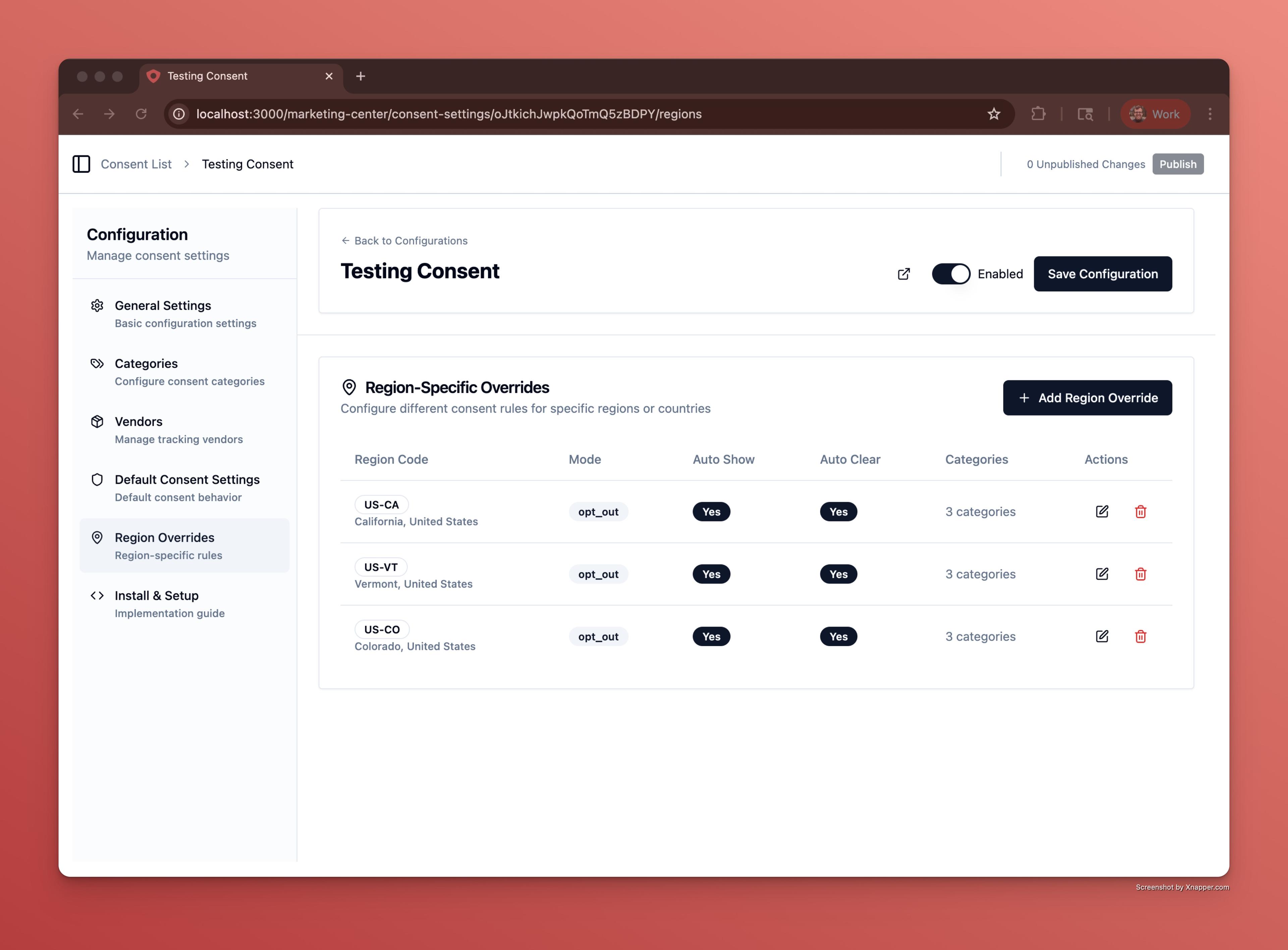
The Ours Privacy CMP supports Regional-Specific Overrides to help you comply with GDPR, CCPA, and other state or country-specific privacy laws. These overrides allow you to redefine any consent settings, UI text, categories, or behavior for visitors from specific regions.
You can think of them as complete reconfigurations for specific regions. For example:
- Change the consent mode to opt-in for EU/EEA visitors and opt-out for US states that allow it.
- Customize the consent banner text to match legal requirements in different jurisdictions.
- Provide translations for specific languages or legal disclaimers.
- Override categories or default states for specific laws.
- Tailor the preferences modal for different compliance frameworks.
- Override Auto Show Dismiss Settings for specific regions (e.g., auto-dismiss after 3 pages for EU visitors, never auto-dismiss for California visitors).
- Set the Blocking Mode independently per region (e.g., Enforce mode for EU visitors, Monitor mode for US visitors).
How It Works
- Define as many region-specific rules as needed in your configuration.
- Select the region or country code:
- Country code:
US,CA,DE, etc. (ISO 3166-1 alpha-2) - Multi-country region:
EU - US state:
US-CA(California),US-TX(Texas), etc. - Canadian province or territory:
CA-QC(Quebec),CA-ON(Ontario), etc.
- Country code:
- Customize all available settings (categories, vendors, UI text, consent mode, etc.) just like your global/default configuration.
- Users in those regions will see the specifically tailored banner and experience you've designed.
Note on Canadian provinces: Quebec's Law 25 typically requires consent and disclosure obligations distinct from the rest of Canada and from PIPEDA. Use a
CA-QCrule to deliver a Quebec-specific banner experience while keeping a separateCArule for the rest of the country.
This flexibility ensures that your site:
- Automatically adapts to visitors' locations.
- Meets global privacy law requirements.
- Offers a clear, localized, and compliant experience.
Tip: Always review legal requirements in target regions to ensure your overrides meet local consent standards.
Handling Unknown US Regions (US-UNKNOWN)
In some cases, our geolocation service cannot determine the specific US state for a visitor. This can happen when:
- The visitor is using a VPN or proxy service
- The visitor is behind a corporate network with shared egress IPs
- The geo-IP database lacks precise data for certain IP ranges
For these visitors, the region is set to US-UNKNOWN instead of a specific state code like US-CA or US-NY.
Best Practice: Add US-UNKNOWN to Your Most Conservative Rule
If you have state-specific rules (e.g., US-CA for California's CCPA requirements), we recommend adding US-UNKNOWN to the Additional Regions field of your most privacy-protective rule.
Example: If your California (US-CA) rule has the strictest opt-in requirements, edit that rule and add US-UNKNOWN to its Additional Regions. This ensures visitors with indeterminate locations receive the same compliant treatment as California visitors.
This way, you're never accidentally under-protecting a visitor who might be in a regulated state but whose specific location couldn't be determined.
Note:
US-UNKNOWNonly applies to US traffic. Non-US countries without region data will fall back to country-level rules or your default configuration.
Next Steps
- General Settings: Configure your default global settings
- Styling & Customization: Customize region-specific text and translations
How is this guide?