

Script Conflicts
Guide to identifying and resolving conflicts between the Ours Privacy CMP and other scripts that manipulate the DOM or alter script execution, including Cloudflare Rocket Loader and other optimization tools.
Script Conflicts
The Ours Privacy CMP works by manipulating the DOM (the collection of elements that make up a webpage) to detect, block, and control script execution based on user consent. When other scripts—such as lazy loading libraries or tools like Cloudflare Rocket Loader—also manipulate the DOM or script execution, we cannot guarantee that the CMP will be able to manage and block scripts correctly.
Any script that manipulates the DOM or alters script execution timing can potentially interfere with the CMP. This includes optimization tools, caching plugins, and other third-party scripts that modify how or when scripts load and execute.
Cloudflare Rocket Loader
Rocket Loader is a Cloudflare product that loads JavaScript asynchronously to optimize page loading times. When Rocket Loader is enabled, we cannot guarantee that the CMP will be able to manage and block scripts correctly, because its asynchronous loading conflicts with the CMP's ability to detect and control which page elements load and execute according to consent.
Recommended Solution
If you use Rocket Loader, we recommend manual mode to improve the chance that the CMP can control which page elements are loaded and executed. Even with manual mode, we cannot guarantee correct behavior. Only use Rocket Loader to optimize elements that you are certain do not set any cookies or only set necessary cookies.
Configuration Steps
- In your Cloudflare dashboard, navigate to Performance Settings
- Set the Rocket Loader option to Manual
- If needed, manually mark up the elements that you wish to be loaded by Rocket Loader:
<script data-cfasync="true" src="https://example.org/js/"></script>Important: Scripts marked with
data-cfasync="true"will be able to set cookies regardless of the visitor's consent choices. Only mark up elements that do not set any cookies or only set necessary cookies.
Lazy loading libraries
Lazy loading libraries (such as lazysizes) and the CMP both manage src and data-src on images and iframes. The CMP uses these attributes to block or restore resources based on consent; lazy loaders use them to defer loading until the element is in view. Because both systems read and write the same attributes, we cannot guarantee that the CMP will be able to manage and block scripts correctly when a lazy loading library is used. If you use lazy loading for images or embeds that require consent, test carefully—conflicts may prevent correct blocking or restoration.
Skip Blocking Classes
To stop the two systems fighting over the same element, add your lazy loader's class name to Skip Blocking Classes in your consent setting's General section. The CMP leaves elements carrying those classes alone entirely.
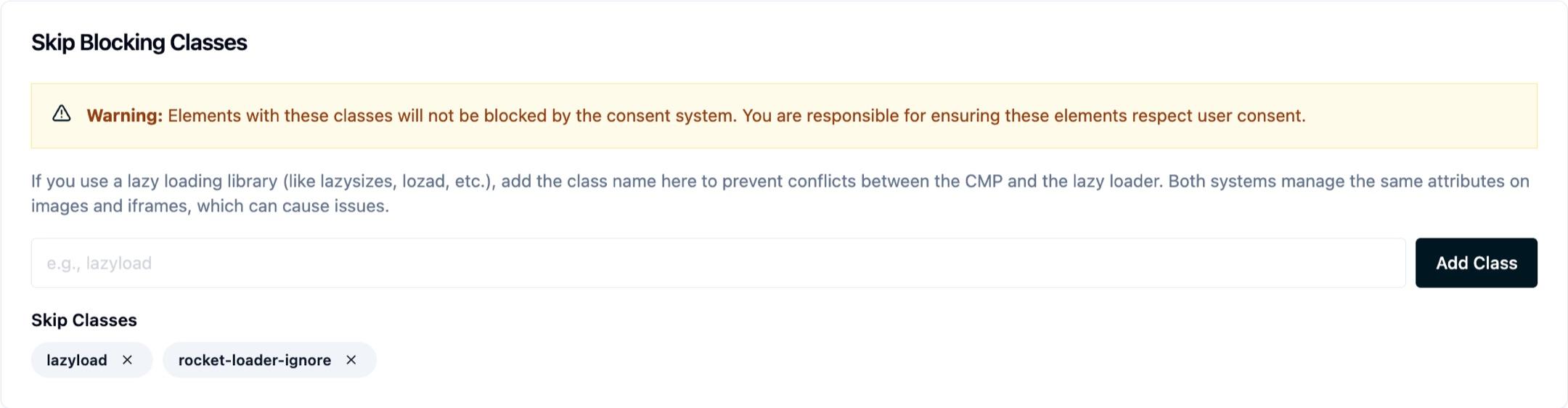
That exemption is the whole point of the setting, and also its risk: an element you skip is no longer governed by consent at all, so you are responsible for making sure it respects the visitor's choices some other way. Only add classes for elements that set no cookies, or only necessary ones.
Other Common Conflicts
Other optimization and caching tools that may cause similar conflicts include:
- WP Rocket (WordPress caching plugin)
- LiteSpeed Cache (WordPress optimization tool)
- Other script optimization plugins that defer, delay, or asynchronously load scripts
- Any custom scripts that manipulate script loading or execution timing
The same principles apply: when these or similar tools are used, we cannot guarantee that the CMP will be able to manage and block scripts correctly.
General Recommendations
Identify Potential Conflicts
- Review all scripts, plugins, and optimization tools on your site
- Look for tools that:
- Defer or delay script loading
- Load scripts asynchronously
- Modify script execution timing
- Manipulate the DOM to inject or modify scripts
Configuration Best Practices
- Exclude CMP scripts from optimization: Ensure the Ours Privacy CMP script is excluded from any optimization, minification, or caching processes
- Test thoroughly: After configuring optimization settings, test your website to ensure:
- The consent banner displays correctly
- Scripts are properly blocked before consent
- Scripts are enabled after consent is granted
- User preferences are respected
When in Doubt
If you're experiencing issues with script blocking or consent management:
- Temporarily disable optimization tools to see if the issue resolves
- Check browser developer tools to verify scripts are being blocked/enabled correctly
- Review your optimization tool settings to ensure CMP scripts are excluded
- Contact support@oursprivacy.com if you need assistance
Next Steps
- Script Blocking: Learn about automatic and manual script blocking
- Installation: Ensure proper script placement for blocking to work
- General Settings: Configure Services and categories for blocking
How is this guide?