

Styling & Customization
Complete guide to customizing your Ours Privacy CMP consent banner, including themes, colors, typography, layouts, and text content.
Ours Privacy CMP offers extensive customization options to match your website's branding and user experience. You can control everything from colors and fonts to layout and button styles, ensuring your consent banner feels like a natural part of your site.
Visual Customization Options
You can configure styles directly in the application via the Design tab in your CMP configuration. The Design tab covers core visual customization needs, including colors, button styles, and border radius. You can adjust these settings and use the Preview button to see how your changes will look before they go live. Important: Changes must be published to take effect. They are not applied immediately.
All of these customization options are available through point-and-click controls in the Design tab, no coding required:
- Theme Selection: Choose from multiple pre-built themes including light, dark, and minimal designs
- Color Customization: Set primary colors, background colors, text colors, and accent colors using color pickers
- Typography: Control font families, sizes, and weights for all text elements
- Layout Options: Choose between banner, modal, or floating button layouts
- Button Styling: Customize button shapes, sizes, colors, and hover effects with simple controls
- Border & Shadow: Add borders, rounded corners, and shadow effects
- Responsive Design: All themes automatically adapt to mobile and desktop screens
How different two banners can actually be
Every banner below is the same product on the same page. Each one is a different configuration: a different layout and screen position, a different number of action buttons, different button wording, and a different amount of copy. Nothing here required custom code. Each is a set of choices in the Design tab and the text fields described above.
Copy length matters more than most teams expect. The same layout looks unrecognizable with one line of text versus five, so treat your description as a design decision and not only a legal one.
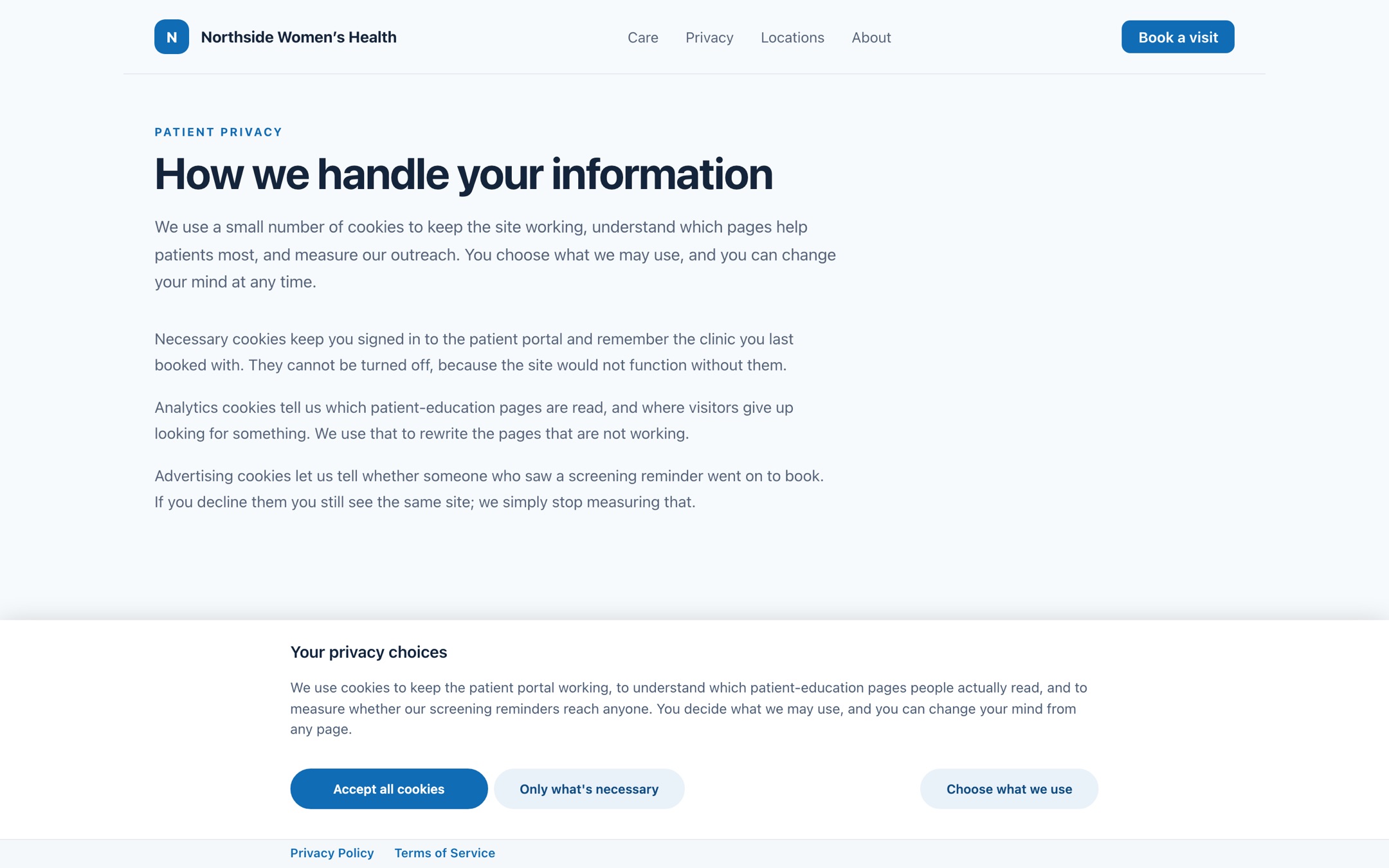
Bar, three actions. A bottom bar with all three actions visible. The widest layout, and the one that gives a longer explanation room to breathe without covering the page.
Advanced Customization with CSS Variables
The Design tab covers most use cases. If you're not technical, you can typically configure everything you need without editing CSS.
For technical users who require advanced customization beyond the options available in the Design tab, CSS variables and CSS classes are available. You can find a complete reference of available CSS variables in the CSS Variables Reference tab within the Design section of your CMP configuration. These are intended for engineering and design teams who need deeper control over the consent modal's appearance.
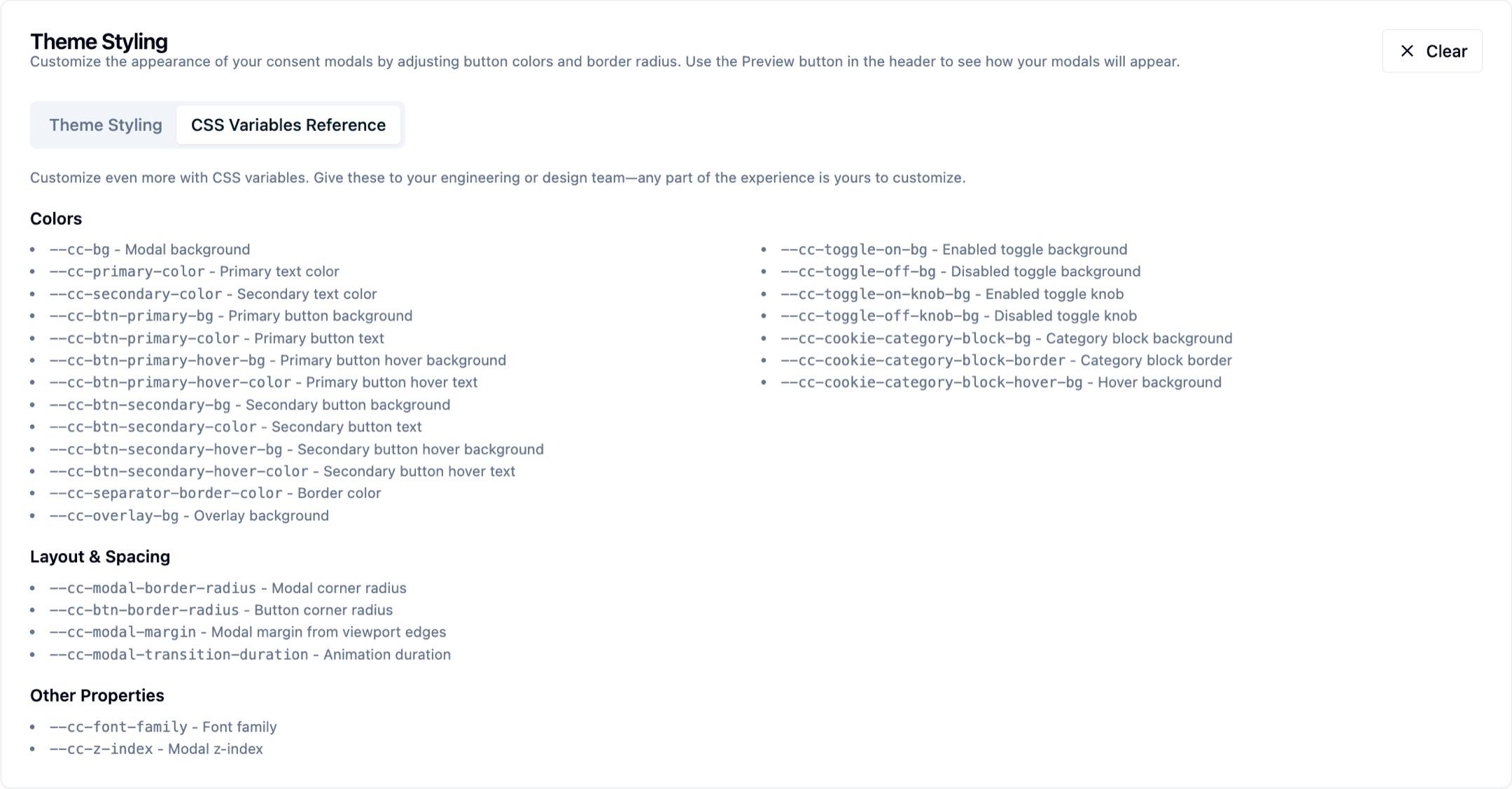
How far the variables go
This gallery is the mirror image of the one earlier on this page. There, the configuration changed with every slide; here it is held completely still. Each banner below is the same consent configuration on the same page, and only the CSS variable values differ. Every value is listed in the reference above. Nothing about the banner's markup, copy, or button order changed between them.
Because the consent banner renders into your page rather than into an iframe, your own stylesheet can set these variables. Declare them on :root in a stylesheet that loads after the consent snippet. The CMP sets its own defaults on :root too, so the last declaration wins.
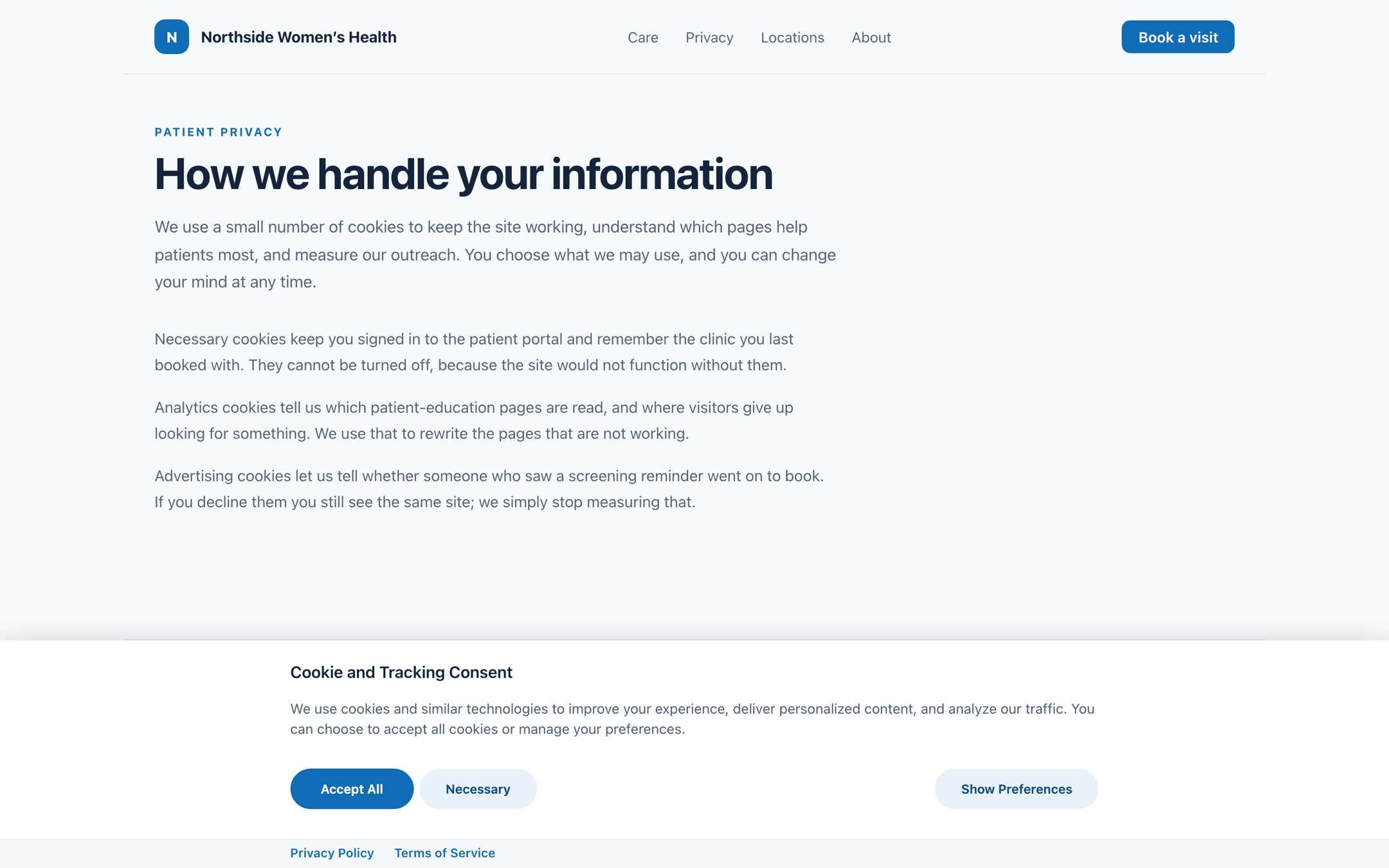
Soft clinical. Fully rounded buttons and a pale secondary fill, from --cc-btn-border-radius, --cc-btn-primary-bg, and --cc-btn-secondary-bg.
Text & Content Customization
Beyond visual styling, you have complete control over all text content:
- Banner Headlines: Customize the main title and description text
- Button Labels: Set custom text for "Accept All," "Reject All," "Preferences," and other buttons
- Category Descriptions: Write clear explanations for each cookie category
- Legal Text: Customize privacy policy links and legal disclaimers
- Regional Translations: Provide different text for different geographic regions
- Accessibility: Ensure all text meets accessibility standards
Try Before You Configure
Want to see how different customization options look before implementing them on your site? The Design tab in your CMP configuration provides an in-app interface for configuring and previewing styles. You can adjust colors, button styles, and other visual settings, then use the Preview button to see how your changes will appear before publishing them to your live site.
- Demo different themes and see how they look in real-time
- Test color combinations and typography options
- Preview layouts on different screen sizes
- Experiment with text content and translations
- Compare different consent modes (opt-in vs opt-out)
- Test regional variations and compliance scenarios
- Validate different button-layout strategies for each jurisdiction before publishing
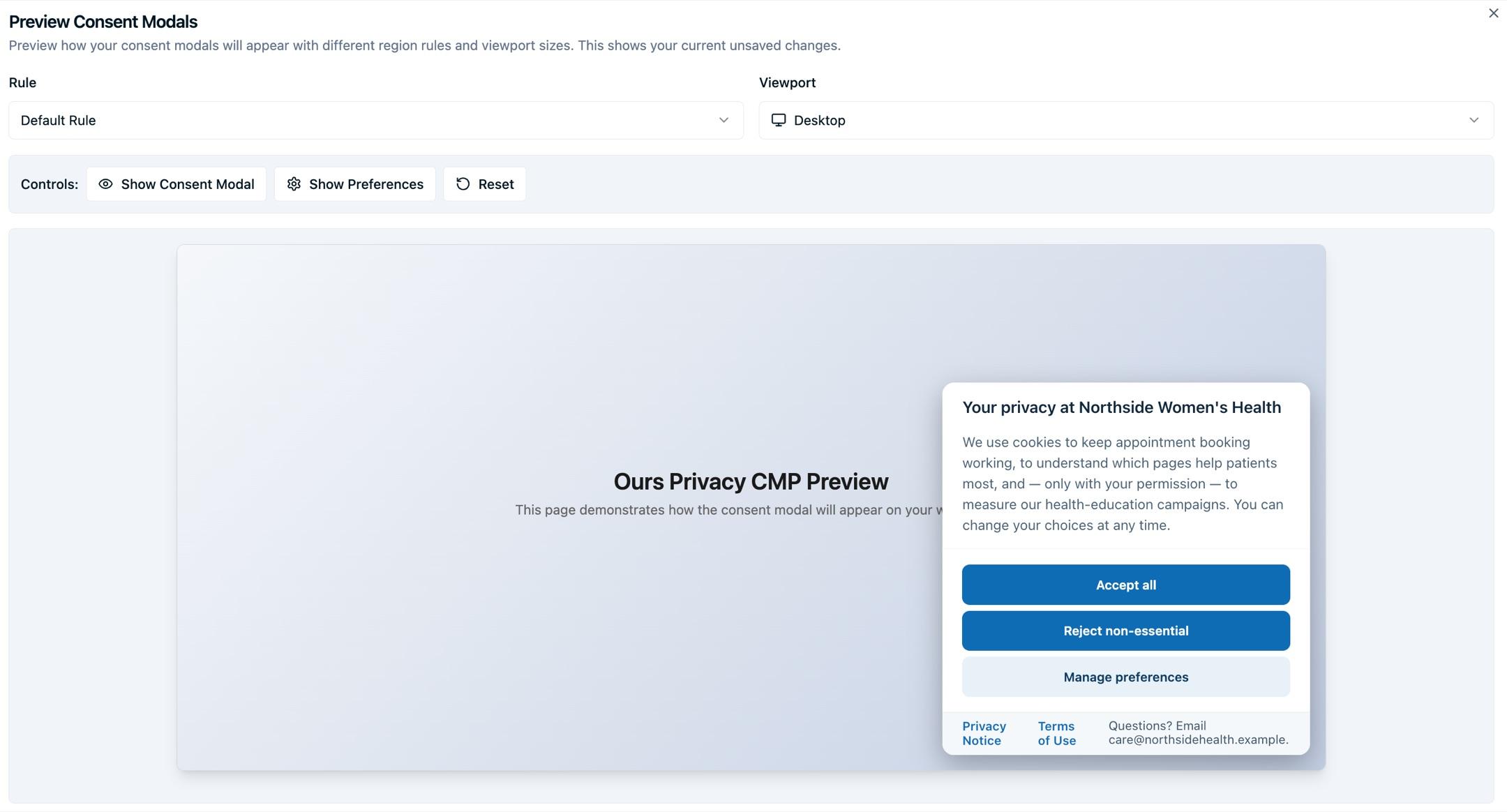
The preview functionality lets you experiment with all customization options without affecting your live site, making it easy to find the perfect configuration for your brand and compliance needs.
Example: Consent Platform Theme
Ours Privacy CMP offers a variety of theme options to match your website's branding and user experience needs.
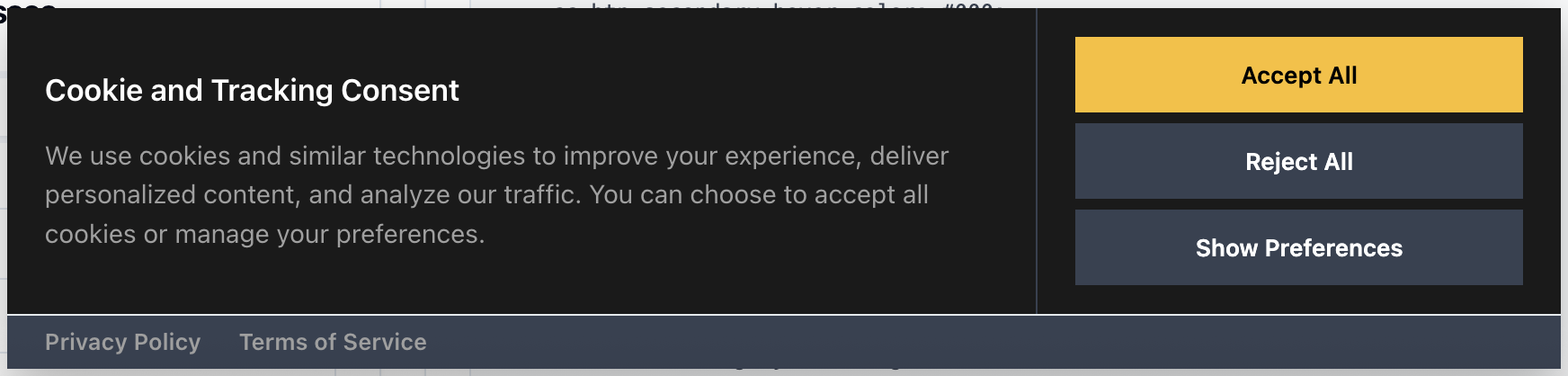
Wide banner. Use a wide layout when the message and three consent actions need equal room across the page.
Next Steps
- General Settings: Configure categories, vendors, and UI text
- Regional Policies: Set up region-specific text and translations
How is this guide?