

Conversion Attribution - Multi-Touch
Multi-touch attribution that splits conversion credit across every source, medium, and campaign a visitor touched before converting, using the attribution model you choose.
Conversion Attribution splits credit for a conversion event across every source, medium, and campaign that touched a visitor's journey before they converted, using whichever attribution model fits how your team thinks about credit.
Open Conversion Attribution in appEarly access. Conversion Attribution is rolling out gradually. Contact your account representative to turn it on for your organization.
Looking for conversion rates and revenue for a specific group of visitors instead? See Audience Performance. Conversion Attribution answers a different question: which channels and campaigns deserve credit for conversions, across the whole visitor journey rather than just the last click.
What Multi-Touch Attribution Solves
What it is. Most analytics tools default to last-touch reporting: a conversion gets attributed entirely to whichever source the visitor used right before converting. Multi-touch attribution instead looks at every session a visitor had in the run-up to converting, and splits credit across all of them.
Why it matters. Last touch hides the channels that introduced or nurtured a visitor earlier in their journey. A visitor who first found you through paid social, came back twice through organic search, and converted after clicking an email link gets reported as 100% organic under last touch. Multi-touch attribution shows all three touchpoints, so budget and credit decisions reflect the full path, not just the final click.
How it works. For each visitor who triggered your chosen conversion event, Conversion Attribution looks back across their sessions within the lookback window you select, groups them by source, medium, and campaign, and splits credit between those touchpoints according to the attribution model you choose.
Multi-touch depends on identity. A touchpoint only earns credit if it was connected to the converting person in the first place. Sessions are resolved to a person using server-set first-party cookies, any external_id or email you send, and Identity Recovery, which is what makes a journey that starts on a phone and converts on a laptop read as one journey rather than two visitors. Every touchpoint identity resolution misses is credit silently handed to the last click. See Visitor Identity and Matching for how the layers fit together.
Impressions count too: if you run programmatic, CTV, or audio campaigns, view-through conversions tracked with the impression pixel become touchpoints in these models, so ads that worked without a click are not invisible.
How Each Model Splits Credit
The model is the rule that divides one conversion's worth of credit across a visitor's touchpoints. Change the model and you change the slope of credit across the path. The conversions themselves don't change, only the story about which channels earned them. Ours Privacy gives you six models on the same first-party data, so you can see which channels hold up across all of them and which only look strong because the default model flatters them.
The diagrams below use one visitor with four touchpoints, earliest to most recent. The bars show each model's shape, not exact output, since the real split also depends on how many sessions a source appears in and how far apart they fall.
First Touch
All credit goes to the earliest touchpoint in the lookback window.
Paid social  ████████████  100%
Organic       ·              0%
Email         ·              0%
Direct        ·              0%
Use it when you want to know which channels introduce people to you and you're optimizing top-of-funnel discovery.
Last Touch
All credit goes to the most recent touchpoint before the conversion.
Paid social   ·              0%
Organic       ·              0%
Email         ·              0%
Direct       ████████████  100%
Use it when you want a single channel to own each conversion, for example to compare against an ad platform's last-click report.
Note: Under First Touch and Last Touch, an untagged
(direct)session never steals credit from a tagged channel. The earliest (First Touch) or latest (Last Touch) tagged session wins;(direct)only takes credit when every touchpoint in the path is untagged. This mirrors the "last non-direct click" behavior marketers expect from most ad and analytics tools.
Linear
Credit is shared across the visitor's sessions, so a source seen in more sessions earns proportionally more. With four equally weighted sessions, each earns a quarter.
Paid social   ███           25%
Organic       ███           25%
Email         ███           25%
Direct        ███           25%
Credit is split per session, not per channel. A channel that shows up in several sessions (retargeting or email, for example) accumulates more Linear credit than one touched once. That's by design, but worth keeping in mind when you compare a high-frequency channel against a low-frequency one.
Use it when you treat every interaction as equally important and want the simplest, least opinionated multi-touch view.
U-Shaped
Position-based: the first and last touch each get 40% of the credit, and the remaining 20% is split evenly across the touchpoints in between.
Paid social  ████████       40%
Organic       ██            10%
Email         ██            10%
Direct       ████████       40%
Use it when you care most about how a visitor was introduced and what closed them, while still giving the middle of the journey some credit.
J-Shaped
Position-based and back-weighted: the converting touch gets 60% of the credit, the first touch gets 20%, and the remaining 20% is split evenly across the touchpoints in between.
Paid social  ████           20%
Organic       ██            10%
Email         ██            10%
Direct       ████████████   60%
J-Shaped sits between U-Shaped and Last Touch. It agrees with Last Touch that the session which closed the deal did the most work, but unlike Last Touch it still credits the channel that started the journey with a real share rather than nothing.
Use it when your sales motion is closing-heavy and you want the converting channel to dominate, without erasing the channel that created the demand.
Time Decay
Touchpoints closer to the conversion earn more credit. Each touchpoint's weight halves every 7 days further back from the conversion, then the weights are scaled so the visitor's credit still sums to one conversion. In practice, a touch the day before converting is worth about double one from a week earlier, and roughly four times one from two weeks earlier.
Paid social   ██            least credit (oldest)
Organic       ███
Email         █████
Direct        ████████      most credit (most recent)
Use it when recency matters and the touches nearest the conversion did the most work, common for shorter consideration cycles and retargeting-heavy programs.
Choosing a Model
There's no single correct model. The honest approach is to read your conversions under more than one. Start with Last Touch to match what your ad platforms report, then switch to First Touch to see which channels they quietly undersell. Use Linear as a neutral baseline, U-Shaped when your team thinks in terms of "what opened and what closed," J-Shaped when closing deserves most of the credit but discovery still deserves some, and Time Decay when recent touches genuinely matter more. A channel that ranks high across several models is doing real work at every stage; one that only ranks high under Last Touch may be harvesting demand that other channels created.
A Worked Example
Say one visitor converts on appointment_booked after four sessions inside the lookback window:
- Paid social, about 21 days before converting
- Organic search, about 14 days before
- Organic search, about 7 days before
- Email, the day before
That one conversion splits very differently depending on the model:
| Channel | First Touch | Last Touch | Linear | U-Shaped | J-Shaped | Time Decay |
|---|---|---|---|---|---|---|
| Paid social | 100% | 0% | 25% | 40% | 20% | 7% |
| Organic search | 0% | 0% | 50% | 20% | 20% | 42% |
| 0% | 100% | 25% | 40% | 60% | 51% |
Reading across one row tells the story. Paid social introduced this visitor and owns the whole conversion under First Touch, but barely registers under Time Decay. Organic search never wins a single-touch model, yet earns the most credit under Linear because it appears in two of the four sessions. Email closes the visitor and dominates the recency-weighted view, and under J-Shaped it takes 60% while paid social still keeps a fifth of the credit. Same conversion, six defensible stories. (Values are illustrative; the real split depends on how many sessions each source appears in and how far apart they fall.)
Permissions
Conversion Attribution uses the Web Analytics permission set:
| Permission | Capabilities |
|---|---|
| Web Analytics: View | View Conversion Attribution reports: change the conversion event, attribution model, lookback window, and audience filters, and export results |
| Web Analytics: Write | All View capabilities, plus saving an audience filter combination as a reusable segment |
If you don't have the required permission, ask your account administrator to grant Web Analytics access.
Building a Report
Navigate to Attribution Center > Conversion Attribution.
Step 1: Choose the Conversion Event and Date Range
Pick the event that counts as a conversion from the dropdown, which lists every event your website is tracking. Then select a date range of up to 31 days.
The date range is capped at 31 days. Ranges longer than that aren't supported.
Step 2: Choose an Attribution Model
The attribution model controls how credit for a conversion is split across a visitor's touchpoints:
| Model | How it splits credit |
|---|---|
| First Touch | All credit to the earliest session in the lookback window |
| Last Touch | All credit to the most recent session before the conversion |
| Linear | Credit shared across the visitor's sessions, so a source seen in more sessions earns proportionally more |
| U-Shaped | 40% to the first touch, 40% to the last touch, the remaining 20% split across everything in between |
| J-Shaped | 60% to the last touch, 20% to the first touch, the remaining 20% split across everything in between |
| Time Decay | Credit weighted toward recency, with each touchpoint's weight halving every 7 days the further back it occurred |
First Touch and Last Touch give all credit to a single session. Linear, U-Shaped, J-Shaped, and Time Decay are true multi-touch models that spread credit across multiple sessions in the same path. See How Each Model Splits Credit above for how each one reshapes the same journey and when to choose it.
Step 3: Choose a Lookback Window
The lookback window sets how far back Conversion Attribution looks for a visitor's sessions before their conversion. Choose 7, 14, 30, or 60 days. A shorter window favors recent, bottom-of-funnel touchpoints; a longer window surfaces channels that introduced the visitor further in advance.
Step 4: Narrow with Audience Filters (Optional)
Add audience filters to scope the report to a subset of visitors, the same filter dimensions available in Web Analytics: UTM source, medium, campaign, content, and term, referrer, country, region, city, device, browser, operating system, and entry or exit page. You can also scope the report to a single web source.
Filtering by a specific page URL isn't supported for Conversion Attribution (entry page and exit page filters still work). Use Audience Performance or Web Analytics if you need to filter by page.
If you have Web Analytics: Write access, save your filter combination as a segment to reuse it in future reports.
Viewing Results
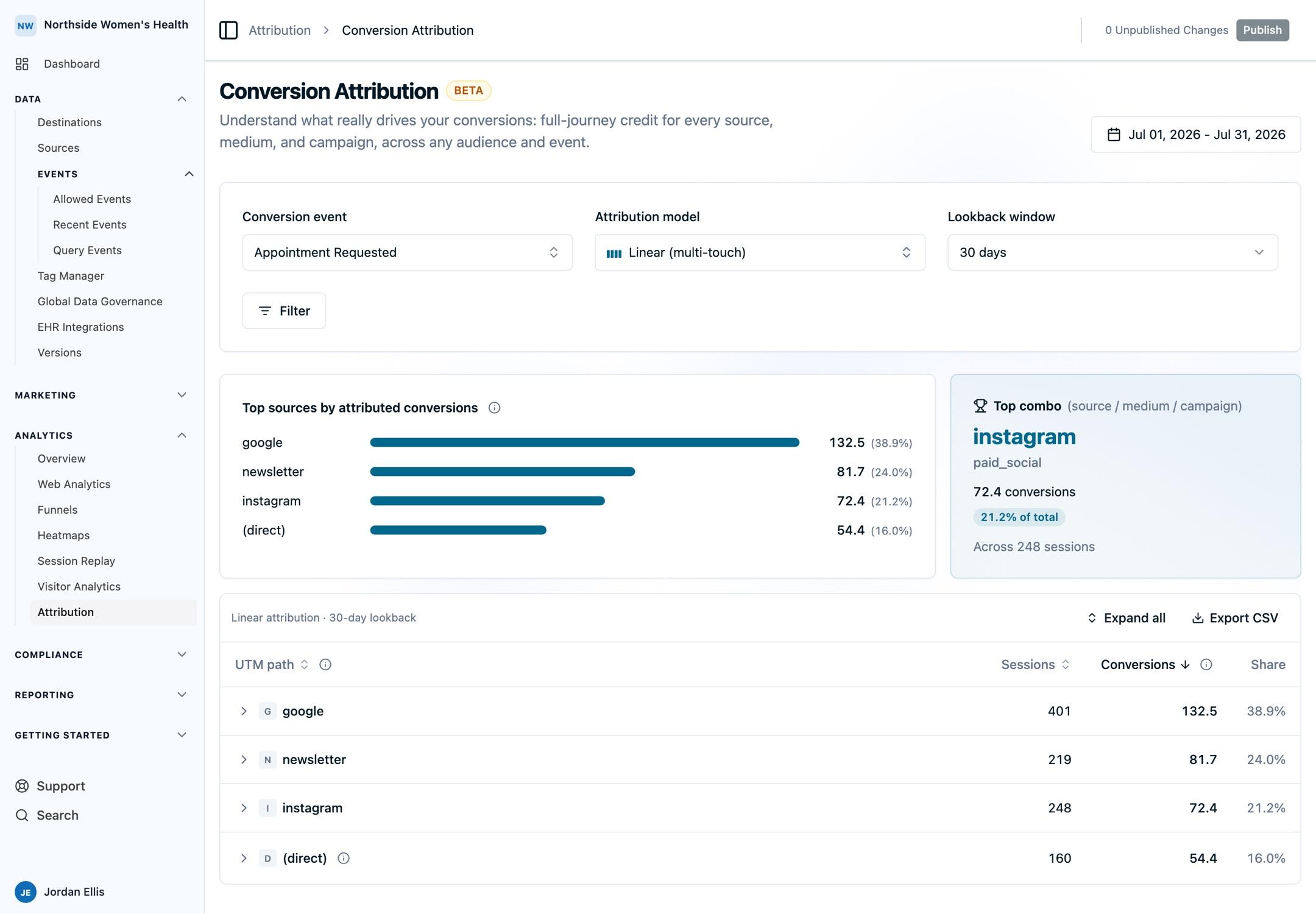
Audience Contribution
When you scope the report with audience filters or a web source, a summary card shows what share of all conversions for the chosen event came from that scoped audience.
Top Touchpoints
A chart of the five sources with the highest attributed credit, ranked by their share of total attributed conversions. Expand a row in the table below to see the medium and campaign behind a source.
Top Combo
A card calling out the single highest-credit source, medium, and campaign combination, with its conversion credit, its share of the total, and the number of sessions behind it. A real UTM combination is preferred over (direct) for this card, so untagged traffic only takes the top spot when every path is untagged.
Source / Medium / Campaign Table
A hierarchical table breaking down attributed conversions by source, medium, and campaign:
| Column | Description |
|---|---|
| Source | Traffic source (e.g., google, (direct)) |
| Medium | Traffic medium (e.g., cpc, (none)) |
| Campaign | Campaign name |
| Sessions | Sessions counted toward this path |
| Conversions | Attributed conversion credit for this path, under the selected model |
| Share % | This path's share of total attributed conversions |
Rows nest by UTM dimension: source, then medium, then campaign. Expand or collapse a row to drill into the next level, or use Expand all to open the full hierarchy. Sort by UTM path, sessions, or conversions. Conversions default to highest first.
Because Linear, U-Shaped, J-Shaped, and Time Decay split one conversion across the touchpoints in a path, per-path conversion values can be fractional and do not sum to the converter total. First Touch and Last Touch award the whole conversion to one path.
Untagged sessions are grouped under (direct) and earn credit like any other touchpoint. The
preference rule applies only to the single-credit models: with First Touch or Last Touch, a tagged
source is preferred over (direct) when both occur at the same point in a path, and (direct)
only takes the top spot when every touchpoint in the path is untagged. Under Linear, U-Shaped,
J-Shaped, and Time Decay there is no tie to break, so (direct) is treated as an ordinary bucket
and can rank at the top when enough sessions are untagged.
Exporting
Click Export CSV to download the source, medium, campaign, sessions, conversions, and share percentage for every row in the table.
Next Steps
- Audience Performance: measure conversion rate and revenue for an audience you define.
- Event Attribution Insights: explore one event and the visitors behind it.
- Attribution FAQs: attribution models, lookback windows, exports, and more.
How is this guide?