

Analytics Recipes
Tile-by-tile build lists for healthcare dashboards in Ours Privacy: patient access, virtual care growth, dental new-patient demand, orthopedic campaigns, urgent care, seasonal campaigns, and a go-live health check.
Use this page to build a dashboard for a common healthcare marketing goal. Each recipe lists the saved reports to create, how to chart each one, and the tile size to give it, followed by what to look for when you review it each week.
Save each report in Insights, Funnels, or Journeys first, then add it to a dashboard as described in Dashboards. Event names follow Standard Healthcare Events. Swap in your own where they differ.
Two patterns repeat across the recipes:
- One metric per value. To chart bookings by location or service line, add one
appointment_bookedmetric per value, each with its own filter. Up to 10 metrics fit in one Insight. - Comparison is applied when you read. Compare is temporary on a dashboard. Turn it on from the toolbar during the review.
Patient access command center
For: a health system's patient access or digital front door team that reviews demand, booking conversion, and service-line mix every Monday.
| Report | Type | Chart | Metric or steps | Size |
|---|---|---|---|---|
| Patient access scorecard | Insight | Metric | Appointment requests (lead_captured with a form filter), call_tracked, appointment_booked | Full, Compact |
| New patient demand by channel | Insight | Stacked column | Online appointment requests, tracked calls, chat requests | Half, Regular |
| Appointment request funnel | Funnel | Funnel | Provider profile viewed, request started, request submitted, appointment_booked | Half, Regular |
| Bookings by service line | Insight | Pie | appointment_booked, one metric per service_line value | One third, Regular |
| Bookings by location | Insight | Bar | appointment_booked, one metric per location_id value | One third, Regular |
| Provider profile views | Insight | Line, 7-day rolling average | Page views filtered to provider profile pages | One third, Regular |
| Paths to a booking | Journey | User Flows | Anchor appointment_booked, steps before | Full, Tall |
The dashboard in Dashboards shows this build at 4,380 appointment requests, 2,910 tracked calls, and 3,642 appointments booked, with the funnel converting at 24.7%.
Each week, compare the scorecard with the previous period and check whether a change in bookings matches a change in requests or in funnel conversion. A drop in one location's bar with steady requests usually points to scheduling capacity, not demand. Filter the dashboard to one service line to see its funnel and paths on their own.
Ask the AI Assistant to preview bookings by location for the last 90 days when a location's bar moves.
Virtual weight care growth
For: a virtual weight care membership program that grows through an online eligibility quiz, a clinician consult, and a paid membership.
| Report | Type | Chart | Metric or steps | Size |
|---|---|---|---|---|
| Growth scorecard | Insight | Metric | quiz_completed, consult booked (appointment_booked), membership started (purchase) | Full, Compact |
| Quiz starts and completions | Insight | Line | quiz_started, quiz_completed | Half, Regular |
| Quiz to membership | Funnel | Funnel | quiz_started, quiz_completed, appointment_booked, purchase | Half, Regular |
| Memberships by channel | Insight | Bar | purchase, one metric per utm_source value | Half, Regular |
| Consults booked this period | Insight | Line, Cumulative | appointment_booked | Half, Regular |
| What happens after the quiz | Journey | Top Paths | Anchor quiz_completed, steps after | Full, Regular |
Turn on Compare with Previous period each week. Lighter lines and faded bars show last period, and each scorecard card shows the change. Read the funnel to see whether growth came from more quiz traffic or from better consult-to-membership conversion. If the paths after the quiz end mostly at pricing pages, the consult offer may need to appear earlier.
For cost per membership, open UTM Performance Comparison in Attribution.
Ask the AI Assistant to preview the most common paths after quiz_completed for the last 30 days.
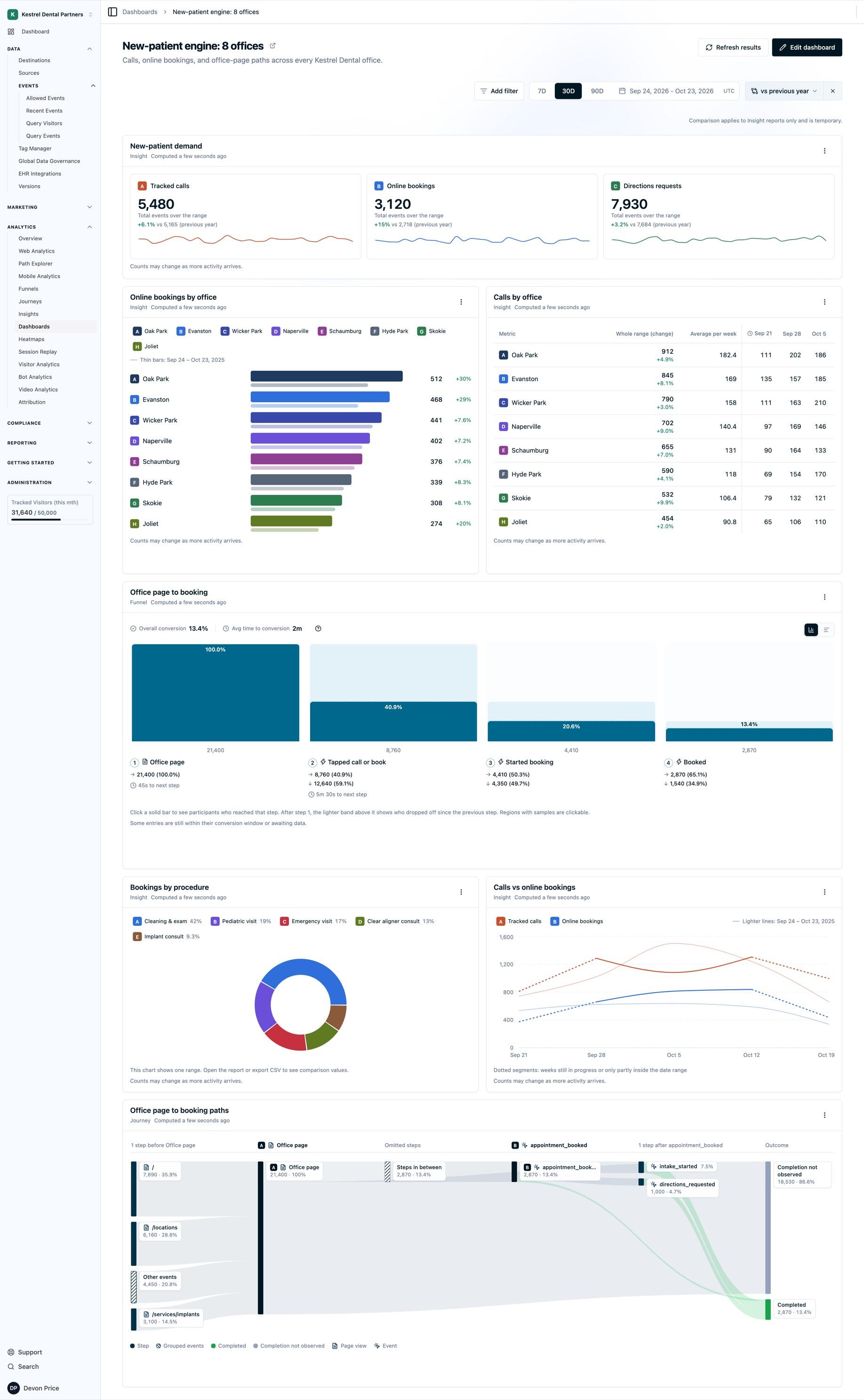
New-patient engine for a dental group
For: a dental group with 8 offices that wants front-desk demand, online booking, and procedure mix on one page.
| Report | Type | Chart | Metric or steps | Size |
|---|---|---|---|---|
| Front desk scorecard | Insight | Metric | call_tracked (5,480), online bookings (appointment_booked with booking_channel = online, 3,120), directions requests (7,930) | Full, Compact |
| Bookings by office | Insight | Bar | appointment_booked, one metric per office's location_id (8 metrics) | Half, Regular |
| Calls by office | Insight | Table | call_tracked, one metric per office | Half, Regular |
| Bookings by procedure | Insight | Pie | appointment_booked, one metric per service_line value, such as hygiene, implants, and ortho | One third, Regular |
| Office page to booking | Funnel | Funnel | Office page (21,400), tapped call or book (8,760), started booking (4,410), appointment_booked (2,870) | Half, Regular |
| Calls and bookings by week | Insight | Line, weekly | call_tracked, appointment_booked | Full, Regular |
| Paths to a booking | Journey | User Flows | Anchor appointment_booked, steps before | Full, Tall |
Track "tapped call or book" as one click event sent by both buttons on the office page, so the funnel step stays a single event.
Each week, turn on Compare with Previous year to read the calls and bookings lines against the same season last year. An office with high calls and low bookings in the two office tiles often has a phone answering gap. Filter the dashboard to one office to give its manager their own view, or duplicate the dashboard per region.
Ask the AI Assistant to preview bookings by office against the previous year.
Joint and spine campaign performance
For: an orthopedic practice running paid campaigns for joint replacement and spine consults.
| Report | Type | Chart | Metric or steps | Size |
|---|---|---|---|---|
| Consult requests by source | Insight | Bar | Consult requests, one metric per utm_source value | Half, Regular |
| Online requests and calls | Insight | Stacked column | Online consult requests, call_tracked | Half, Regular |
| Qualified calls | Insight | Metric | call_qualified, call_tracked | One third, Compact |
| Knee replacement landing views | Insight | Line | Page views filtered to the knee replacement landing page | One third, Compact |
| Paid landing to consult | Funnel | Funnel | Landing page view with utm_medium = cpc, form started, consult requested, appointment_booked | Half, Regular |
| Top paths before a consult | Journey | Top Paths | Anchor appointment_booked, steps before, entry filtered to consult bookings | Full, Regular |
Each week, check whether consult requests from each source held steady while landing views changed. Read qualified calls against tracked calls to see how many calls were real consult inquiries. The top paths show which pages people read before they booked, which is where to put the next campaign's landing content.
For cost per consult, open UTM Performance Comparison in Attribution.
Ask the AI Assistant to preview consult requests by source for the last 30 days.
Urgent care and virtual visits
For: an urgent care network with online check-in reservations and on-demand virtual visits.
| Report | Type | Chart | Metric or steps | Size |
|---|---|---|---|---|
| Reservations by clinic | Insight | Stacked line | Reservations, one metric per clinic | Full, Regular |
| Reservations this period | Insight | Line, Cumulative | Reservations | Half, Regular |
| Reservation flow | Funnel | Funnel, counting Events | Clinic page view, reservation started, reservation confirmed | Half, Regular |
| In-clinic and virtual visits | Insight | Line, log scale | Reservations, virtual visits started | Half, Regular |
The stacked line shows total demand and each clinic's share in one chart. The log scale keeps a smaller virtual visit volume readable next to clinic reservations. Because the funnel counts Events, it shows event volume per step, which suits walk-in patients who reserve more than once.
Each week, look for clinics whose share of the stack grew while total demand held, which can signal wait times shifting patients between sites.
Fall flu and wellness campaign
For: a primary care group running a seasonal flu shot and annual wellness campaign across 6 locations.
| Report | Type | Chart | Metric or steps | Size |
|---|---|---|---|---|
| Campaign scorecard | Insight | Metric | Campaign landing views, flu shot bookings, wellness visit bookings, call_tracked, directions requests, appointment_completed | Full, Compact |
| Bookings by location | Insight | Stacked column | appointment_booked, one metric per location (6 metrics) | Full, Regular |
| Bookings by campaign source | Insight | Pie | appointment_booked, one metric per utm_source value | One third, Regular |
| Campaign landing to booking | Funnel | Funnel | Campaign landing view, booking started, appointment_booked | One third, Regular |
| Bookings by visit type | Insight | Bar | appointment_booked, one metric per visit type, such as flu shot, annual wellness, and sports physical | One third, Regular |
Set the dashboard to the campaign dates and save it, so everyone opens the same window. Each week, read the stacked column for locations that are falling behind, and check the source pie before moving budget between channels.
Ask the AI Assistant to preview bookings by visit type for the campaign dates.
Go-live health check
For: the team installing Ours Privacy on a new site, who need to see in the first weeks that events arrive from every source.
| Report | Type | Chart | Metric or steps | Size |
|---|---|---|---|---|
| Events per day | Insight | Column | Total events of page_view, lead_captured, call_tracked, and appointment_booked in one metric | Full, Compact |
| Events by source | Insight | Stacked column | The same events, one metric per source, such as the website and your call tracking source | Half, Regular |
| Bookings | Insight | Metric | appointment_booked | One third, Compact |
| Calls | Insight | Metric | call_tracked | One third, Compact |
| Install validation | Funnel | Funnel | page_view, lead_captured, appointment_booked | Half, Regular |
Review this dashboard daily during the first two weeks. A day with no column, or a source missing from the stack, points to a tag or source that stopped sending. A funnel with page views but no later steps usually means the form or booking events are not firing yet. See Tracking and Debugging Events to check a single event.
Next Steps
- Dashboards: add, arrange, and filter the reports in these recipes.
- Insights: build the metric cards, lines, bars, and pies.
- Funnels: set the steps, counting, and conversion window.
- Journeys: set the anchors and choose User Flows or Top Paths.
- UTM Performance Comparison: cost per lead and conversion by campaign.
How is this guide?