

Conversions & Funnels
Go beyond pageviews to measure conversions: build multi-step funnels to find drop-off and segment audiences to measure conversion rate and revenue.
Use this page to move from "how many visitors?" to "how many converted?" Web Analytics tells you who came and what they viewed; conversion analysis tells you who completed the actions that matter: booking an appointment, submitting a form, finishing a purchase.
Conversions are built on the events you already track. Any event the SDK sends (a form submission, a checkout, a custom action) can be used as a conversion. To start sending one, see tracking events with the Web SDK.
Tracking a healthcare practice? The Standard Healthcare Events schema gives you ready-made conversion events (
appointment_booked,appointment_completed,revenue_recognized) so your funnels and conversion reports work against the patient journey without naming each step yourself.
Funnels: Find Where Visitors Drop Off
A funnel is an ordered series of steps, page views or events, that visitors move through toward a goal. Funnels show conversion rate at each step and exactly where people fall out, so you can focus on the step that's leaking the most.
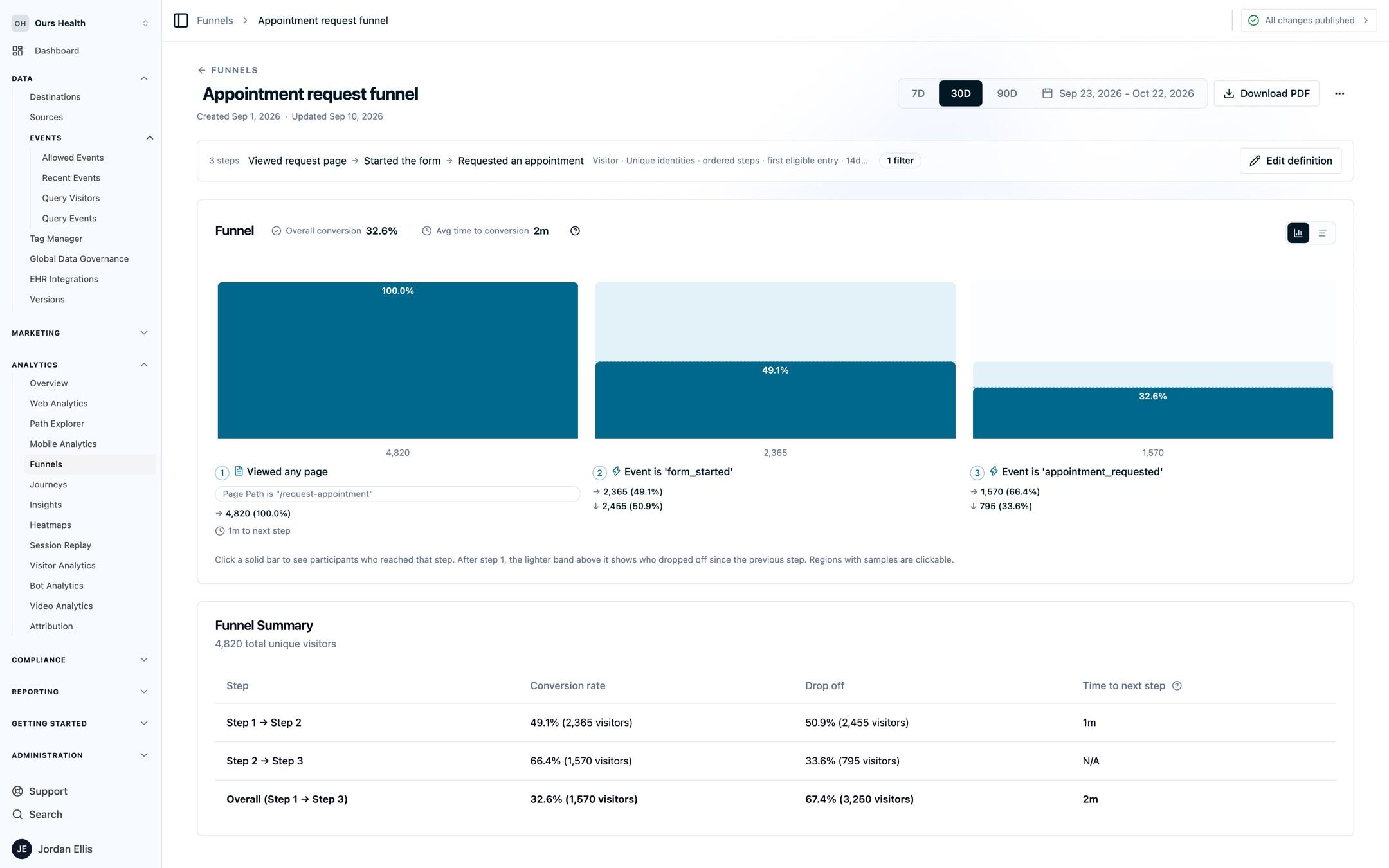
A funnel follows a person across visits by default, over a range of up to 90 days. Funnels support 2 to 10 steps, conversion windows, counting by people, sessions, or events, ordered or any-order steps, and filters on entry, on every event, and per step, plus drill-down into session replays and PDF export.
Open the Funnels guide for the full walkthrough of building and reading a funnel.
Audience Performance: Conversion Rate and Revenue by Segment
Where a funnel follows a single path, Audience Performance starts from a segment and measures how it converted. Define an audience from session activity (UTM source, campaign, entry page, device, country, and more), pick a conversion event, and see audience size, converters, conversion rate, average value, and total revenue, with period-over-period comparison and a source/medium/campaign breakdown.
This is the report to reach for when you want to compare who converts: paid vs. organic, one campaign vs. another, mobile vs. desktop.
Open the Audience Performance guide to build a segment and measure its conversions.
Funnels vs. Audience Performance
| Use a Funnel when… | Use Audience Performance when… |
|---|---|
| You want to see drop-off across an ordered path | You want conversion rate and revenue for a segment |
| The question is "where do people fall out?" | The question is "which audience converts best?" |
| You care about step-by-step progression | You care about the outcome and its revenue |
Common Use Cases
- Fix a leaky intake flow. Build a funnel across your booking steps and find the step with the steepest drop, then watch replays of visitors who fell out.
- Compare campaign quality. Use Audience Performance to measure conversion rate and revenue per campaign, not just the traffic each one sent.
- Prove channel ROI. Segment by UTM source and attach a revenue value to your conversion event to see which channels actually drive value.
Next Steps
- Funnels: build a multi-step conversion funnel and find drop-off
- Audience Performance: measure conversion rate and revenue for a segment
- Sources & Campaigns: identify the traffic feeding your conversions
- Web SDK: track the events you want to convert on
Need Help?
Reach out to support@oursprivacy.com if you have questions about measuring conversions, building funnels, or audience performance.
How is this guide?