

Query Visitors
Find the people behind your events in Ours Privacy with Query Visitors: filter visitors by an event they fired, a page they viewed, and the campaign that brought them, then open any visitor's profile, event timeline, and session replays.
Use Query Visitors to answer "who": which people fired an event, on which page, from which campaign, in which window. Each row is one visitor, and each opens to that visitor's profile, events, and session replays.
Open Query Visitors in appIn the app, Query Visitors lives under Data > Events > Query Visitors, next to Query Events. Query Events lists events. Query Visitors lists the people behind them, one row per visitor no matter how many times they fired the event.
Permissions
| Permission | Capabilities |
|---|---|
| View Web Analytics | Open Query Visitors and browse the list |
| View Visitor | Open a visitor's page and their full profile, which can hold PHI |
Every query and every visitor you open is audit logged.
Filter visitors
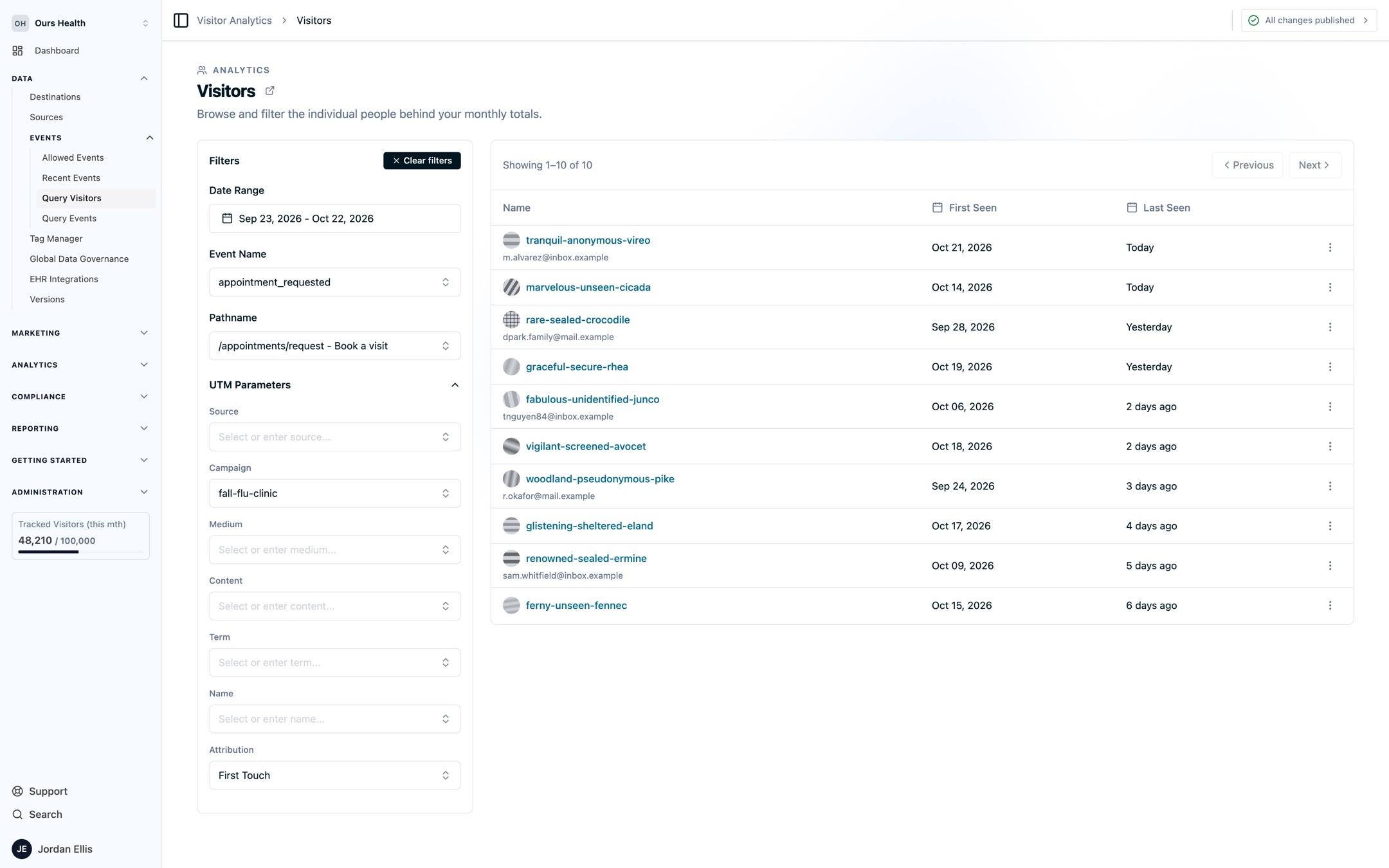
The Filters panel narrows the list. Filters combine, so a visitor must match all of them.
- Date Range: up to 60 days. The list includes visitors last seen in the range.
- Event Name: visitors who fired this event in the range. The list offers your allowed events and the events tracked in the last 60 days.
- Pathname: visitors who viewed this exact page in the range. Pick from your top pages or type a path.
- UTM Parameters: Source, Campaign, Medium, Content, Term, and Name. Attribution decides which UTMs to match: First Touch (the default) uses the values from the visitor's first visit, Last Touch uses their most recent.
Your filters are saved in the page URL, so you can bookmark a query or share it with a teammate. Clear filters resets them.
Read the list
The list shows 25 visitors per page, most recently seen first. Use Previous and Next to page through.
| Column | Shows |
|---|---|
| Name | A generated name, such as tranquil-anonymous-vireo, and the visitor's email once they are identified |
| First Seen | The date of the visitor's first recorded activity |
| Last Seen | Today, Yesterday, or days ago for the past week, then the date. Hover for the exact time |
The generated name comes from the visitor ID, so the same visitor always has the same name and a real name never appears in the list. An email appears only after the visitor is identified. See Visitor Identity and Matching for how that happens.
Open a row's menu for:
- Open visitor page: the Visitor page below.
- View visitor profile: a drawer with the visitor's current profile, including click IDs and custom properties, and their unified profile.
- View visitor events: Query Events scoped to this visitor.
- View session replays: Session Replay filtered to this visitor.
The Visitor page
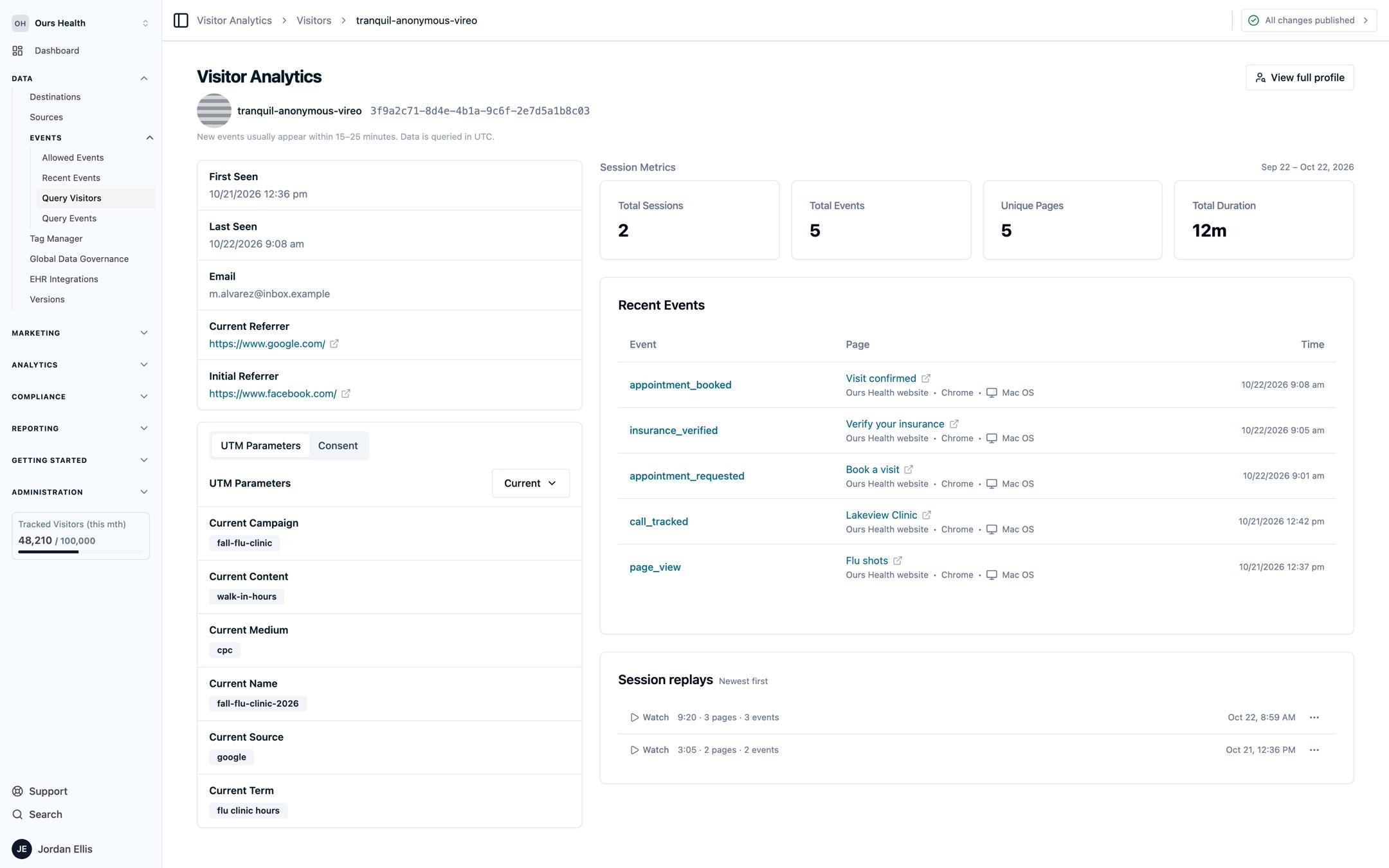
Select a visitor's name to open their page. The header shows the generated name, the visitor ID, and View full profile.
- Profile: first seen, last seen, email, and the current and initial referrer.
- UTM Parameters: campaign, content, medium, name, source, and term. Switch between Current and Initial values.
- Consent: the consent state recorded for the visitor.
- Session Metrics: total sessions, total events, unique pages, and total duration.
- Recent Events: up to 50 of the visitor's events with the page, source, browser, device, and time. Select an event name to open it in Query Events.
- Session replays: the visitor's recorded sessions, newest first, each with Watch.
View full profile opens the same drawer as the row menu. The Unified profile tab shows the merged profile when visitors share an external_id. See Unified User Profiles.
FAQs
How is this different from Funnels and Journeys?
Funnels and Journeys follow people in aggregate: how many converted and which paths they took. Query Visitors names the individual visitors so you can open one and see exactly what they did.
Can I export the list?
Query Visitors has no export. To export what one visitor did, select View visitor events and export from Query Events.
Why does a visitor have no email?
The visitor has not been identified yet, so no email is stored on their profile. See Visitor Identity and Matching for the ways a visitor becomes identified.
Next Steps
- Query Events: the events behind each visitor, with filters, columns, and export.
- Visitor Identity and Matching: how visitors are identified and merged into one profile.
- Funnels: conversion and drop-off across the same people over time.
- Session Replay: watch what a visitor did on your site.
How is this guide?