Event Conditions
Filter an Ours Privacy audience on behavior - event counts inside a rolling day window, filters on the event's own properties, and the zero-count pattern for excluding converters.
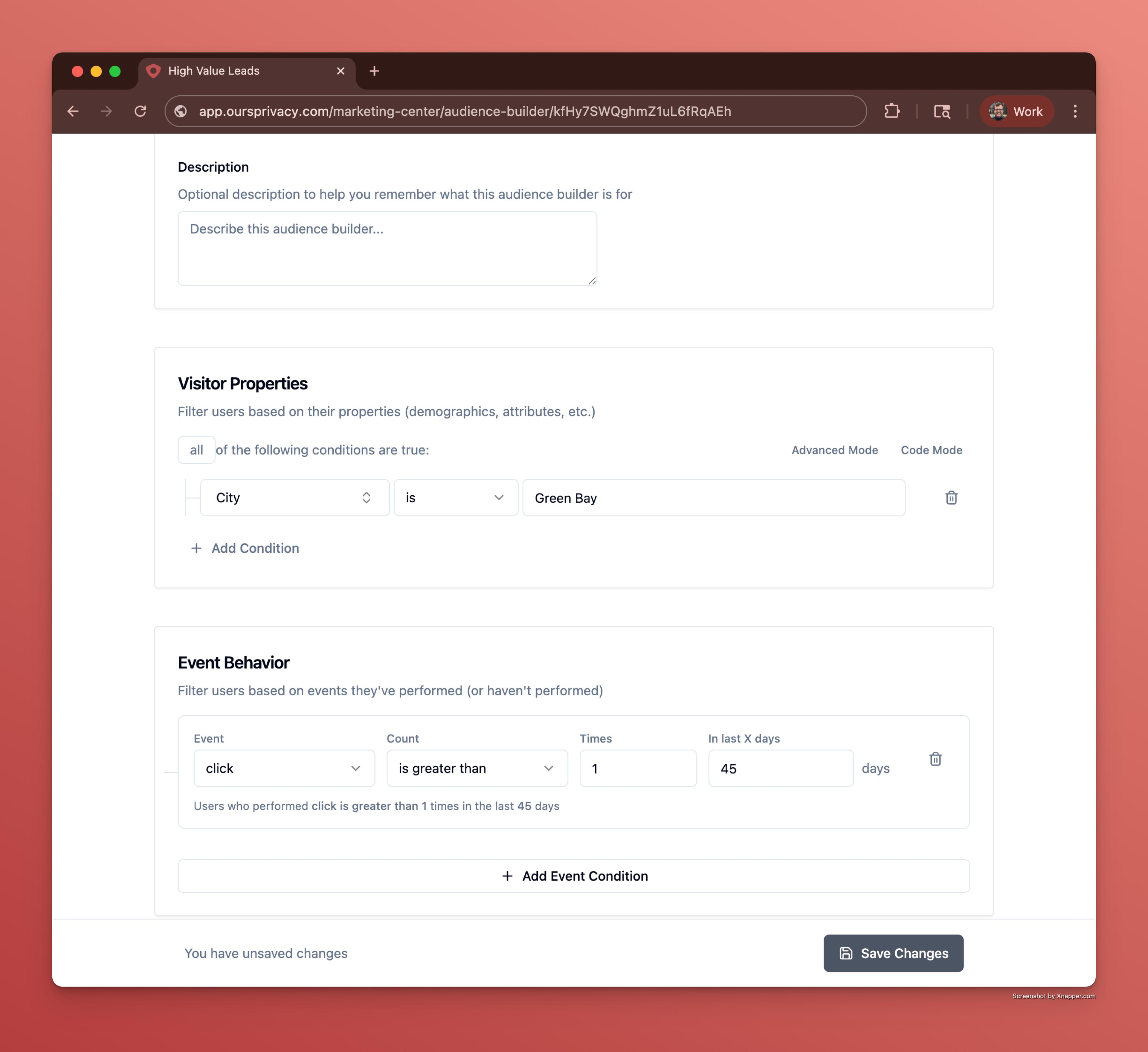
Use this page as the reference for the Event Behavior section of an audience. Event conditions describe what visitors did rather than who they are; for attributes, see Visitor conditions.
Important: Advertising platforms are not HIPAA business associates and do not sign BAAs. Hashing an email does not make it anonymous. Read Compliance for audiences before sending an audience to any platform.
What an event condition says
Every event condition answers one question: did this visitor perform this event this many times in the last this many days?
Three parts make that up.
- The event. Pick one from your account's events or type a name. The dropdown is built from the events your account actually collects.
- The count. An operator and a number, for example at least 2, or exactly 0.
- The window. A number of days, counted backwards from now on a rolling basis. A 30-day window today covers a different 30 days than it did last week.
Optionally, a fourth part: nested conditions that narrow which occurrences of the event count at all.
Count operators
| Operator | Reads as |
|---|---|
| is exactly | Performed it precisely this many times |
| is not | Performed it any number of times other than this |
| is greater than | More than this many times |
| is greater than or equal to | At least this many times |
| is less than | Fewer than this many times |
| is less than or equal to | At most this many times |
At least is the workhorse for inclusion. At most zero is the workhorse for exclusion, and it is worth its own section below.
Time windows
The window is a rolling number of days. Some rough guidance on picking one.
| Window | Fits |
|---|---|
| 3 days | Retargeting while your brand is still top of mind |
| 7 days | Weekly engagement patterns |
| 14 days | A campaign flight with a two-week cadence |
| 28 to 30 days | The default for most audiences, and comparable to monthly reporting |
| 90 days | Long consideration cycles, and audiences that would otherwise be too small to be usable |
Two things to keep in mind. A longer window makes an audience larger but less current, which for retargeting is usually the wrong trade. And when several conditions in one audience use different windows, the audience means something more complicated than it reads like. If two conditions describe the same funnel, give them the same window unless you have a specific reason not to.
Filtering which occurrences count
A bare event condition counts every occurrence of the event. That is almost never what you want for page views, because every page on your site fires one.
Nested conditions fix that. They filter the individual occurrences, so only the ones matching count toward the total.
Take "performed a page view at least twice in the last 30 days." On most sites that matches nearly every returning visitor. Add a nested condition that the page URL contains /appointments and it means something: two visits to the appointments section specifically.
The properties available to nest on are the ones carried by the event itself: the page URL where it happened, the UTM values in effect at the time, and any properties you attach when you send the event. They are shown with the same labels you see elsewhere in the dashboard, and every operator from Visitor conditions works here too.
Rule of thumb: if the event is a page view or another event that fires on many pages, it needs a nested URL condition. If the event is specific by nature, such as a form submission or a booking confirmation, it usually does not.
The zero-count pattern
Setting the count to at most zero means the visitor never performed the event inside the window. This is how you exclude people, and it is the single most useful thing in this section.
Almost every effective retargeting audience is built from a pair of conditions:
- At least one occurrence of an interest signal, such as a view of a service page.
- At most zero occurrences of the conversion, such as a view of the confirmation page.
That combination targets exactly the people who showed interest and did not convert, which is where retargeting spend does the most good. Without the second condition you pay to advertise to people who already booked.
The event you pick as the conversion matters. Use the last step that only completers reach: a confirmation or thank-you page rather than the first step of the form, which people abandon.
See Targeting strategies for how this composes with exclusion audiences and lookalike seeds.
Combining event conditions
AND requires the visitor to match every event condition. This is the normal choice, and it is what funnel-shaped audiences are made of: did this, did not do that.
OR requires any one of them to match. Use it when several different events all count as the same signal, for example any of three different form submissions on your site.
Event conditions also combine with the Visitor Properties section, and a visitor has to satisfy both sections. The precise audiences are almost always both: visitor properties set the baseline (consent, attribution), event conditions identify the behavior pattern.
Building an audience from an experiment
To target the visitors who saw a specific experiment variant, use From experiment in the Event Behavior card. It fills in the impression event and the variant filter for you, which is faster and less error-prone than assembling it by hand.
Two uses come up. Advertising to everyone who saw one variant, and suppressing them from a campaign so a different variant's audience stays clean. See Experimentation.
Practical notes
Preview after every condition, not at the end. An event condition that is subtly too broad looks identical in the interface to one that is right. The count is the only thing that tells you.
Watch for the audience that collapses to nothing. Three AND conditions with mismatched windows can describe a sequence nobody actually performs. If Preview returns an unexpectedly tiny count, remove conditions one at a time to find which one is doing it.
Recent events are available quickly. Event data becomes queryable within about fifteen minutes of collection, so an audience built on behavior from this morning works this afternoon.
Deliverability is separate from matching. A visitor can match every event condition perfectly and still be skipped by a sync because their record has no email address. See Audience Destinations.
Next Steps
- Visitor conditions for the attribute side and the full operator list.
- Previewing an audience to validate what you built.
- Recipes for worked event configurations, including funnel exclusions.
- Targeting strategies for exclusions, retargeting, and lookalike seeds.
Need help? Contact support@oursprivacy.com.
How is this guide?