Exporting a CSV
Download an Ours Privacy audience as a CSV in one of three formats - all fields raw for internal use, or hashed and formatted for Google Ads or Meta - and read the matched-row count.
Use this page to download an audience as a file. If you want the audience delivered to a platform automatically instead, see Syncing to destinations.
Important: Advertising platforms are not HIPAA business associates and do not sign BAAs. Hashing an email does not make it anonymous. A downloaded CSV also leaves every control Ours Privacy has, so treat the file accordingly. Read Compliance for audiences.
Running an export
- Save your changes. The Export CSV button is enabled only when the audience has a name, has at least one condition, and has nothing unsaved.
- Press Export CSV in the header.
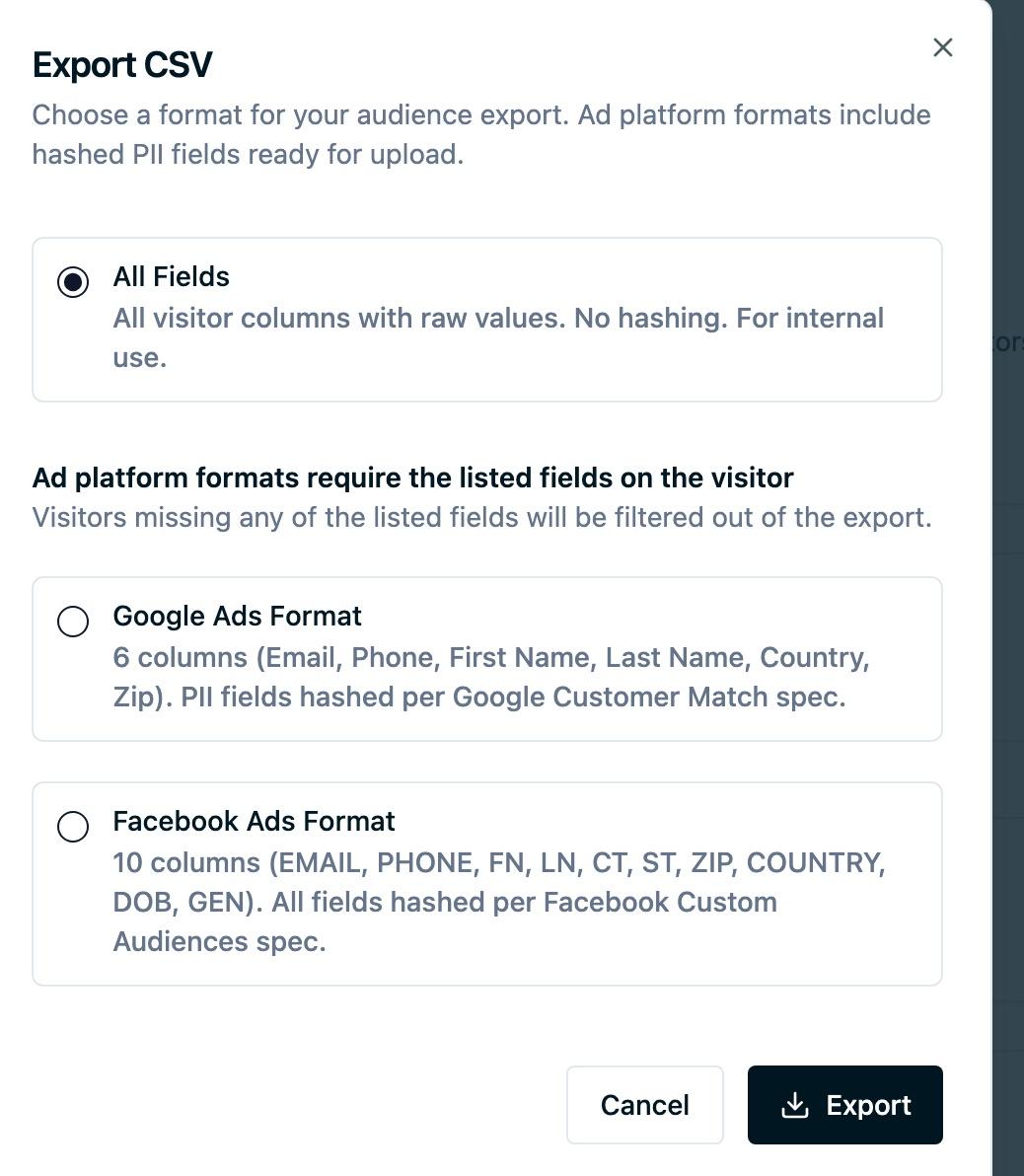
- Choose a format.
- Press Export. The export runs in the background, which for a large audience takes a few minutes, then the file downloads.
The dialog stays useful if you close it. The export keeps running and you can reopen the audience later to collect the result from Recent Exports.
The three formats
All Fields
Every visitor column, raw values, nothing hashed. This is the internal format: CRM uploads, warehouse loads, analysis in a spreadsheet.
It is the widest of the three by a long way, covering identity fields, location, first-touch and current-session UTM values, referrer and referring domain, ad platform click IDs, timestamps, and your custom properties. It is also the only format containing raw email addresses, so it is the one to be most careful with.
Google Ads Format
Six columns, formatted for a Google Customer Match list: Email, Phone, First Name, Last Name, Country, and Zip.
Email, phone, and the name fields are normalized and SHA-256 hashed to Google's specification. Country and Zip are sent as plain values, because that is what Google expects. Email normalization follows Google's rules, which for Gmail and Googlemail addresses means dots and any plus-suffix are removed before hashing.
Facebook Ads Format
Ten columns, formatted for a Meta customer list: EMAIL, PHONE, FN, LN, CT, ST, ZIP, COUNTRY, DOB, and GEN.
Every column is normalized and SHA-256 hashed to Meta's specification, which is stricter than Google's about punctuation: names and city are reduced to letters only, state to a two-character code, dates of birth to an eight-digit form, and gender to a single character.
What the row counts mean
Both ad platform formats report two numbers when the export completes, and the difference between them is the most useful thing on the screen.
Rows is how many visitors matched your audience.
Rows with matchable data is how many of them had at least one identifier, meaning an email address or a phone number, that a platform could match on. A visitor with a city and a first name but no email or phone cannot be matched by anyone, so they are filtered out of the file rather than shipped as an unmatched row.
A result reading 4,102 of 38,540 rows had matchable data is not an error. It is telling you that most of that audience has no identifier, and that the fix is in your data collection or in the audience conditions rather than at the platform. Adding a visitor condition requiring email to be not null makes this visible in Preview instead. See Previewing an audience.
If none of the rows had matchable data, the export says so and offers the file anyway. Uploading it will not accomplish anything, but you may want it for diagnosis.
The All Fields format reports a single row count, because it is not built for matching.
The file name
Every export is named after the audience's Export Name plus the date and time it was generated. This applies to all three formats.
That is a deliberate consequence of the naming model: the internal name you use to describe the audience never reaches a file name, so a CSV that gets forwarded, saved to a shared drive, or attached to a ticket does not carry a description of who is in it. See Export names.
Recent exports
Completed exports are listed on the audience under Recent Exports, with the export name, the format, when it ran, and the row counts. A finished export stays available to re-download for a limited window, after which it drops off the list and you run the export again. See Data Retention for how retention works across the platform.
Each download link is issued fresh when you press Download, and an individual link is short-lived. If a link stops working, go back to the audience and press Download again rather than reusing an old URL.
Failed exports appear in the same list with the reason, which is usually more useful than retrying blind.
Bulk exporting
You can export several audiences at once from the audience list by selecting them and choosing to export. Each audience produces its own file in the format you pick, and each is named after its own Export Name.
Practical notes
Advertising consent is not filtered on a CSV. A download contains everyone who matched, including visitors who rejected the advertising consent category. A sync excludes them; a download does not, because a download is data about your own visitors. If you are exporting in order to upload to an ad platform by hand, add the consent condition to the audience yourself. See Compliance for audiences.
Prefer syncing when a platform supports it. A CSV is a snapshot from the moment you pressed the button. People who no longer match stay in the platform's list until you replace it, and the list you uploaded ages from the day it lands. A sync replaces the full membership daily. See Audience Destinations.
Re-download rather than keep a copy. A recent export can be downloaded again from the audience, and a copy on a laptop is outside every control the product has.
A large export takes minutes, not seconds. It runs in the background, so you can close the dialog and come back.
Next Steps
- Syncing to destinations to have the audience delivered daily instead.
- Previewing an audience to check the deliverable size before exporting.
- Export names for the name the file gets.
- Compliance for audiences for what to consider before a file leaves.
Need help? Contact support@oursprivacy.com.
How is this guide?