

Data Observed
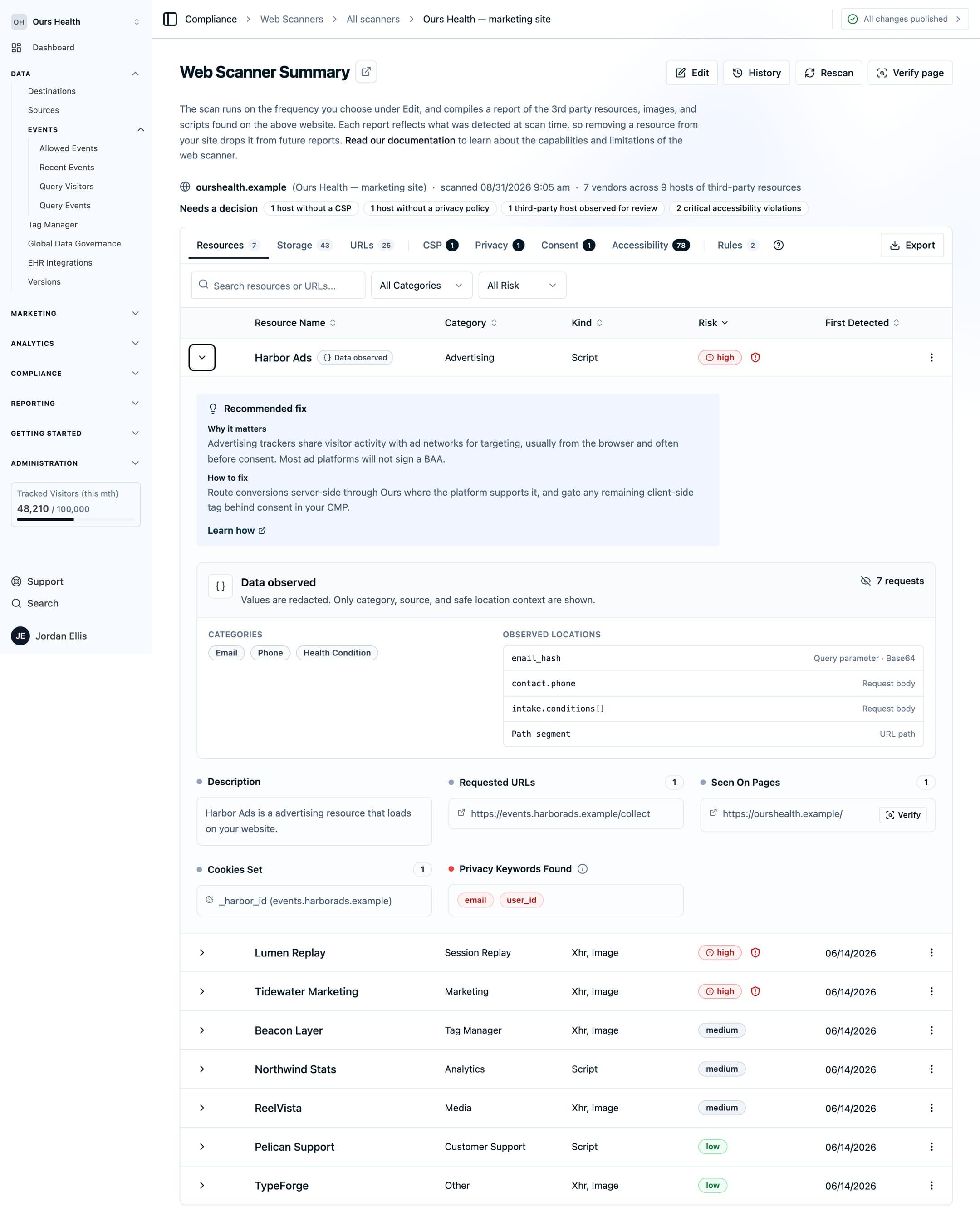
The Web Scanner flags third-party requests that carry patterns matching personal or health information, such as an email, a phone number, or a diagnosis term, and shows the category and field without the value.
Use this page to read the Data observed badge on a Resources row: which categories the scanner looks for, where it looks, and what it cannot see.
What is detected
While a page loads, the scanner inspects the query strings, request bodies, and URL paths of every third-party request, decoding one layer of Base64 where it finds it. It looks for eleven categories:
- Email address
- Phone number
- Social Security number
- Card number (checked with the Luhn algorithm before it counts)
- Date of birth
- Public IP address
- Medical record number
- Health plan ID
- Diagnosis
- Medication
- Health condition
A match adds a Data observed badge to the vendor's row on the Resources tab. Expanding the row opens a panel listing each category, where it appeared (query parameter, request body, or URL path), the field name when available, and the encoding. URL-path findings show Path segment when there is no field name.
What you see, and what you never see
The panel shows the category, the source, and the field name or Path segment label. It never shows the value. Matching happens before anything is stored, and the stored finding carries no raw data. Findings roll up per third-party hostname with a cap on signals per recipient, so a frequent pixel produces one reviewable entry.
Limits
Detection is pattern-based, so misses and false positives are both possible. Use the category and location in the panel to judge each finding.
- Health conditions match a fixed keyword list, so a common term is caught and a rarer one is not.
- Medical record number, health plan ID, diagnosis, and medication are found mostly from the field names they travel under.
- The scanner does not fill in or submit forms. It sees data already present in requests fired while the page loads, such as a condition term in a page URL forwarded to a pixel. Information typed into a form and sent on submit is outside what a page-load scan can observe.
Next Steps
- What the scanner detects: scripts, privacy keywords, cookies, CSP, and accessibility.
- Consent checks: which third parties were contacted after Reject all.
- Recommended fixes: what to do about each class of finding.
How is this guide?