

Consent Checks
Every full scan loads your homepage before any consent choice, after Reject all, after Accept all, and with Global Privacy Control on, then shows which third parties were contacted in each state.
Use this page to read the Consent tab on a scan result: what each of the four captures shows, and what a clean result does and does not establish.
The four states
Every full scan loads your homepage four times, each in a fresh browser with no cookies or storage carried over from the previous capture:
- Before any choice. The homepage loads with no consent interaction.
- After Reject all. The consent banner is set to necessary only, then the homepage reloads.
- After Accept all. The banner is set to accept all, then the homepage reloads.
- With Global Privacy Control. The page loads with the Global Privacy Control signal switched on.
For each state the tab lists the third-party hosts contacted, the cookies set, and the local storage keys written, plus what was added or removed compared with the Before any choice capture. Findings read as plain statements: Contacted before any consent choice, Contacted after Reject all, Contacted with Global Privacy Control. A host that appears in more than one state is summarized in one line, such as "Contacted before any choice, and again after Reject all".
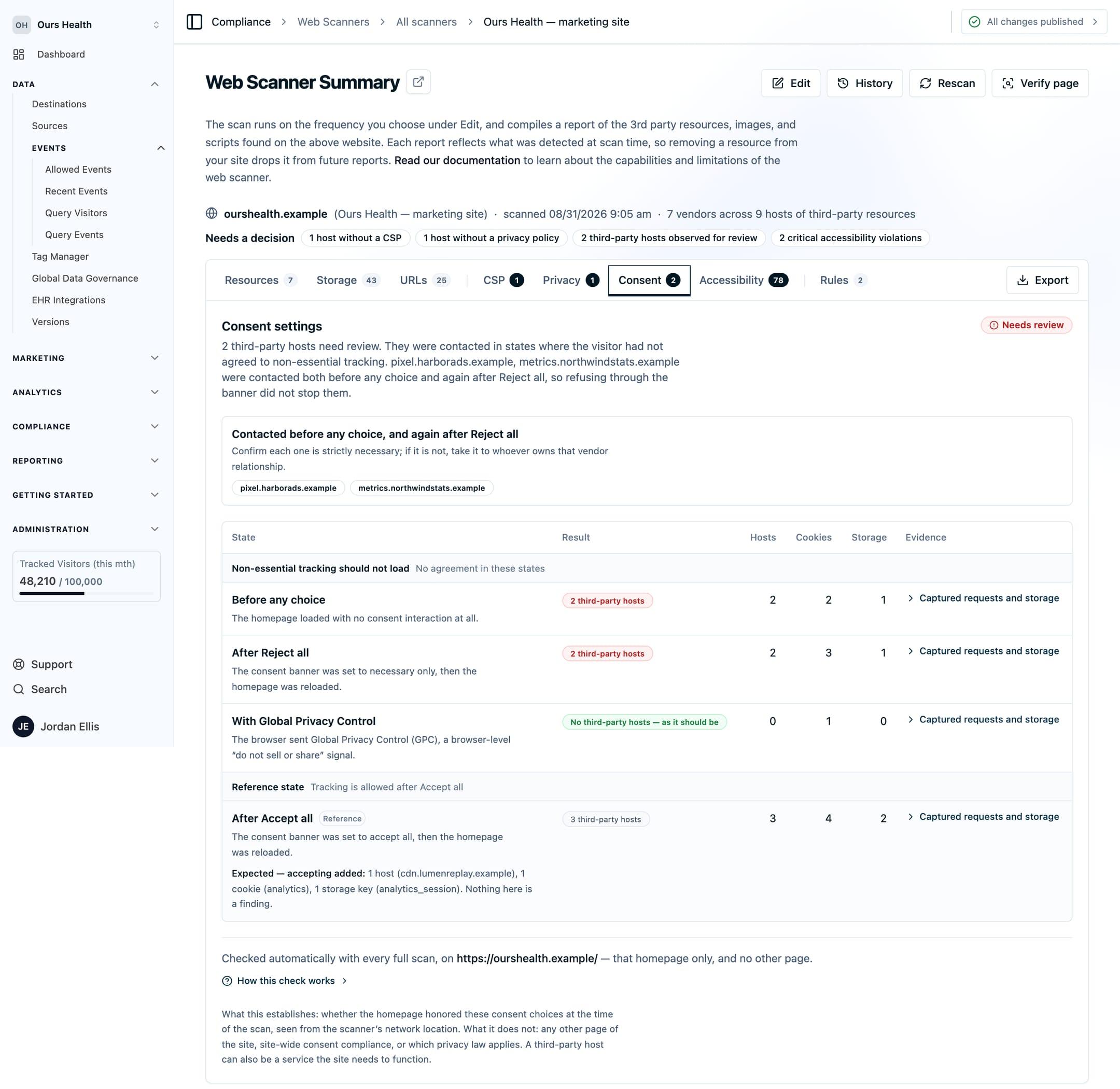
Consent results are included in the PDF exports alongside the other tabs. On an authenticated scan, the credential you supply is applied to the consent captures too.
What the check requires
- Reject all and Accept all need Ours Privacy Consent Management on the page. The scanner drives those two choices through the Ours Privacy consent script. On a site running a different consent platform, those two states show as unsupported.
- The other two states work on any site. Before any choice and With Global Privacy Control are captured whether or not you use Ours Privacy Consent Management.
What a clean result means
A clean Consent tab establishes that your homepage honored those choices during that scan, from the scanner's network location. It does not establish compliance for the whole site, and it does not decide which law applies to you. A contacted host may be strictly necessary for the page to work.
- The check covers the homepage only. Other pages are inventoried by the crawl but are not loaded in the four consent states.
- A capture that did not finish is labeled running, unsupported, failed, or missing evidence. A partial capture is never shown as a clean pass.
- Server-to-server connections do not appear in a browser scan. Review those in your destination configuration.
Next Steps
- Data observed: what the requests leaving each page were carrying.
- Verify a page: re-check one page after a fix.
- Real-time script blocking: stop an uncategorized script before it runs, instead of reporting it afterward.
How is this guide?