

Scanner Configuration
Exclude pages from scans and set how much of your site each Web Scanner monitor covers.
Scanner Configuration
Use this page to tailor what the Web Scanner crawls: exclude pages you don't want monitored, and set how much of your site each scan covers.
Excluding pages from scans
You can configure the scanner to exclude certain pages or URL patterns from being scanned. This is useful for:
- Staging or development environments that shouldn't be monitored.
- Admin or internal pages that require authentication.
- Pages with sensitive content that shouldn't be included in scans.
- Temporary or test pages that aren't part of your production site.
When you exclude pages, the scanner skips them during future scans, reducing unnecessary alerts and focusing on the pages that matter most for your privacy compliance monitoring.
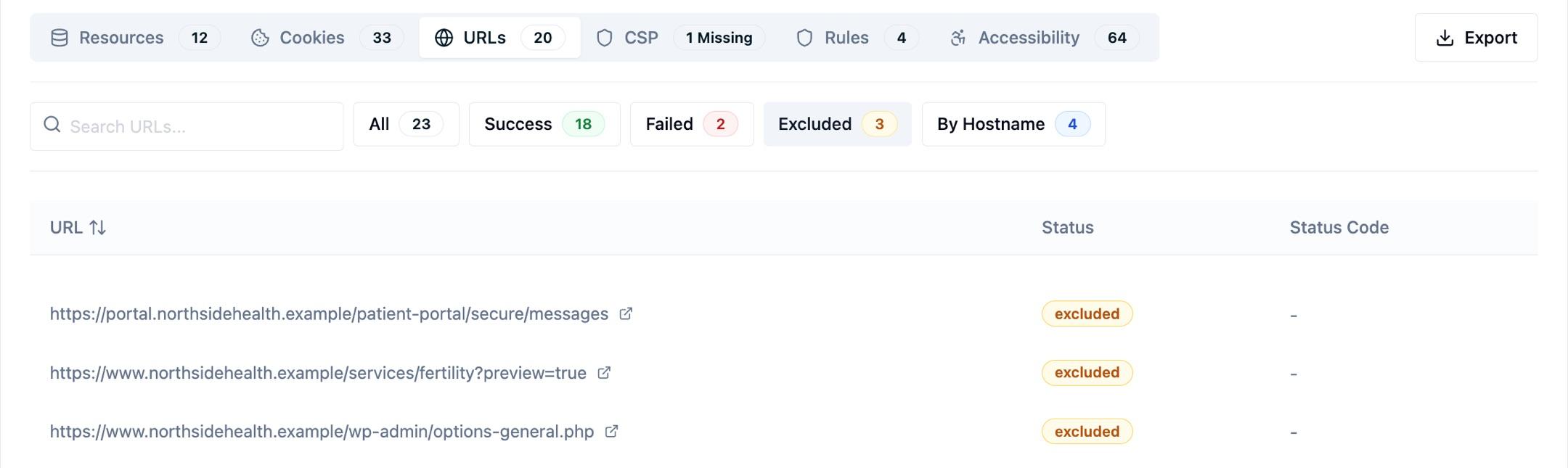
To confirm an exclusion is doing what you meant, open the URLs tab on the scanner and filter to Excluded — every URL the patterns skipped is listed there.
Scan coverage
Coverage is sized to your site, and you set it per monitor in your monitor settings. Sites with thousands of pages are supported, and you can raise the coverage on a monitor at any time as your site grows.
What the scan reaches also depends on discovery. The scanner finds pages by following links from your homepage and from any sitemaps it discovers, so make sure the pages you want scanned are reachable that way. If part of your site isn't (a landing page domain with no inbound links, for example), add those URLs as extra starting points under Additional Start URLs in your monitor settings.
Each monitor covers one root domain and its subdomains. To cover several unrelated domains, add a monitor for each one.
Scan frequency
How often each monitor crawls is also a per-monitor setting: daily, weekly, monthly, or manual only. See Scan schedule.
Pages behind a login
A standard scan can't reach pages that require signing in first. See Authenticated scanning to cover those pages with a short-lived header or cookie credential.
Next Steps
How is this guide?