

FAQs
Common questions and answers about the Ours Privacy Translation Widget.
Frequently Asked Questions
Common questions about the Translation Widget.
General Questions
Does the widget auto-translate based on browser language?
Yes. The widget can automatically translate based on the visitor's browser language settings. Additionally, if a visitor has previously selected a language, that preference is restored automatically on their next visit.
Where is the language preference stored?
The visitor's language choice is stored in browser localStorage under the key translate-widget-language. It persists until the visitor clears their browser storage or clicks "Reset translations" in the widget.
Can visitors reset to the original language?
Yes. The widget includes a reset option that clears the language preference and reloads the page to restore original content.
Can I see how the widget is being used?
Yes. Each widget has a built-in Analytics tab showing pages translated, unique visitors, and demand broken down by language, site, and page. See Usage Analytics.
Content & Translation
What content gets translated?
The widget translates all visible text content on the page, including headings, paragraphs, button text, links, and table content. It automatically skips form inputs, hidden elements, scripts, and styles.
How do I exclude specific content from translation?
Add the data-translate-skip attribute to any element:
<span data-translate-skip>Brand Name</span>See Excluding Content for more details.
Can I block specific words from ever being translated?
Yes. Add them to the Never Translate Terms list on your widget in the Ours Privacy dashboard. The widget preserves those terms in their original form everywhere they appear, in every supported language, with no markup changes required. This is the right approach for brand names, drug names, and other terms you want to keep consistent across all languages. See No-Translate Terms for details.
Does it work with dynamically-loaded content?
Yes. The widget automatically detects new content added to the page. This works with:
- Single Page Applications (SPAs)
- Infinite scroll
- AJAX-loaded content
- JavaScript-rendered content
New content is automatically translated when detected.
Customization
Can I change the widget's position?
Yes. Choose from four positions in your widget configuration:
bottom-right(default)bottom-lefttop-righttop-left
Can I customize the colors?
Yes. You can set:
- Theme: Light or dark mode
- Brand color: Any hex color for accents
Can I limit which languages are available?
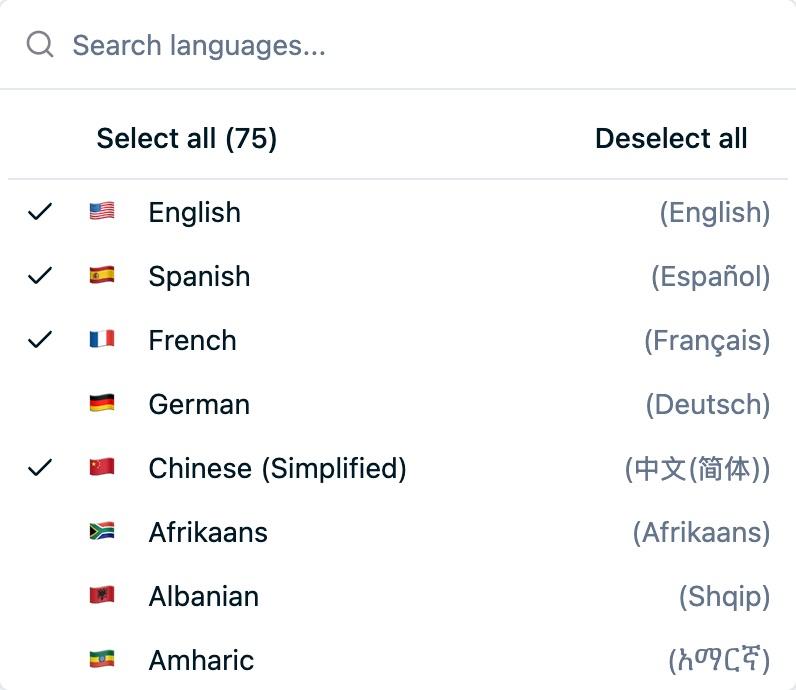
Yes. In the Ours Privacy dashboard, select only the languages you want to offer. Visitors will only see your selected languages in the widget.
Technical Questions
Why doesn't the widget appear on my site?
Common causes:
- Domain not allowed: Add your domain to the widget's allowlist in the Ours Privacy dashboard
- Wrong widget ID: Verify the ID in your script tag matches your widget
- Script blocked: Check if ad blockers or security tools are blocking the script
- JavaScript errors: Check browser console for errors
What happens if the translation API is slow or fails?
The widget handles errors gracefully:
- Automatic retries: Failed requests retry automatically
- Error UI: Shows a retry button if translation fails
- Content preservation: Errors don't break already-translated content
- Original content safe: Your original content is never modified
Does the widget affect page performance?
The widget is designed for minimal impact:
- Async loading: Script loads asynchronously, doesn't block page render
- Debounced updates: DOM changes are batched for efficiency
- Efficient caching: Reduces API calls for repeated content
- Lazy initialization: Only activates when visitor interacts
Privacy & Security
Is the widget designed for HIPAA compliance?
Yes. The Translation Widget is designed to support HIPAA compliance requirements. All translation operations flow through Ours Privacy infrastructure, and only visible text content is transmitted, never form data, passwords, or sensitive inputs.
What data is sent for translation?
Only visible text content on the page. The widget explicitly excludes:
- Form inputs and textareas
- Hidden content
- Scripts and styles
- Password fields
Does it use Google Translate?
No. Unlike browser-based Google Translate, our widget uses Ours Privacy's own translation infrastructure. This means:
- No third-party tracking
- Data handling designed to support HIPAA compliance
- Your visitors' browsing data stays private
Troubleshooting
The widget appears but shows no languages
Check that you've enabled languages in your widget configuration in the Ours Privacy dashboard under Translations.
Some content isn't being translated
The content may be:
- Hidden (
display: noneorvisibility: hidden) - Inside a form input
- Marked with
data-translate-skip - Inside an iframe
- Inside a
<script>or<style>tag
Translation seems slow on first load
The first translation request may take a moment as content is sent to our translation service. Subsequent requests (and return visits) will be much faster due to caching.
The widget disappears behind other elements
The widget automatically calculates z-index to stay above other elements. If you're still having issues, check for elements with very high z-index values on your page.
Need More Help?
Contact support@oursprivacy.com for additional assistance.
How is this guide?