

No-Translate Terms
Configure a list of brand names, drug names, or other terms that the translation widget will never translate, wherever they appear on the page.
No-Translate Terms
Open Translations in appUse this page to keep specific words and phrases in their original form, in every language the widget offers. This is the right tool for brand names, product names, drug names, legal entities, and other terms that must read identically across all languages.
Already using
data-translate-skip? That attribute is the right choice when you want to exclude a single HTML element — a logo lockup, a footer block, a code snippet. No-translate terms are the right choice when the same word appears in many places and you want every occurrence preserved without touching the markup.
Configure in the dashboard
- Open your translation widget.
- In Never Translate Terms, add one term per line.
- Click Save Changes.
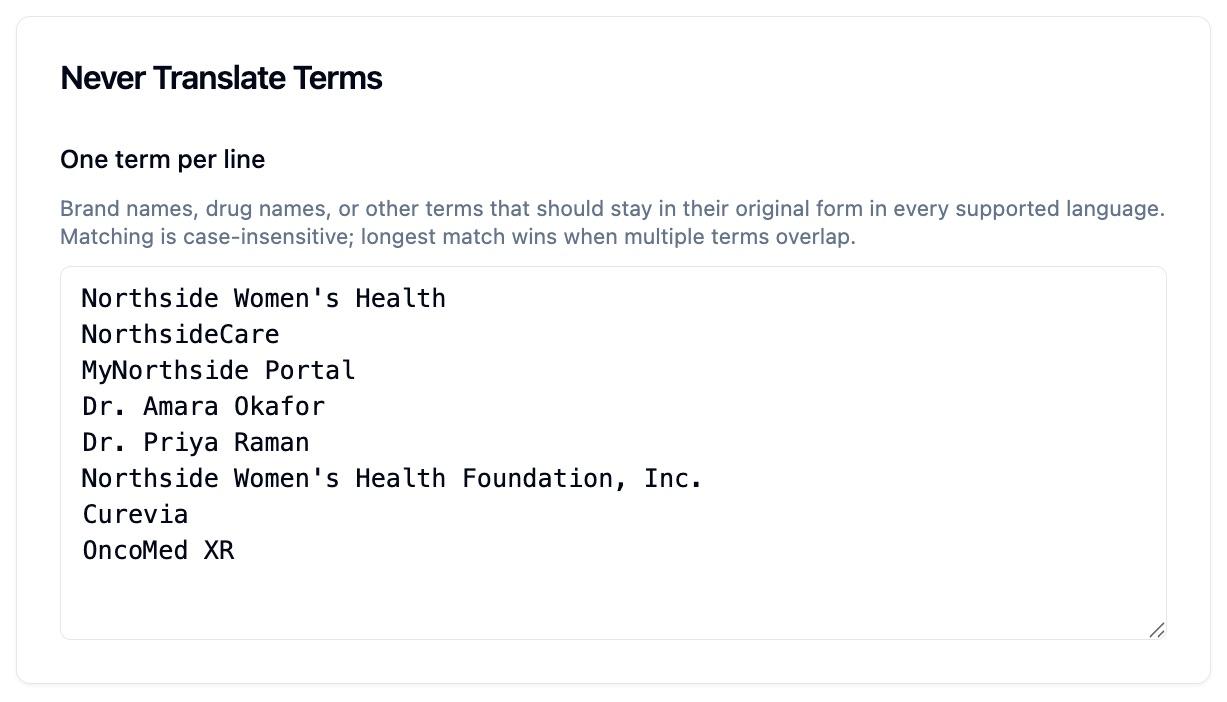
The widget will pick up the new list on the next page load. There is no need to update the embed snippet.
How it works
- Add the terms to the Never Translate Terms list on your widget.
- The widget script picks up the updated list automatically on the next page load.
- When a visitor selects a language, the widget protects each occurrence of those terms — case-insensitively — before sending text to be translated.
- The translated content is rendered with your terms restored to the casing you configured.
The same term is protected everywhere it appears on the page, including content added later by JavaScript.
Behavior
- Case-insensitive matching.
Acme,ACME, andacmeall match the configured term and are restored to the casing you supplied in the dashboard. - Longest match wins. If you list both
AcmeandAcme Healthcare, the longer term takes precedence wherever both could match. - Substring-safe by configuration, not by default.
Acmewill match insideAcmeCorp. If you do not want substring matches, configure the longer, more specific term instead (e.g. addAcmeCorpto the list as well). - Dynamic content. Terms are protected in content added after page load (SPAs, infinite scroll, AJAX inserts).
- Form inputs. The widget does not translate form inputs or textareas; you do not need to add their contents to this list.
- Limits. Up to 500 terms per widget, each up to 200 characters.
Examples
Brand names
Add Acme Healthcare and AcmeCare to the Never Translate Terms list.
Result: every occurrence stays in English, even when the surrounding sentence is translated to Spanish, French, or any other supported language.
Drug and product names
Add OncoMed XR, Curevia, and Restoril.
Drug and product names should stay identical across languages so patients and clinicians can match the term to packaging and prescriptions.
Legal and trademark text
Add Acme Holdings, Inc. to keep the legal entity name intact in every language. Combine with data-translate-skip on standalone legal blocks for full coverage.
Per-page override (escape hatch)
For one-off pages — a staging URL, a draft brand name not yet in the dashboard — you can add extra terms from the page itself by setting window.OURS_NO_TRANSLATE_TERMS before the widget script tag:
<script>
  window.OURS_NO_TRANSLATE_TERMS = ['DraftBrand'];
</script>

<script src="https://cdn.oursprivacy.com/embed/translate.js?id=YOUR_WIDGET_ID" async></script>
The dashboard list and the page-level list are combined — the page can only add to the protected list, never remove dashboard-managed terms. Once a term is stable, move it into the dashboard so every page on every site picks it up automatically.
When to use each option
| You want to… | Use this |
|---|---|
| Keep a single block (e.g. a footer) untranslated | data-translate-skip on the wrapping element |
| Keep a brand name untranslated everywhere it appears | Never Translate Terms in the dashboard |
| Keep a drug or product name consistent across all languages | Never Translate Terms in the dashboard |
| Protect a term on a single page without touching the dashboard | window.OURS_NO_TRANSLATE_TERMS on that page |
| Provide a custom translation for a specific term (e.g. "Login" → "Acceder") | Not currently supported — contact support to discuss |
Troubleshooting
A term is still being translated
- Confirm the term is saved in the Never Translate Terms list and you clicked Save Changes.
- Hard-reload the page so the widget re-fetches the latest configuration.
- Check that the string matches what appears on the page (the widget matches the literal text — punctuation, hyphens, and trademark symbols all count).
A term I did not configure is being preserved
- Check whether it is a substring of a configured term.
Acmewill match insideAcmeCorp; remove the shorter term or addAcmeCorpas a more specific entry.
Performance
The list is matched against page text once per translation request. Hundreds of terms are fine. Keep the list scoped to terms that genuinely need protection.
Next Steps
- Exclude entire elements from translation
- Common questions
How is this guide?