

Usage Analytics
See how visitors use your translation widget: pages translated, unique visitors, and breakdowns by language, site, and page.
Usage Analytics
Use this page to understand how visitors use your translation widget: how many pages get translated, how many people use it, and which languages and sites see the most demand. Analytics are scoped to a single widget, so each widget reports on its own traffic.
Open Translations in appView your analytics
- Open the Ours Privacy dashboard and go to Translations.
- Open the widget you want to inspect.
- Select the Analytics tab.
- Adjust the date range in the top-right to change the reporting window (up to 90 days).
Usage is recorded as visitors translate pages, and reports update within a few minutes of activity.
What's measured
The summary shows three numbers for the selected date range:
- Pages Translated: the total number of times a visitor translated a page with this widget.
- Unique Visitors: how many distinct visitors used the widget.
- Languages Used: how many different languages visitors translated into.

Note: A visitor who translates several pages, or switches languages, counts once toward Unique Visitors but multiple times toward Pages Translated.
Breakdowns
Three tables break the totals down so you can see where translation demand is coming from:
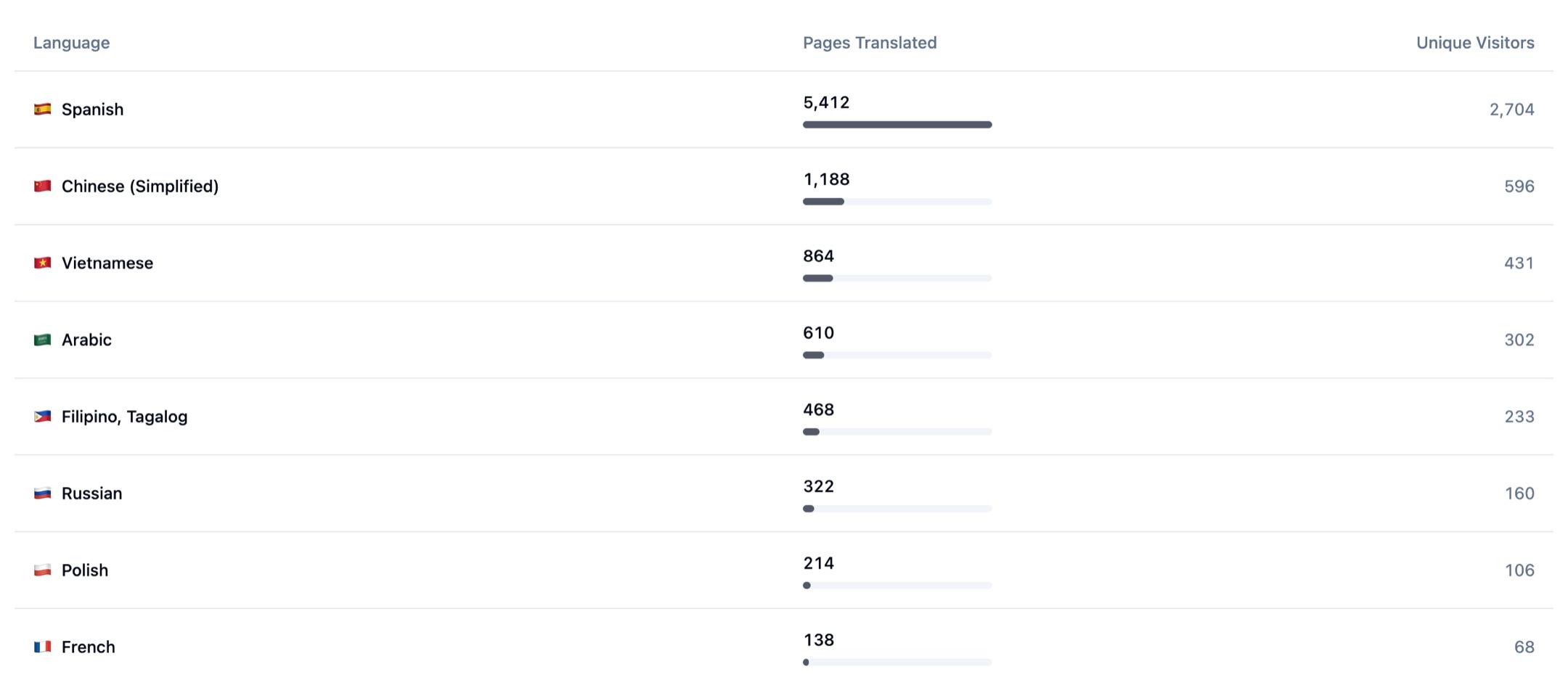
- By Language: which languages visitors translated into, ranked by volume. Use this to decide which languages to keep offering and which to add.
- By Site: which of your allowed domains see the most translation activity.
- Top Pages Translated: the individual pages translated most often, so you can see which content visitors most want in another language.
Each row shows both pages translated and unique visitors, so you can tell heavy repeat use apart from broad reach.
How usage is measured
The widget records an event when a visitor opens it and when they select a language, along with the page and site where it happened. Only this interaction data is used for analytics. No page content, form data, or personal health information is collected to build these reports. Counts are tied to the specific widget, so analytics for one widget never include traffic from another.
Next Steps
- Configure appearance to match your brand
- Review which languages to offer
- Common questions
How is this guide?