

Notifications
How notifications work in Ours Privacy: personal email and in-app preferences scoped to each organization, plus an admin-managed shared Slack channel.
Ours Privacy keeps your team informed about what changes in your account. This includes when a new configuration version is published, when a web scan turns up new or higher-risk scripts, and more over time. You decide which of these reach you and where.
Notifications arrive on two independent layers:
- Personal preferences: each person chooses which notifications they receive by email and in their in-app inbox. These are set per person and apply to one organization at a time.
- Shared Slack delivery: an admin can connect a Slack workspace once for the whole organization and route specific notifications to a shared channel, so the whole team sees them in one place.
Why it matters
- Right person, right signal. Everyone tunes their own email and in-app notifications instead of a one-size-fits-all setting.
- Per-organization control. If you work across several organizations, each one has its own preferences. Quiet one without touching the others.
- Opt-out by design. You receive notifications by default; turn off only the ones you don't want.
- A shared team view. Route the notifications that matter to a Slack channel so nothing important sits in one person's inbox.
- Privacy-first by default. Slack posts carry only summary counts and a link back into the app, never your customers' data.
Key pages
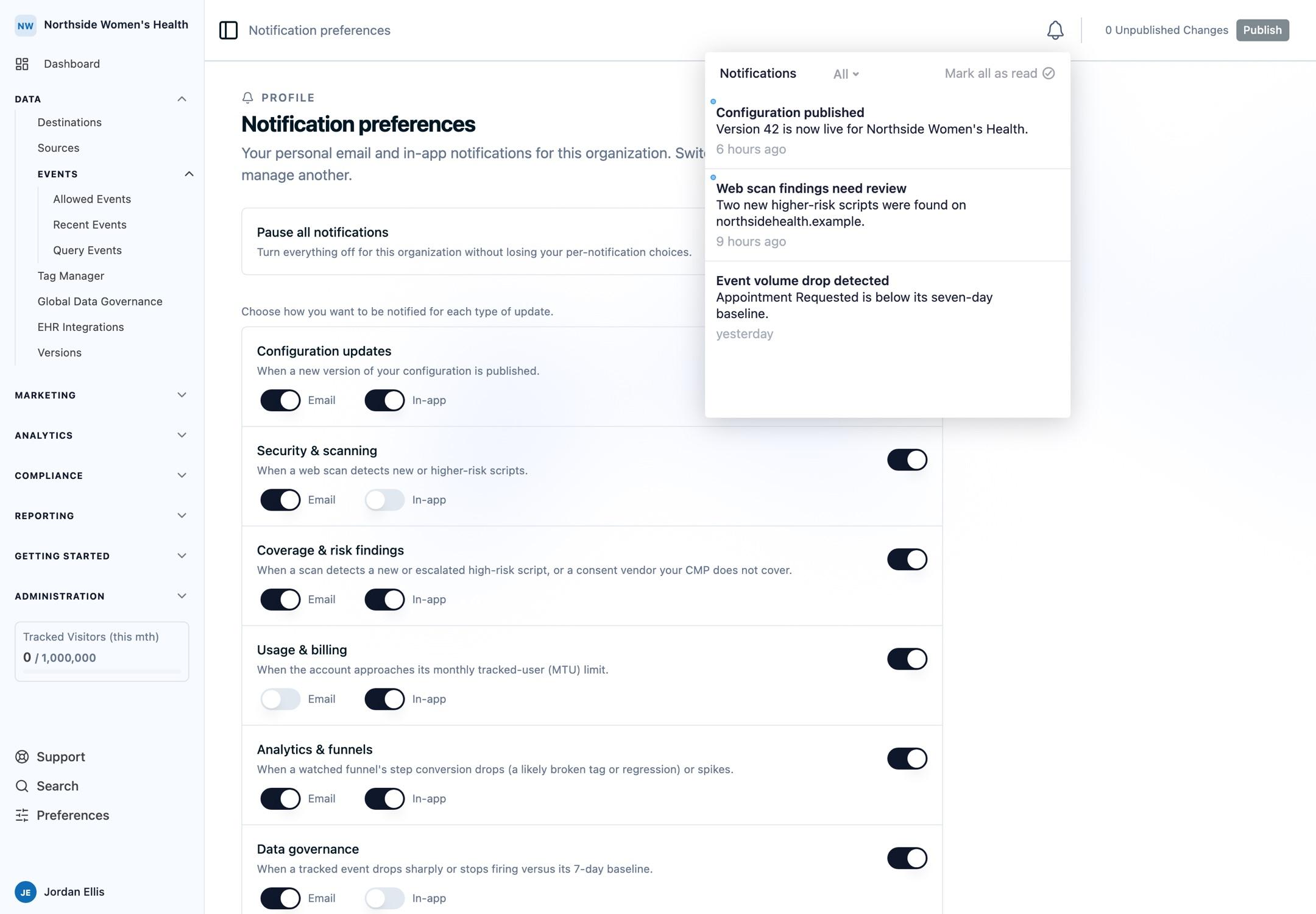
- Manage your notification preferences: choose which notifications you get by email and in-app, by category.
- Turn notifications off for one organization: how per-organization preferences work and how to quiet a single organization.
- Send notifications to a shared Slack channel: connect Slack and choose which notifications post to your team's channel (admin only).
What you can be notified about
- Configuration updates: when a new version of your configuration is published.
- Security & scanning: when a web scan detects new or higher-risk scripts.
- Usage & billing: when the account approaches its monthly tracked-user limit.
This list grows over time, and every new notification appears in your preferences automatically.
FAQ
Do I have to set anything up to start receiving notifications? No. Notifications are on by default. Open your notification preferences only when you want to turn something off or change where it's delivered.
I belong to several organizations. Do my preferences carry over? No. Preferences apply to the organization you're currently in. See per-organization preferences.
Can my whole team get notified in one place? Yes. An admin can route notifications to a shared Slack channel.
Need help?
Reach out to support@oursprivacy.com.
How is this guide?