

AI Summaries
Read an AI summary of any session replay. Get what happened, the moments that mattered, and what to change, with clickable playback markers.
Use this page to read an AI summary of a session replay instead of watching it end to end. The summary names what the visitor did, cites the moments in the recording where it happened, and suggests changes you can make to your own page.
What the summary tells you
Open a replay and select the AI Summary tab in the sidebar. The analysis is written in three parts:
- What happened is one sentence naming the outcome for the visitor, leading with the problem when there was one.
- Details is two to four bullets covering what the visitor did and how the page responded, each citing the playback position where it starts.
- What to change is up to three suggested changes to your page, highest impact first. It is omitted when nothing went wrong.
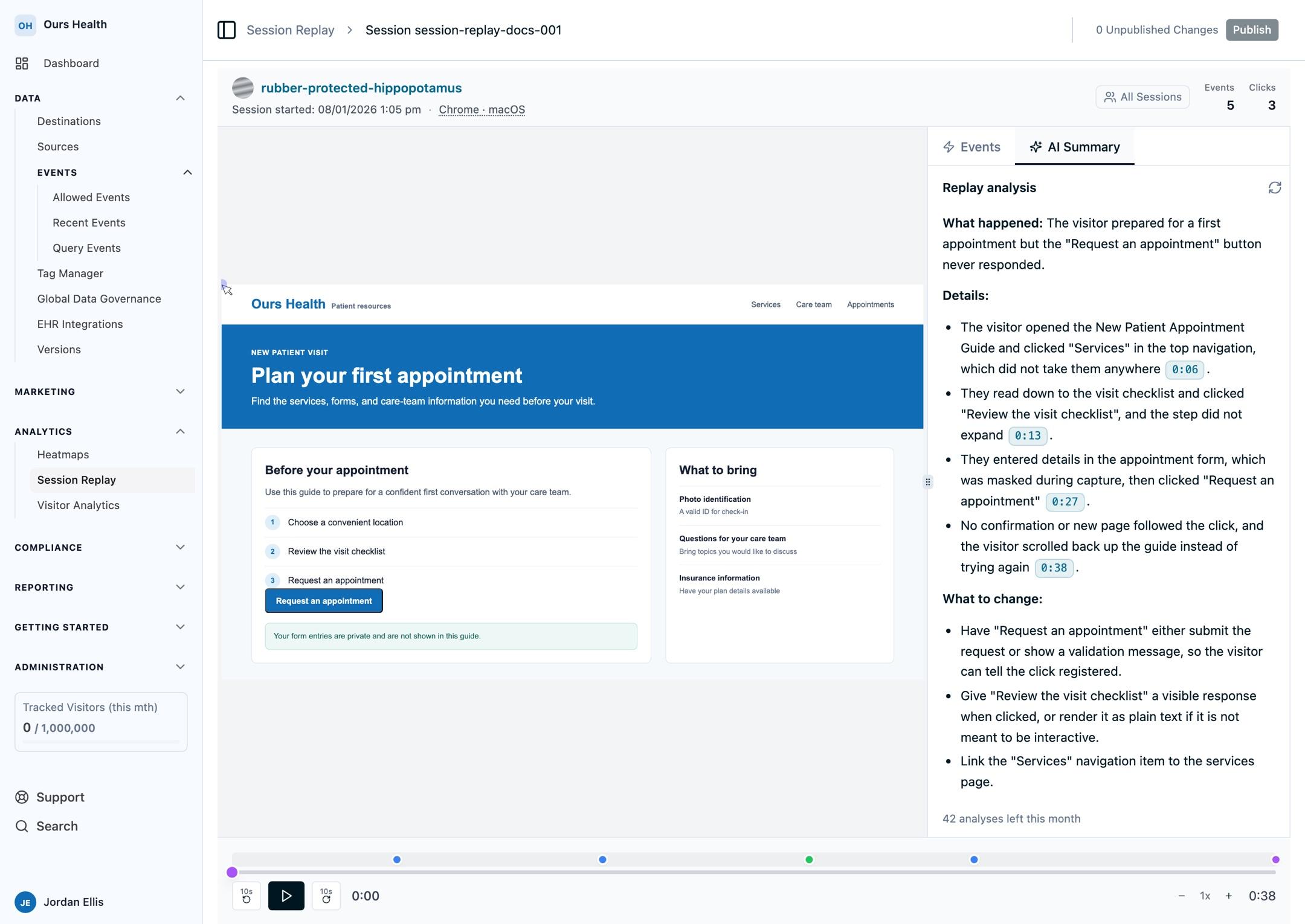
Every timestamp in the summary, such as [0:13], is a link into the recording. Selecting one jumps the player to that moment and starts playing, so you can check any claim in the summary against the replay itself.
What it looks for
The analysis reads the session's event timeline together with the text the visitor actually saw on the page, then looks for evidence of:
- Dead clicks on a target that looks interactive but produces no response
- Rage clicks, repeated rapidly on the same control
- Scroll-depth cliffs where visitors stop scrolling at a particular point
- Rapid back-and-forth navigation that suggests confusion or a broken flow
- Form abandonment after validation errors
Controls are named using the label a visitor would see, quoted from the page. When a target's label was not captured, the summary describes where the control sits on the page and says the label was missing rather than guessing at it.
A short session with no interaction is not treated as a problem. The analysis will say plainly when nothing went wrong instead of manufacturing a finding.
Generating and regenerating
The summary generates when you first open the tab for a replay, and takes a few moments while the recording is read and analyzed. After that it is cached, so reopening the same replay shows the same summary immediately.
Select the refresh control in the panel header to generate a fresh summary for a replay you have already analyzed. Regenerating bypasses the cache. A cached summary is kept for a week, after which reopening the replay generates a new one.
Note: Retrying after a failed analysis is not the same as regenerating. A retry may be served from the cache and cost nothing.
Privacy
The analysis reads the same recording you see in the player. Text and form inputs are masked by default, masked text arrives as asterisks, and the analysis is instructed never to guess or reconstruct it. Blocked elements are not captured at all.
Because the summary is built from the recording, Privacy and masking is the right place to control what the analysis can see. Block elements you do not want included, and both the player and the summary will respect that choice.
Page text is treated strictly as data, never as instructions, so content on a recorded page cannot redirect the analysis.
Summaries are available only to accounts that have AI analysis enabled.
When a summary is not available
- A replay with no recorded activity reports that there is no replay data to analyze. There is nothing to retry.
- A very long or unusually large recording may exceed the limits of what can be analyzed at once. The player is unaffected.
- A replay opened from a shared static view does not offer the tab, because a summary is generated per session against your account.
Availability
AI Summaries are in beta and enabled per account. Contact your account representative to turn them on.
Next steps
- Privacy and masking: control what the analysis can read
- Data and retention: how long replays are kept
- Sampling and event-triggered recording: record the sessions worth analyzing
- FAQs
How is this guide?