

Scheduled Reports
Deliver a recurring, privacy-checked data file built from your event data to Amazon S3, Google Cloud Storage, SFTP, or a pull bucket, hourly to monthly, in CSV, TSV, or Parquet.
Scheduled Reports build a data file from your event data on a fixed cadence, check it against a privacy policy, and deliver it to storage you or a partner control. Use it to send a conversion or outcome file to a media partner, an analytics vendor, or your own data team without anyone exporting by hand.
This is file delivery between systems. Files land in storage, not in an inbox or a dashboard link. For a complete export of every event, dispatch, and visitor, use a warehouse destination such as Amazon S3 or Google BigQuery instead.
Beta: Scheduled Reports are configured with your account team today. There is no dashboard screen. Contact your account representative to request one.
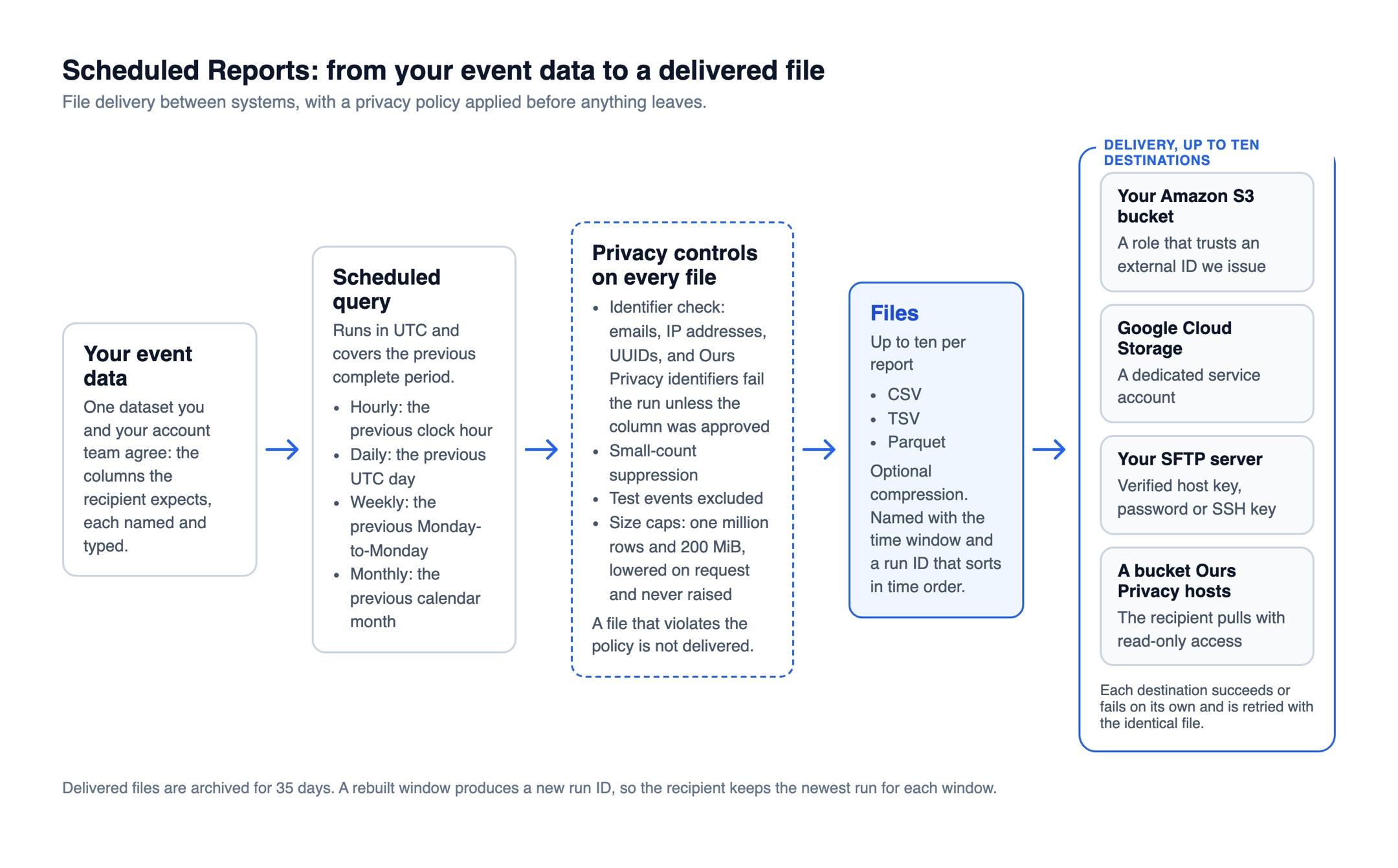
What a Report Contains
- One dataset. You and your account team agree the question the file answers and the columns the recipient expects, each named and typed.
- Up to ten files. The same dataset can be written as CSV, TSV, or Parquet, with optional compression, so a partner and your own warehouse can each receive the format they load.
- Up to ten destinations. Each destination receives one of the report's files and succeeds or fails on its own.
Schedules
Reports run in UTC and cover the previous complete period.
| Cadence | Window covered |
|---|---|
| Hourly | The previous clock hour |
| Daily | The previous UTC day |
| Weekly | The previous Monday-to-Monday |
| Monthly | The previous calendar month |
A run that was missed is caught up automatically for up to 24 hours. For older gaps, contact your account representative.
Where Files Go
- Your Amazon S3 bucket: you create a role that trusts an external ID Ours Privacy issues for the report.
- Google Cloud Storage: you grant a dedicated service account write access to the bucket.
- Your SFTP server: you provide the host, a verified host key fingerprint, and a password or SSH key. The target folder must already exist.
- A bucket Ours Privacy hosts: the recipient pulls files with read-only access, which suits partners who ingest from a bucket rather than accept pushes.
Each file name carries the time window and a run ID that sorts in time order. A rebuilt window produces a new run ID, so the recipient keeps the newest run for each window. A destination that did not receive its file is retried with the identical file, without resending to destinations that succeeded. Delivered files are archived for 35 days.
Privacy Controls on Every File
| Control | What it does |
|---|---|
| Identifier check | A cell holding an email address, an IP address, a UUID, or an Ours Privacy identifier fails the run unless that column was approved for it during setup. |
| Small-count suppression | Rows under a count threshold you choose are left out, so a rare combination cannot point to one person. |
| Test events excluded | Test traffic never reaches a delivered file. |
| Size caps | One million rows and 200 MiB per dataset. The caps can be lowered for a report and never raised. |
A file that violates the policy is not delivered.
Optional Matching Mode
When a partner sends daily input files to S3 or Google Cloud Storage, a report can join them to your event data by IP address and return counts instead of rows, with a lookback of up to 30 days. The join key never appears in the output.
Next Steps
- Amazon S3 and Google BigQuery: complete event, dispatch, and visitor exports to your own warehouse.
- Standard Healthcare Events: event names for booking and attendance outcomes in a delivered file.
- Data Access and Privacy: how Ours Privacy handles identifiers across the platform.
How is this guide?