

Advanced Location Services
Build custom location search experiences with Ours Privacy Advanced Location Services. Includes map tiles, geocoding, reverse geocoding, and location search APIs for HIPAA-compliant healthcare applications.
Build custom location search experiences with Ours Privacy Advanced Location Services. Access HIPAA-compliant map tiles, geocoding APIs, and location search through our infrastructure, perfect for healthcare organizations that need full control over their mapping implementation.
Overview
Advanced Location Services gives you the building blocks to create custom location experiences tailored to your organization's needs. Whether you're building a provider directory, multi-location search, or patient-facing location tools, you have complete control over the implementation.
What You Can Build
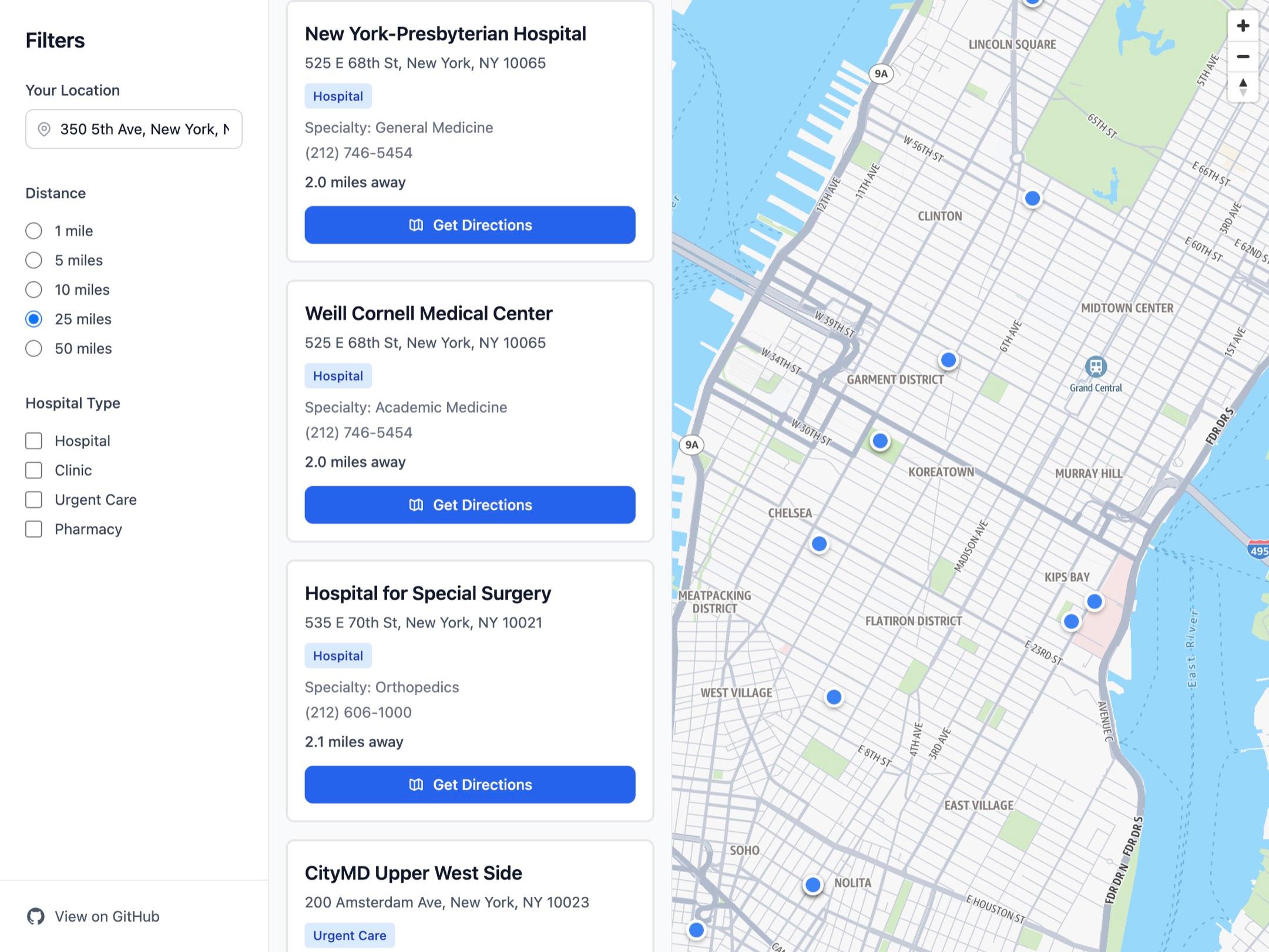
Multi-Office Location Search
- Help patients find the nearest clinic, urgent care center, or medical office
- Filter locations by specialty, services offered, or availability
- Display multiple locations on an interactive map with custom markers
Provider and Doctor Search
- Build "Find Your Doctor" tools that search by name, specialty, or location
- Show provider locations on a map with detailed information
- Enable patients to search for providers near their home or work
Healthcare System Location Tools
- Create location finders for hospitals, emergency departments, and specialty centers
- Build wayfinding tools for large medical campuses
- Display service availability by location
Dental Practice Locators
- Multi-practice dental groups can show all locations in one searchable interface
- Filter by services (orthodontics, oral surgery, general dentistry)
- Help patients find the closest practice accepting new patients
Custom Mapping Experiences
- Render maps with MapLibre GL JS or your preferred mapping library
- Customize markers, popups, and map styling to match your brand
- Integrate location search with your existing patient portal or website
Getting Started
Get Your API Key
- Log in to your Ours Privacy dashboard
- Go to Marketing Center → Maps
- Click Advanced API Key (this button appears once Advanced Location Services is enabled for your organization)
- Copy your API key
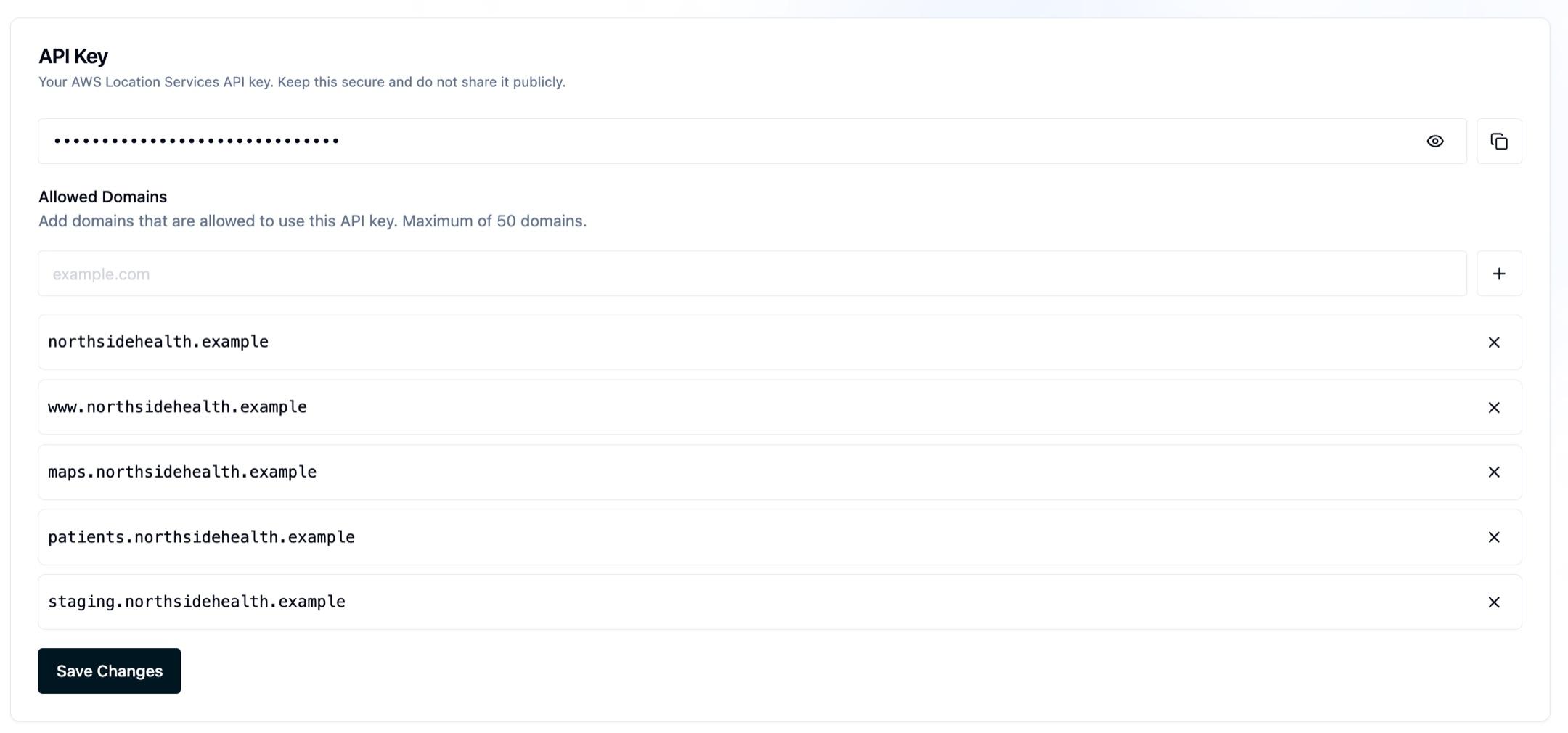
Your API key authenticates all requests and ensures data flows through our HIPAA-compliant infrastructure.
Base Endpoint
All location services APIs use this base URL:
https://cdn.oursprivacy.com/location-servicesFor map tiles specifically:
https://cdn.oursprivacy.com/location-services/v2/styles/${style}/descriptor?key=${apiKey}&color-scheme=${mapColorScheme}Custom Domain Support
When using a custom domain, replace cdn.oursprivacy.com with your domain:
https://metrics.yourdomain.com/location-servicesMap Tiles and Rendering
Ours Privacy serves map tiles compatible with MapLibre GL JS and other mapping libraries. Map tiles include the cartographic information required to display maps, including street networks, place labels, building outlines, and terrain features.
Why MapLibre GL JS
We recommend MapLibre GL JS for rendering maps. It's an open-source library that understands our tile format and provides full interactivity. If you're using React, Vue, Angular, or another framework, you can use framework-specific wrappers or integrate MapLibre directly.
Loading MapLibre GL JS
Include MapLibre in your HTML:
<script src="https://unpkg.com/maplibre-gl@^5.15.0/dist/maplibre-gl.js"></script>
<link href="https://unpkg.com/maplibre-gl@^5.15.0/dist/maplibre-gl.css" rel="stylesheet" />
Or install via npm:
npm install maplibre-glMap Style Configuration
Configure MapLibre to use our style descriptor endpoint:
https://cdn.oursprivacy.com/location-services/v2/styles/${style}/descriptor?key=${apiKey}&color-scheme=${mapColorScheme}Style Options:
standard-light: Full-color map with light themestandard-dark: Full-color map with dark themevisualization-light: Grayscale style, light themevisualization-dark: Grayscale style, dark theme
Parameters:
style: The map style (required)key: Your Ours Privacy API key (required)color-scheme: Color scheme preference (optional)
Creating Your First Map
Here's a basic example:
const apiKey = 'YOUR-API-KEY-HERE';
const mapStyle = 'standard-light';
const styleUrl = `https://cdn.oursprivacy.com/location-services/v2/styles/${mapStyle}/descriptor?key=${apiKey}&color-scheme=light`;

const map = new maplibregl.Map({
  container: 'map',
  style: styleUrl,
  center: [-88.0198, 44.5192], // Green Bay [longitude, latitude]
  zoom: 12,
});

map.addControl(new maplibregl.NavigationControl(), 'top-left');
Adding Location Markers
Add markers for your locations:
const locations = [
  {
    lngLat: [-88.0198, 44.5192],
    title: 'Downtown Medical Center',
    street: '123 Main St',
    city: 'Green Bay, WI 54301',
    contact: '(920) 555-0100',
  },
  {
    lngLat: [-88.0098, 44.5292],
    title: 'Northside Clinic',
    street: '456 Oak Ave',
    city: 'Green Bay, WI 54302',
    contact: '(920) 555-0200',
  },
];

locations.forEach((location) => {
  const infoPopup = new maplibregl.Popup({ offset: 25 }).setHTML(`
      <div>
        <h3>${location.title}</h3>
        <p>${location.street}</p>
        <p>${location.city}</p>
        <p>${location.contact}</p>
      </div>
    `);

  new maplibregl.Marker({ color: '#0066cc' })
    .setLngLat(location.lngLat)
    .setPopup(infoPopup)
    .addTo(map);
});
Auto-Fit Map to Show All Locations
Automatically adjust the map view to show all your locations:
const mapBounds = new maplibregl.LngLatBounds();

locations.forEach((location) => {
  mapBounds.extend(location.lngLat);
});

map.fitBounds(mapBounds, { padding: 100 });
React Integration
If you're using React, use react-map-gl:
npm install react-map-gl maplibre-glimport { Map } from 'react-map-gl';
import 'maplibre-gl/dist/maplibre-gl.css';
function LocationMap() {
const apiKey = 'YOUR-API-KEY-HERE';
const mapStyle = 'standard-light';
const styleUrl = `https://cdn.oursprivacy.com/location-services/v2/styles/${mapStyle}/descriptor?key=${apiKey}&color-scheme=light`;
return (
<Map
mapLib={import('maplibre-gl')}
initialViewState={{
longitude: -88.0198,
latitude: 44.5192,
zoom: 12,
}}
style={{ width: '100%', height: '400px' }}
mapStyle={styleUrl}
/>
);
}Available Location APIs
Advanced Location Services provides access to AWS Location Services v2 APIs through our HIPAA-compliant infrastructure:
Geocoding and Reverse Geocoding
- Geocode: Convert addresses to coordinates
- ReverseGeocode: Convert coordinates to addresses
Location Search
- Autocomplete: Complete addresses as users type
- SearchText: Text-based location search
- SearchNearby: Find places within a radius
- Suggest: Get location suggestions based on context
Place Information
- GetPlace: Retrieve detailed information about a place by ID
Static Maps
- StaticMap: Generate static map images with optional scale display for embedding in web pages, emails, or other applications
Routing and Directions (Beta)
- CalculateRoutes: Get turn-by-turn directions between two points
- CalculateRouteMatrix: Calculate distance and duration between multiple origins and destinations
- CalculateIsolines: Determine reachable areas within a time or distance threshold
- OptimizeWaypoints: Find the most efficient order to visit multiple stops
- SnapToRoads: Align GPS coordinates to the nearest road segments
Complete Location APIs Reference
Authentication and domain whitelisting
All API requests use the key query parameter:
?key=YOUR-API-KEY-HEREReplace YOUR-API-KEY-HERE with your API key from the Ours Privacy dashboard.
Because location services run in the browser, the API key is visible to clients. Access is protected by domain whitelisting instead: your key only works for requests coming from the domains you authorize, so a copied key cannot be used from another site.
- Add every domain that will call the API (your production site, plus any staging or preview domains) to your key's whitelist in the dashboard.
- Requests from a domain that is not on the whitelist are rejected, and the map or API call fails on that domain until you add it.
- Local development on
localhostis a common case to whitelist while you build.
Map not loading on a new domain? This is almost always a missing whitelist entry. Add the domain to your key, then reload.
Example Resources
- GitHub Repository: Complete code examples and implementation guides
- Live Demo: Interactive demonstration of Advanced Location Services
Next Steps
- Location APIs: Complete reference for all available location APIs
- FAQs: Common questions about Advanced Location Services
- Custom Domains: Configure custom domains for your location services
Need Help?
If you have questions about Advanced Location Services or need assistance with setup, reach out to support@oursprivacy.com.
How is this guide?